VisualSpace 2.31
Описание
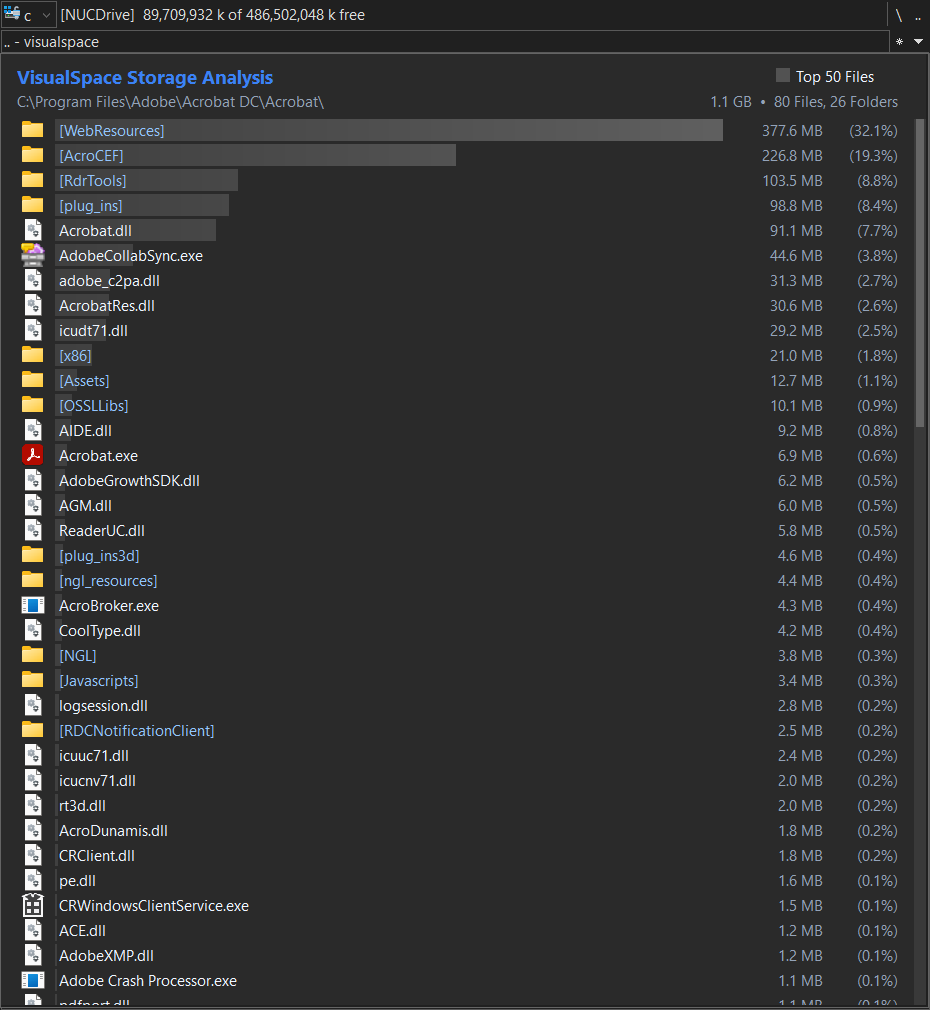
VisualSpace — плагин просмотрщика (.wlx / .wlx64, 32-битный и 64-битный) для Total Commander, который анализирует использование дискового пространства папкой и показывает результаты в виде списка градиентных полос, отражающих относительные размеры файлов и папок.Основные возможности:
•Сканирует папки в фоновом потоке, поэтому интерфейс Total Commander остаётся отзывчивым даже при сканировании больших или глубоко вложенных структур папок (например, C:\Windows или большой папки OneDrive).
•Может по желанию использовать поисковую программу Everything (voidtools), чтобы получать размеры папок, количество файлов и список Top Files напрямую из её индекса вместо сканирования, сокращая время обработки больших папок с десятков секунд до почти мгновенного.
•Показывает счётчик найденных файлов и папок в реальном времени во время сканирования.
•Отображает каждый файл и папку верхнего уровня в целевом каталоге в виде градиентной полосы, размер которой соответствует занимаемому месту на диске, вместе с общим размером.
•Также включает альтернативное представление результатов в виде древовидной карты («карта размеров») — блочную визуализацию с выбором из нескольких визуальных стилей.
•Необязательные заголовки столбцов с сортировкой (имя, расширение, количество файлов, размер, процент) и поле поиска в реальном времени для быстрого отбора отображаемых результатов по имени.
•Включает переключатель «Top Files», который переключает отображение только на самые большие файлы, найденные в любом месте просканированного дерева папок, независимо от того, в какой подпапке они находятся.
•Щелчок правой кнопкой мыши по файлу или папке переходит во второй панели Total Commander непосредственно к этому элементу и выделяет его, даже если он найден на несколько уровней подпапок глубже. Файлы типа архивов (такие как .zip, .xlsx, .docx) выделяются, а не открываются как виртуальная папка.
•Автоматически пропускает точки повторной обработки (символические ссылки, junction-точки, точки монтирования), чтобы избежать циклического сканирования и завышенных итогов.
•Активируется, только когда курсор стоит на папке; если курсор на файле, используется обычный просмотр файла Total Commander.
•Поддерживает пути к папкам длиннее стандартного ограничения Windows в 260 символов, что полезно для глубоко вложенных папок облачной синхронизации.
•Автоматически подстраивается под настройку тёмного режима самого Total Commander, переключаясь между тёмной и светлой цветовыми темами; также можно принудительно выбрать одну тему независимо от настройки Total Commander.
•Корректно масштабируется при любом масштабе отображения Windows (100%, 125%, 150% и т. д.) — макет, интервалы и размер значков изменяются вместе с текстом, а не только шрифты.
•Полностью настраивается через файл VisualSpace.cfg, расположенный рядом с плагином: цвета для тёмной и светлой тем, шрифты, заголовки, поиск, стиль древовидной карты, параметры отображения жирного шрифта и значков, интеграция с Everything, количество файлов в списке Top Files и максимальная глубина рекурсии папок.
Что нового
v2.31
v2.2
v2.1
v2.0b
v2.0a
v2.0
v1.8a
v1.8
v1.7a
v1.7
v1.6a
v1.6
v1.5
v1.4
v1.3
v1.2
v1.1
v1.0 initial release
- Added the IgnoreList setting under [Filters]: hide the files and folders on Total Commander's own ignore list (default N).
- Changed: on narrow windows, the search box, TreeMap button and "Top N Files" move to the right and shrink instead of covering the title.
- Fixed right-clicking the path line in Quick View doing nothing when the cursor in the source panel was on a subfolder.
- Fixed some antivirus scanners flagging the 32-bit plugin (false positive).
v2.2
- Added browsing inside the plugin in the F3 Lister window: click a folder to open it; Backspace or right-click the path line to go up; Alt+Left/Right or the mouse back/forward buttons for history.
- Added right-clicking the path line in Quick View to move the source panel up one level.
v2.1
- Fixed a Total Commander crash (VisualSpace+9190) when opening the Lister or Quick View.
- Fixed typing in the search box while a folder was still being scanned possibly interfering with the scan.
- Changed opening to be faster: with Everything, the list appears as soon as sizes are known and the "[N Files]" counts fill in shortly afterwards; icons load in the background; settings are only re-read when they change.
- Added ESC in the search box to clear it; ESC again closes the plugin view.
- Added remembering of the sort order chosen via the column headers (Headers setting) until Total Commander restarts.
- In Top Files mode, the search box (Searchbox setting) now searches all files in all subfolders, not just the top N files displayed.
v2.0b
- Fixed percentage formatting (list column and treemap tooltip) to follow the same thousands/decimal separator as the filesize column.
- Fixed header row alignment between the "Top Files" checkbox and the treemap toggle button, and made it more consistent across DPI scaling and font sizes.
v2.0a
- Added a SizeDisplay setting (Auto/GB/MB/KB/B) to show every size in one fixed unit instead of the default automatic per-item unit.
- Added size and count formatting that follows Total Commander's own thousands/decimal separators, falling back to the Windows locale default.
- Added a JumpToPane setting (Same/Other) so the right-click jump can target the panel hosting the plugin itself or the opposite panel.
v2.0
- Added optional sortable headers above the results (Headers setting); click a column header to sort by it.
- Added an optional search box (Searchbox setting), to search within the displayed results (not within subfolders).
- Added a treemap view ([Treemap] section), as an alternative view to see results.
- Added optional small fancy visual tweaks.
- Fixed minor cosmetic issues.
v1.8a
- Fixed slow performance when running Total Commander as Administrator while Everything itself isn't running as Administrator.
- Fixed typos in the file-count label ("[1 Files]").
v1.8
- Added a real recursive file count for folders sized via Everything's own index, instead of just the generic "[Everything]" label.
- Fixed a missing DarkMode= key in wincmd.ini incorrectly following Windows' own system theme instead of defaulting to light.
- Fixed ignoring Total Commander's RedirectSection= convention (redirecting a config section's real keys to a different ini file).
v1.7a
- Added FontName=Auto support for matching Total Commander's own file list font weight (wincmd.ini FontWeight=), not just its face and size.
- Fixed Total Commander's Dark Mode toggle not updating the background color live when switched while a folder was open in Quick View.
v1.7
- Added a ShowExeIcons setting in VisualSpace.cfg (Y/N/Auto) to control whether .exe/.lnk files show their own real icon or a shared generic program icon; Auto follows Total Commander's own equivalent setting.
- .exe/.lnk files with no icon of their own now fall back to Windows' own generic "program" icon instead of the plain file icon.
- Fixed some .exe/.lnk files showing the generic icon instead of their own real icon in the normal folder view.
- Fixed row icons at 16px sometimes looking cropped; icons at that size are now sourced from a real 16px icon instead of being scaled down from 32px.
- .exe/.lnk files now get a distinct icon when ColorIcons=N (flat icon mode).
- Added a DirBrackets setting in VisualSpace.cfg (Y/N/Auto) to wrap folder names in square brackets, matching Total Commander's own equivalent option.
- Added a TCListIcons setting in VisualSpace.cfg (Y/N/Auto) to show folders, generic files/programs, and archives using Total Commander's own classic icon set instead of Explorer's; Auto follows Total Commander's own OldListIcons setting.
v1.6a
- Fixed the "Top Files" checkbox background color in the light theme.
- Fixed ThemeMode=Auto sometimes defaulting to the dark theme incorrectly.
v1.6
- Files now show their real icon for each file type (PDF, Excel, .exe, etc.) instead of a single generic file icon.
- Added FontName=Auto: automatically matches Total Commander's own file list font.
- Added IconSize=Auto: automatically matches Total Commander's own file list icon size.
- Added RowHeight=Auto (new default): automatically matches Total Commander's own row spacing; can also be set manually.
- General cosmetic and layout polish, so VisualSpace's appearance more closely tracks Total Commander's own.
v1.5
- Simplified the Everything integration: it connects directly and falls back to the normal scan automatically if Everything isn't available or doesn't have an answer.
- Fixed the layout not scaling correctly on Windows displays set to anything other than 100% scaling (125%, 150%, etc.).
- Added a Dark/Light theme system. VisualSpace automatically matches Total Commander's own Dark Mode setting (Configuration -> Color -> Dark Mode).
- Added a [ThemeLight] section in VisualSpace.cfg alongside the existing [ThemeDark] section.
- Added a separate configurable color for the "Top N Files" label text in both themes.
- Added a BarScaleMode setting: bars now default to showing the largest item at 100%.
- Added an option to show a small icon instead of the "[Everything]" text next to accelerated folders, either in the count column or as an overlay on the folder icon.
- Fixed the scrollbar not using the configured background/theme colors.
- Fixed the mouse cursor not always displaying correctly over the plugin's window.
- Changed default settings: Everything is now enabled by default (Everything=Y), since it already falls back safely when unavailable.
v1.4
- Added optional integration with the Everything search tool (voidtools). Folder sizes and the Top Files list are retrieved directly from Everything's own index instead of being calculated by scanning. Requires Everything 1.4.1 or later with "Index folder size" enabled in its own settings.
- Added an Everything=Y/N setting under a new [Everything] section in VisualSpace.cfg to enable this.
- Added a ShowEverythingLabel=Y/N setting to show or hide the "[Everything]" label shown next to accelerated folders' file counts.
v1.3
- Added a 32-bit build (VisualSpace.wlx) alongside the existing 64-bit build (VisualSpace.wlx64).
- Files and folders now use separate, configurable name colors instead of sharing one color.
- Added a BoldFolderNames setting in VisualSpace.cfg to show folder names in bold (the "[N Files]" count next to the name always stays regular weight).
- Added a ColorIcons setting in VisualSpace.cfg to switch between full-color Windows-style folder/file icons and flat single-color versions.
v1.2
- Added support for folder paths longer than the standard 260-character Windows limit.
- Added a MaxFolderDepth setting in VisualSpace.cfg to control the folder recursion limit (default: 15).
- Plugin now only activates on folders; on files, Total Commander's normal file preview is used instead.
- Fixed the folder path display being clipped at the bottom while a scan is in progress.
v1.1
- Added right-click on a file or folder to jump the other Total Commander panel to that location and select it.
- Fixed right-clicking an archive-type file (e.g. .zip, .xlsx, .docx) opening it as a folder instead of selecting it.
- Fixed the total size in the header appearing truncated on very large scans.
- Added thousands separators to file and folder counts.
- Improved rendering performance of the gradient bars.
v1.0 initial release
- asynchronous folder scanning, gradient size visualization, Top Files filter, reparse point handling, and click-to-navigate.
Предыдущие версии
- 2.2.0.0 01.11.2026 Скачать 298 КБ