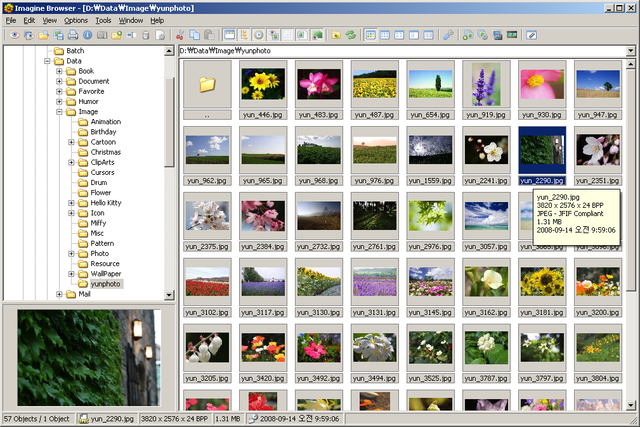
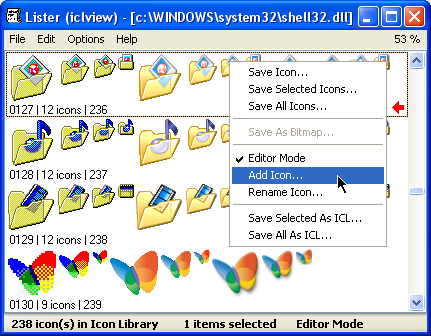
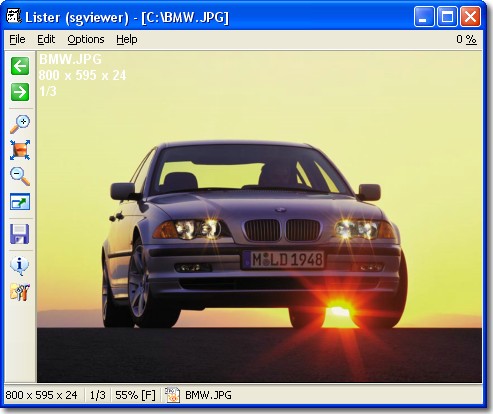
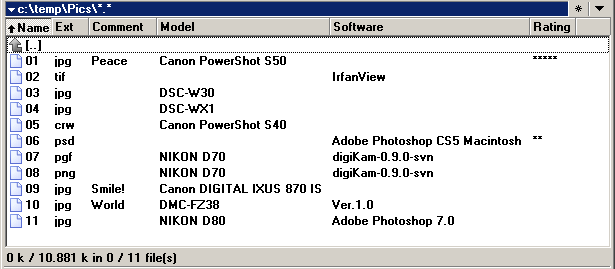
Imagine (beta) 1.0.0.0 beta 10
Описание
Imagine - Image/Animation Viewer for Windows*** Features ***
- Views image/animation files with the fastest speed
- Numerous image formats supported
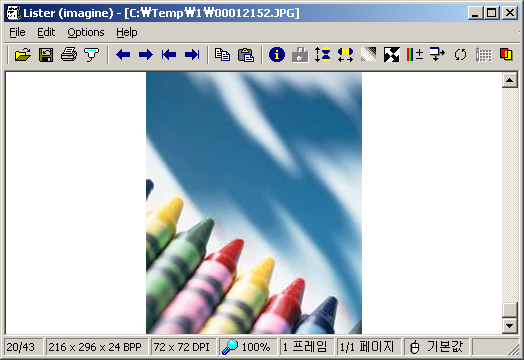
- Shows information of image/animation files
- Shows EXIF information
- Shows transparency
- Extracts a frames from animation file
- Exports Animation file
(Animated GIF file/AVI/Flic/Pro Motion Animation)
- Manipulates image
(Flip,Grayscale,Negative,Change color depth,Swap colors,Rotate,Resize,
Effect filter,Edit palette,Transparency set, etc.)
- Tiny & Fast & Pure & Neat executable
- Fully customizable
- Plugin add-on available
- Multilingual support
- Unicode support
- Shell extension support
- Provides Total Commander lister plugin
Что нового
Version 1.0.0.0 beta 10 'Jan 13 2008
- Changes in license (freeware -> donationware)
- 'Always on top' option added
- Some bug with save dialog fixed
Version 1.0.0.0 beta 9 'Dec 09 2007
- Some enhancement in progress bar
- 'Keyboard shortcuts' menu added
- 'depth' command line option added
- 'filter' command line option added
- 'resize' command line option added
- 'wallpaper' command line option added
- 'Show full path in title bar' option added
- 'Add extension with capital letters' option added
Version 1.0.0.0 beta 8 'Nov 20 2007
- Some BMP bug in packer plugin fixed
- Some BMP with RLE encoding error fixed
Version 1.0.0.0 beta 7 'Nov 09 2007
- Dither for 1/4 bit color depth conversion
- Some progress bar bug fixed
- Some enhancement in status bar
- More accurate colors in 8bit desktop
Version 1.0.0.0 beta 6 'Oct 07 2007
- Thumbnail loading speed enhancement
- Some printing bug fixed
- Targa grayscale image bug fixed
- Palette import bug fixed
- Some thumbnail window bug fixed
Version 1.0.0.0 beta 5 'Jun 30 2007
- Command history dialog available
- Some enhancement in status bar
Version 1.0.0.0 beta 4 'May 06 2007
- Undo available
- Display frequency while loading can be configured
- Some scroll bug fixed
- Some menus added
- Filter browser preview speed enhancement
Version 1.0.0.0 beta 3 'Dec 02 2006
- 'ListLoadNext' function is supported in Total Commander
Version 1.0.0.0 beta 2 'Nov 04 2006
- 'Full screen at startup' menu added
- 'fullscreen' command line option added
Version 1.0.0.0 beta 1 'Oct 22 2006
- 'Batch conversion' menu added
- Some enhancement in shell extension
(Now all frames of animation files are showed in shell extension)
- 'Cut' menu added
- Some status bar tooltip bug fixed
Version 0.9.7.0 'Sep 07 2006
- Alpha blend drawing routine rewritten
- 16 BPP 5:6:5 image clipboard bug fixed
- HTML color code is displayed as pixel color
- Some XNM bug fixed
- Some transparent background mask bug fixed
- Some file list bug fixed
Version 0.9.7.0 beta 13 'Aug 19 2006
- TWAIN acquiring available
- Some enhancement in print dialog
Version 0.9.7.0 beta 12 'Jul 29 2006
- File format added:
ICL (Icon Library)
- 'Rotate according to EXIF' option works in shell extension
Version 0.9.7.0 beta 11 'Jul 22 2006
- File format added:
MNG (Multiple-image Network Graphics)
- Some crop bug fixed
Version 0.9.7.0 beta 10 'Jul 17 2006
- Current directory index bug fixed
- Crop with scrolling
- DPI information available
Version 0.9.7.0 beta 9 'Jul 08 2006
- 'First/Last' menu added
- Current directory index can be shown in status bar
- Mouse configure enhancement
Version 0.9.7.0 beta 8 'Jun 08 2006
- Preview in open dialog can be zoomed with original size
- Icon bug in preference dialog fixed
- Some enhancement in status bar
Version 0.9.7.0 beta 7 'Mar 28 2006
- Thumbnail size can be configured
- Context menu image size in shell extension can be configured
- Some command line options are supported
Version 0.9.7.0 beta 6 'Mar 04 2006
- JBIG saving added
- Bitmaps were added to tab control in preference dialog
Version 0.9.7.0 beta 5 'Feb 22 2006
- GIF routine rewritten
- Animation option added
Version 0.9.7.0 beta 4 'Feb 01 2006
- Thumbnail image can also show transparency
- Thumbnail directory tree can hide
- Thumbnail loading speed enhancement
- 'Rotate according to EXIF' option is also available in thumbnail window
- Item list in preferences dialog can be dragged with mouse
Version 0.9.7.0 beta 3 'Jan 25 2006
- Status bar configure available
- Some enhancement in 'Display while loading' option
(Now there's no resizing process after loading.)
- Some enhancement in thumbnail window
- Thumbnail image can also show transparency
- Now mask in information dialog can show 32bit alpha value
- Zoom factor changes automatically when it enters to full screen mode
- File size in information dialog added
- Some PNG error fixed. (16 bits per sample)
- Some TIFF error fixed. (16 bits per sample and tiled image)
- Some bug with PCX fixed
- Full screen toolbar and status bar disappearing problem fixed
Version 0.9.7.0 beta 2 'Jan 08 2006
- 'Open with' menu added
- Enhanced printing available
Version 0.9.7.0 beta 1 'Dec 19 2005
- Mouse configure available
- 'Lock zoom' menu added
Version 0.9.0.0 'Sep 16 2005
- Shell extension crash bug fixed
- Shell extension enhancement
- Filter browser dialog error in Windows XP fixed
- Thumbnail window was reformed
- Preferences dialog was reformed
- 'Ignore errors' option added
- Metafile error fixed
- Preferences dialog font bug fixed
- Some file types are changed to built-in
- Launching error in Windows 95 fixed
- Flickering Lister when its size is changed fixed
- Menu in thumbnail window available
- MRUD count configure available
- Unicode version is available
- Plugin SDK updated. (Version 0.1.0.5)
Version 0.9.0.0 beta 12 'Jul 15 2005
- File format added:
WMF (Windows Metafile)
EMF (Windows Enhanced Metafile)
- Zoom factor configure available
- 'Create multiple page' menu added
- Scroll bug fixed
Version 0.9.0.0 beta 11 'Jul 06 2005
- File format added:
MAC;MACP (Apple Macintosh MacPaint)
RLA (Wavefront Raster Image)
- Some EXIF error fixed
- 'Previous frame' menu added
- 'Rename' menu added
- 'Only one instance' option added
Version 0.9.0.0 beta 10 'Apr 10 2005
- File format added:
XCF (GIMP Bitmap)
- Transparent image scroll bug fixed
- Some EXIF error fixed
- Thumbnail background color problem fixed
- 32bit clipboard paste bug fixed
Version 0.9.0.0 beta 9 'Mar 10 2005
- File format added:
PSP (Paint Shop Pro Image)
XBM (X10/X11 Bitmap)
XPM (X11 Pixmap)
ANM (DeluxePaint Animation)
- Zoom/Fit feature was renewed
- More internal optimizing
- Resize resample filter added
- Rotate according to EXIF option added
- Fixed the flickering screen
- Dialog font configure available
- Thumbnail Tooltip added
- Bug fixed when directory has more than 1024 image files
- Rotation bug fixed
- Shortcut dialog bug fixed
- Plugin SDK updated. (Version 0.1.0.2)
Version 0.9.0.0 beta 8 'Feb 10 2005
- File format added:
DDS (DirectDraw Surface)
- Some internal optimizing
- Toolbar color was renewed
- Windows 9x transparent pixel color problem fixed
- Thumbnail treeview icon bug fixed
- Shell extension crash bug fixed
- CMYK TIFF is now showed correctly
- Plugin SDK available. (Version 0.1.0.0)
- Preview color quality enhancement
- Application icons were changed
Version 0.9.0.0 beta 7 'Jan 22 2005
- Supports TC 6.5 thumbnail mode
Version 0.9.0.0 beta 6 'Jan 08 2005
- Anti aliasing option added
Version 0.9.0.0 beta 5 'Dec 27 2004
- Shell extension context menu available
(You can view the image briefly with context menu in Explorer.)
- Toolbar data is now in Imagine.ini
- Shortcut data is now in Imagine.ini
Version 0.9.0.0 beta 4 'Dec 10 2004
- Thumbnail window was decorated
- The main routine file was changed from Imagine.wlx to Imagine.DLL
- Some file operations added. (Copy/Move)
- Resize available (Primitive yet)
- Print available (Primitive yet)
- Help available (Primitive yet)
Version 0.9.0.0 beta 3 'Aug 28 2004
- Thumbnail window available
- 'Supported file formats' menu added
- Packer Plugin for Total Commander now can read Imagine.ini
- Some window menu added
Version 0.9.0.0 beta 2 'Aug 14 2004
- Packer Plugin for Total Commander available. (Imagine.wcx)
- Some translation added
- MRUD available
- Some window option added
(Center window, Fit to image)
Version 0.9.0.0 beta 1 'Aug 06 2004
- Stand-alone executable can be executed without arguments
- File extension registering dialog was reformed. (Now in Preferences dialog)
- Save, Close, Clear clipboard command added
- File format added:
PIC;CEL (Autodesk Animator PIC)
Version 0.8.4.0 'Jul 26 2004
- Toolbar added. (customizable)
- Some delete bug fixed
- Palette import added
Version 0.8.4.0 beta 3 'Jul 14 2004
- Stand-alone executable available
- Transparency set/clear available
- File format added:
CDR;CDT;PAT;CMX (CorelDRAW Drawing)
- PNG interlaced saving added
- Targa 32bit alpha value supported
- Some JPEG error fixed
Version 0.8.4.0 beta 2 'Mar 18 2004
- Keyboard shortcuts configure available
- Some bugs of Multiple TIFF were fixed
- More texts can be translated
- Comments in language file(menu,text) available
- Multiple Icon/Cursor saving added
- Show zoom factor when image is fitted
- 16bit color depth conversion available
Version 0.8.4.0 beta 1 'Feb 26 2004
- 'Display while loading' option added
- Multilingual support
- Image information enhancement
- File list sorting support
- 'Delete(Direct/Recycle Bin)' menu added
- 'Reopen' menu added
- 'Paste' menu added
- 'Preferences' shortcut was changed to 'Alt+Enter' again
- Support saving Progressive JPEG
Version 0.8.0.0 'Feb 07 2004
- Effect filter supported
- 'Full screen' menu added
- Multiple page image(TIF,ICO,DCX) supported
(Browse the pages with Shift+PgUp/PgDown(Home/End).)
- EXIF(JPEG) information available
- Information dialog was reformed
- Most common TIFF compression method added
(RAW,Packbits,CCITT,LZW,ZIP,JPEG,ThunderScan)
- TIFF saving added
- 'Rotate free' menu added
- 'Installed plugins' menu added
- 'Ask to overwrite file' option added
- 'Don't notify end/begin of the directory' option added
- Zoom out smaller than original size of the image
- Zoom in/Zoom out with mouse wheel supported. (with Shift key)
- Refresh speed enhancement when image is zoomed in
- Horizontal scroll with mouse wheel supported. (with Ctrl key)
- Some palette file type added
- 'Palette export' menu added
- File format added:
DCX (Zsoft Multi-Page Paintbrush)
WBMP;WAP;WBM (Wireless Bitmap)
- Some PCX error fixed
- Some RLE error fixed
Version 0.7.3.0 'Jan 01 2004
- An image has alpha value (ex. PNG 32bit) now showed correctly
- Drag&Drop supported
- Zoom in/Zoom out supported
- 'Open' menu added
- 'Fit only big images' menu re-added
- 32bit BMP that has color mask is now showed correctly
- Properties dialog is now opened correctly in Windows NT
Version 0.7.0.1 'Nov 24 2003
- Windows XP runtime error fixed
Version 0.7.0.0 'Nov 22 2003
- Now with TC 6.0, BMP,ICO files can be viewed with Imagine plugin
- File format added:
JBG;JBIG (JBIG Bi-level Image)
ICO (Windows Icon)
CUR (Windows Cursor)
ANI (Windows Animated Cursor)
CLP (Windows Clipboard)
RLE (Utah RLE)
- Flic saving added
- Animation file saving is now 'Save as'
(Some export menus(except for AVI) were deleted.)
- Plugin system added
- 'Center Image' option added
- Menu was reformed
- Mouse left button to get pixel color information
- Mouse right button to scroll
- Next/Previous image (Space/Backspace)
- Ini file location was changed. (Same directory as Imagine.wlx)
- Keyboard shortcuts now work correctly in Win9x
Version 0.6.0.0 'Sep 06 2003
- File format added:
RAS (Sun Raster Image)
SGI;RGB;BW (Silicon Graphics Image)
- 'Change color depth' added
- Auto color conversion when saving file
(Now you can save JPG to GIF with auto color conversion.)
- 'Set as wallpaper' added
- Edit palette keyboard access added. (Use arrow keys and press 'E' or 'Alt+E')
- 'Preferences' added. (Background color, Transparent background color/pattern)
- Small scroll bug fixed
Version 0.5.0.0 'Aug 10 2003
- Status bar added
- Save option available
- Show progress(in save file/modify image) available
- Some shortcuts added
Version 0.4.9.0 'Aug 06 2003
- PNG transparency added
- File format added:
PBM (Portable Bitmap)
PGM (Portable Graymap)
PPM (Portable Pixelmap)
Version 0.4.8.0 'Aug 02 2003
- PNG saving added
Version 0.4.7.0 'Aug 01 2003
- 'Show transparency' added
- File format added:
PCD (Kodak PhotoCD)
JPC;JP2;J2K (JPEG2000 Wavelet)
Version 0.4.1.1 'Jul 28 2003
- Some PNGs error fixed
Version 0.4.1.0 'Jul 28 2003
- 'Edit palette' added
Version 0.4.0.0 'Jul 24 2003
- 'Fit only big images' option added
- 'Vertical/Horizontal flip' added
- 'Grayscale, Negative' added
- 'Swap colors' added
- 'Rotate' added
Version 0.3.7.0 'Jul 22 2003
- Some GIFs error fixed
- Scroll error fixed
Version 0.3.0.0 'Jul 16 2003
- First release
- Changes in license (freeware -> donationware)
- 'Always on top' option added
- Some bug with save dialog fixed
Version 1.0.0.0 beta 9 'Dec 09 2007
- Some enhancement in progress bar
- 'Keyboard shortcuts' menu added
- 'depth' command line option added
- 'filter' command line option added
- 'resize' command line option added
- 'wallpaper' command line option added
- 'Show full path in title bar' option added
- 'Add extension with capital letters' option added
Version 1.0.0.0 beta 8 'Nov 20 2007
- Some BMP bug in packer plugin fixed
- Some BMP with RLE encoding error fixed
Version 1.0.0.0 beta 7 'Nov 09 2007
- Dither for 1/4 bit color depth conversion
- Some progress bar bug fixed
- Some enhancement in status bar
- More accurate colors in 8bit desktop
Version 1.0.0.0 beta 6 'Oct 07 2007
- Thumbnail loading speed enhancement
- Some printing bug fixed
- Targa grayscale image bug fixed
- Palette import bug fixed
- Some thumbnail window bug fixed
Version 1.0.0.0 beta 5 'Jun 30 2007
- Command history dialog available
- Some enhancement in status bar
Version 1.0.0.0 beta 4 'May 06 2007
- Undo available
- Display frequency while loading can be configured
- Some scroll bug fixed
- Some menus added
- Filter browser preview speed enhancement
Version 1.0.0.0 beta 3 'Dec 02 2006
- 'ListLoadNext' function is supported in Total Commander
Version 1.0.0.0 beta 2 'Nov 04 2006
- 'Full screen at startup' menu added
- 'fullscreen' command line option added
Version 1.0.0.0 beta 1 'Oct 22 2006
- 'Batch conversion' menu added
- Some enhancement in shell extension
(Now all frames of animation files are showed in shell extension)
- 'Cut' menu added
- Some status bar tooltip bug fixed
Version 0.9.7.0 'Sep 07 2006
- Alpha blend drawing routine rewritten
- 16 BPP 5:6:5 image clipboard bug fixed
- HTML color code is displayed as pixel color
- Some XNM bug fixed
- Some transparent background mask bug fixed
- Some file list bug fixed
Version 0.9.7.0 beta 13 'Aug 19 2006
- TWAIN acquiring available
- Some enhancement in print dialog
Version 0.9.7.0 beta 12 'Jul 29 2006
- File format added:
ICL (Icon Library)
- 'Rotate according to EXIF' option works in shell extension
Version 0.9.7.0 beta 11 'Jul 22 2006
- File format added:
MNG (Multiple-image Network Graphics)
- Some crop bug fixed
Version 0.9.7.0 beta 10 'Jul 17 2006
- Current directory index bug fixed
- Crop with scrolling
- DPI information available
Version 0.9.7.0 beta 9 'Jul 08 2006
- 'First/Last' menu added
- Current directory index can be shown in status bar
- Mouse configure enhancement
Version 0.9.7.0 beta 8 'Jun 08 2006
- Preview in open dialog can be zoomed with original size
- Icon bug in preference dialog fixed
- Some enhancement in status bar
Version 0.9.7.0 beta 7 'Mar 28 2006
- Thumbnail size can be configured
- Context menu image size in shell extension can be configured
- Some command line options are supported
Version 0.9.7.0 beta 6 'Mar 04 2006
- JBIG saving added
- Bitmaps were added to tab control in preference dialog
Version 0.9.7.0 beta 5 'Feb 22 2006
- GIF routine rewritten
- Animation option added
Version 0.9.7.0 beta 4 'Feb 01 2006
- Thumbnail image can also show transparency
- Thumbnail directory tree can hide
- Thumbnail loading speed enhancement
- 'Rotate according to EXIF' option is also available in thumbnail window
- Item list in preferences dialog can be dragged with mouse
Version 0.9.7.0 beta 3 'Jan 25 2006
- Status bar configure available
- Some enhancement in 'Display while loading' option
(Now there's no resizing process after loading.)
- Some enhancement in thumbnail window
- Thumbnail image can also show transparency
- Now mask in information dialog can show 32bit alpha value
- Zoom factor changes automatically when it enters to full screen mode
- File size in information dialog added
- Some PNG error fixed. (16 bits per sample)
- Some TIFF error fixed. (16 bits per sample and tiled image)
- Some bug with PCX fixed
- Full screen toolbar and status bar disappearing problem fixed
Version 0.9.7.0 beta 2 'Jan 08 2006
- 'Open with' menu added
- Enhanced printing available
Version 0.9.7.0 beta 1 'Dec 19 2005
- Mouse configure available
- 'Lock zoom' menu added
Version 0.9.0.0 'Sep 16 2005
- Shell extension crash bug fixed
- Shell extension enhancement
- Filter browser dialog error in Windows XP fixed
- Thumbnail window was reformed
- Preferences dialog was reformed
- 'Ignore errors' option added
- Metafile error fixed
- Preferences dialog font bug fixed
- Some file types are changed to built-in
- Launching error in Windows 95 fixed
- Flickering Lister when its size is changed fixed
- Menu in thumbnail window available
- MRUD count configure available
- Unicode version is available
- Plugin SDK updated. (Version 0.1.0.5)
Version 0.9.0.0 beta 12 'Jul 15 2005
- File format added:
WMF (Windows Metafile)
EMF (Windows Enhanced Metafile)
- Zoom factor configure available
- 'Create multiple page' menu added
- Scroll bug fixed
Version 0.9.0.0 beta 11 'Jul 06 2005
- File format added:
MAC;MACP (Apple Macintosh MacPaint)
RLA (Wavefront Raster Image)
- Some EXIF error fixed
- 'Previous frame' menu added
- 'Rename' menu added
- 'Only one instance' option added
Version 0.9.0.0 beta 10 'Apr 10 2005
- File format added:
XCF (GIMP Bitmap)
- Transparent image scroll bug fixed
- Some EXIF error fixed
- Thumbnail background color problem fixed
- 32bit clipboard paste bug fixed
Version 0.9.0.0 beta 9 'Mar 10 2005
- File format added:
PSP (Paint Shop Pro Image)
XBM (X10/X11 Bitmap)
XPM (X11 Pixmap)
ANM (DeluxePaint Animation)
- Zoom/Fit feature was renewed
- More internal optimizing
- Resize resample filter added
- Rotate according to EXIF option added
- Fixed the flickering screen
- Dialog font configure available
- Thumbnail Tooltip added
- Bug fixed when directory has more than 1024 image files
- Rotation bug fixed
- Shortcut dialog bug fixed
- Plugin SDK updated. (Version 0.1.0.2)
Version 0.9.0.0 beta 8 'Feb 10 2005
- File format added:
DDS (DirectDraw Surface)
- Some internal optimizing
- Toolbar color was renewed
- Windows 9x transparent pixel color problem fixed
- Thumbnail treeview icon bug fixed
- Shell extension crash bug fixed
- CMYK TIFF is now showed correctly
- Plugin SDK available. (Version 0.1.0.0)
- Preview color quality enhancement
- Application icons were changed
Version 0.9.0.0 beta 7 'Jan 22 2005
- Supports TC 6.5 thumbnail mode
Version 0.9.0.0 beta 6 'Jan 08 2005
- Anti aliasing option added
Version 0.9.0.0 beta 5 'Dec 27 2004
- Shell extension context menu available
(You can view the image briefly with context menu in Explorer.)
- Toolbar data is now in Imagine.ini
- Shortcut data is now in Imagine.ini
Version 0.9.0.0 beta 4 'Dec 10 2004
- Thumbnail window was decorated
- The main routine file was changed from Imagine.wlx to Imagine.DLL
- Some file operations added. (Copy/Move)
- Resize available (Primitive yet)
- Print available (Primitive yet)
- Help available (Primitive yet)
Version 0.9.0.0 beta 3 'Aug 28 2004
- Thumbnail window available
- 'Supported file formats' menu added
- Packer Plugin for Total Commander now can read Imagine.ini
- Some window menu added
Version 0.9.0.0 beta 2 'Aug 14 2004
- Packer Plugin for Total Commander available. (Imagine.wcx)
- Some translation added
- MRUD available
- Some window option added
(Center window, Fit to image)
Version 0.9.0.0 beta 1 'Aug 06 2004
- Stand-alone executable can be executed without arguments
- File extension registering dialog was reformed. (Now in Preferences dialog)
- Save, Close, Clear clipboard command added
- File format added:
PIC;CEL (Autodesk Animator PIC)
Version 0.8.4.0 'Jul 26 2004
- Toolbar added. (customizable)
- Some delete bug fixed
- Palette import added
Version 0.8.4.0 beta 3 'Jul 14 2004
- Stand-alone executable available
- Transparency set/clear available
- File format added:
CDR;CDT;PAT;CMX (CorelDRAW Drawing)
- PNG interlaced saving added
- Targa 32bit alpha value supported
- Some JPEG error fixed
Version 0.8.4.0 beta 2 'Mar 18 2004
- Keyboard shortcuts configure available
- Some bugs of Multiple TIFF were fixed
- More texts can be translated
- Comments in language file(menu,text) available
- Multiple Icon/Cursor saving added
- Show zoom factor when image is fitted
- 16bit color depth conversion available
Version 0.8.4.0 beta 1 'Feb 26 2004
- 'Display while loading' option added
- Multilingual support
- Image information enhancement
- File list sorting support
- 'Delete(Direct/Recycle Bin)' menu added
- 'Reopen' menu added
- 'Paste' menu added
- 'Preferences' shortcut was changed to 'Alt+Enter' again
- Support saving Progressive JPEG
Version 0.8.0.0 'Feb 07 2004
- Effect filter supported
- 'Full screen' menu added
- Multiple page image(TIF,ICO,DCX) supported
(Browse the pages with Shift+PgUp/PgDown(Home/End).)
- EXIF(JPEG) information available
- Information dialog was reformed
- Most common TIFF compression method added
(RAW,Packbits,CCITT,LZW,ZIP,JPEG,ThunderScan)
- TIFF saving added
- 'Rotate free' menu added
- 'Installed plugins' menu added
- 'Ask to overwrite file' option added
- 'Don't notify end/begin of the directory' option added
- Zoom out smaller than original size of the image
- Zoom in/Zoom out with mouse wheel supported. (with Shift key)
- Refresh speed enhancement when image is zoomed in
- Horizontal scroll with mouse wheel supported. (with Ctrl key)
- Some palette file type added
- 'Palette export' menu added
- File format added:
DCX (Zsoft Multi-Page Paintbrush)
WBMP;WAP;WBM (Wireless Bitmap)
- Some PCX error fixed
- Some RLE error fixed
Version 0.7.3.0 'Jan 01 2004
- An image has alpha value (ex. PNG 32bit) now showed correctly
- Drag&Drop supported
- Zoom in/Zoom out supported
- 'Open' menu added
- 'Fit only big images' menu re-added
- 32bit BMP that has color mask is now showed correctly
- Properties dialog is now opened correctly in Windows NT
Version 0.7.0.1 'Nov 24 2003
- Windows XP runtime error fixed
Version 0.7.0.0 'Nov 22 2003
- Now with TC 6.0, BMP,ICO files can be viewed with Imagine plugin
- File format added:
JBG;JBIG (JBIG Bi-level Image)
ICO (Windows Icon)
CUR (Windows Cursor)
ANI (Windows Animated Cursor)
CLP (Windows Clipboard)
RLE (Utah RLE)
- Flic saving added
- Animation file saving is now 'Save as'
(Some export menus(except for AVI) were deleted.)
- Plugin system added
- 'Center Image' option added
- Menu was reformed
- Mouse left button to get pixel color information
- Mouse right button to scroll
- Next/Previous image (Space/Backspace)
- Ini file location was changed. (Same directory as Imagine.wlx)
- Keyboard shortcuts now work correctly in Win9x
Version 0.6.0.0 'Sep 06 2003
- File format added:
RAS (Sun Raster Image)
SGI;RGB;BW (Silicon Graphics Image)
- 'Change color depth' added
- Auto color conversion when saving file
(Now you can save JPG to GIF with auto color conversion.)
- 'Set as wallpaper' added
- Edit palette keyboard access added. (Use arrow keys and press 'E' or 'Alt+E')
- 'Preferences' added. (Background color, Transparent background color/pattern)
- Small scroll bug fixed
Version 0.5.0.0 'Aug 10 2003
- Status bar added
- Save option available
- Show progress(in save file/modify image) available
- Some shortcuts added
Version 0.4.9.0 'Aug 06 2003
- PNG transparency added
- File format added:
PBM (Portable Bitmap)
PGM (Portable Graymap)
PPM (Portable Pixelmap)
Version 0.4.8.0 'Aug 02 2003
- PNG saving added
Version 0.4.7.0 'Aug 01 2003
- 'Show transparency' added
- File format added:
PCD (Kodak PhotoCD)
JPC;JP2;J2K (JPEG2000 Wavelet)
Version 0.4.1.1 'Jul 28 2003
- Some PNGs error fixed
Version 0.4.1.0 'Jul 28 2003
- 'Edit palette' added
Version 0.4.0.0 'Jul 24 2003
- 'Fit only big images' option added
- 'Vertical/Horizontal flip' added
- 'Grayscale, Negative' added
- 'Swap colors' added
- 'Rotate' added
Version 0.3.7.0 'Jul 22 2003
- Some GIFs error fixed
- Scroll error fixed
Version 0.3.0.0 'Jul 16 2003
- First release