PassStore 0.61
Описание
~PURPOSE~.This plugin lets you store and manage all your passwords (mail, site,
forum, etc) in a safe way.
Passwords are protected by a master password that is used during the
encyption/decryption process.
~FEATURES~
. Enhanced protection using CEditSecureEx from Dominik Reichl (KeePass Author)
. Uses SH1 for Master password
. Uses Password Based Key derivation create 128 bit key
. Uses AES (Rijndael) for encryption/decryption 128bit key
. URL Field Features like Keepass(c)
. Automatic Database Lock
. Data stored in a xml file
. URL allows to open web sites, programs, programs with params, launch by extension
. Manage you entries like a File System (Copy, rename, move,Find, create dir, delete dir/entry).
Faster than mouse oriented solutions.
. All your data stored in a XML file. You can store it in wherever you want.
Что нового
o Version 0.61 converted to 64-bit 28/11/2011
o Version 0.61 20/04/2010
Fixed: No data was saved to xml when using the [New Entry] from inside the folders.
o Version 0.6 15/04/2010
Updated: tree.hh module updated to 2.65 (03-Apr-2009)
Added: Compression/Decompression code modified and now uses Crypto++ lib.
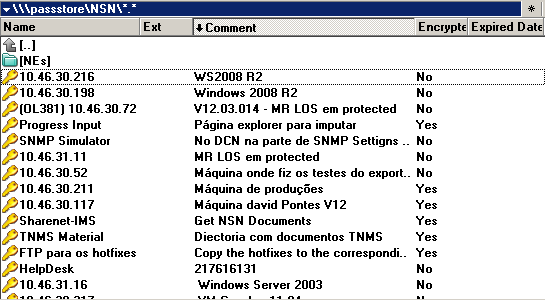
Added: Custom Columns (Encrypted, Date Expired, Comment).
For "Date Expired" check the DateFormat switch in the ini file. For Comment check ini setting ExplicitComment.
Added: A delay for each key pressed can be set in the ini file. In some applications (like IE6) autotype work better with a delay of 50 ms or 60 ms.
Added: Alt-Enter improved. Now you can launch programs with parameters. Default launch by extension also improved. for instance "Remote machine.RDP" was not handled before.
Added: New ini switches. Check the available switches below
Fixed: Tool tips in New Entry dialog
Fixed: Expired date, creation time, modified time and url are now also encrypted in the xml
Fixed: Rename file to the same name of an existing one
Fixed: Renaming a folder to the same name of an entry would have also change the icon
Fixed: Some problems regarding move, copy, delete in some situations
Fixed: The user could still load the database (but not decrypt encrypted entries) with a wrong master password.
o Version 0.5 30/11/2006.
Added: Global hotkey and auto-type. Check section ~Global hotkey and auto-type~ of readme.txt .(Only tested on WinXP SP2!)
Added: Special button "Default Auto Type Window" to specify wether the plugin should use default Auto-Type-Window. See Readme.
Added: Help buttons to help Auto-Type syntax
Added: Password generation
Fixed: Copying an encrypted entry to another place of the plugin file system had a problem in the resulting xml.
Changed: Plugin is now statically linked with mfc
Updated: tree.hh module updated to 2.2 (August, 2006)
o Version 0.43.2 02/10/2006.
Fixed: The user could change the master password to an empty password.
o Version 0.43.1 18/09/2006
Fixed: There was a problem in xml parsing causing the plugin to crash sometimes.
Fixed: It was possible to delete/move/create dir with plugin locked but not refreshed yet.
Fixed: Alt-Enter was not working fine
o Version 0.43 04/08/2006
Fixed: Plugin crash during installation.
Added: Encryption to URL
Added: Encryption to Title
Modif: In the view entry window, the button "Show Password" is now the default one.
If the user wants to see the passsword he just needs to press enter twice. First time to
show dialog "View Entry" and second time to show password.
o Version 0.4 12/07/2006
Fixed: Plugin crash whenever failed to decrypt.
Fixed: If the user tried to change the master password it could see the enties in the pannel.
Fixed: Version resource added to dll.
Added: Master passwor is now stored in xml and not in INI.
Added: Encryption to notes and username.
Added: Option to lock database.
Added: Option to automatically lock database after a timeout.
Added: Overwrite with copy and move as it were a real file system.
Added: Creation date is now used and appears in pannel.
Added: Alt-Enter executes the the text that is in the URL field (can be anything handled by shell)
Added: URL Field Features. Use special strings %PASSWORD%, %USERNAME%, %NOTES%, {PASSWORD}, {USERNAME} and {NOTES}. They wil be substituted in the URL.
Added: Option to easily convert clear text entries to encrypted entries.
Added: Number of entries is shown in field size of special file "New Entry"
o Version 0.31
Lost changes of that version.
Version 0.25 ~ 24/05/2006
~HISTORY (begins with 0.25)~
[!] The master password could be changed even without knowing the password.
[!] In a renaming folder operation the new icon was not stored
[!] "New Entry" could be copy, moved and renamed
[!] Notes field won't allow several lines of imput
[+] Allows clear text passwords
[+] The tag is not treated like a folder anymore. In the latest version My Passwords causes the appearance of a folder named "My Passwords". This was causing some internal problems.
[+] The user can choose wether he wants the log file to be created via INI file
[+] Environment variable %COMMANDER_PATH% can be used in the INI file
o Version 0.61 20/04/2010
Fixed: No data was saved to xml when using the [New Entry] from inside the folders.
o Version 0.6 15/04/2010
Updated: tree.hh module updated to 2.65 (03-Apr-2009)
Added: Compression/Decompression code modified and now uses Crypto++ lib.
Added: Custom Columns (Encrypted, Date Expired, Comment).
For "Date Expired" check the DateFormat switch in the ini file. For Comment check ini setting ExplicitComment.
Added: A delay for each key pressed can be set in the ini file. In some applications (like IE6) autotype work better with a delay of 50 ms or 60 ms.
Added: Alt-Enter improved. Now you can launch programs with parameters. Default launch by extension also improved. for instance "Remote machine.RDP" was not handled before.
Added: New ini switches. Check the available switches below
Fixed: Tool tips in New Entry dialog
Fixed: Expired date, creation time, modified time and url are now also encrypted in the xml
Fixed: Rename file to the same name of an existing one
Fixed: Renaming a folder to the same name of an entry would have also change the icon
Fixed: Some problems regarding move, copy, delete in some situations
Fixed: The user could still load the database (but not decrypt encrypted entries) with a wrong master password.
o Version 0.5 30/11/2006.
Added: Global hotkey and auto-type. Check section ~Global hotkey and auto-type~ of readme.txt .(Only tested on WinXP SP2!)
Added: Special button "Default Auto Type Window" to specify wether the plugin should use default Auto-Type-Window. See Readme.
Added: Help buttons to help Auto-Type syntax
Added: Password generation
Fixed: Copying an encrypted entry to another place of the plugin file system had a problem in the resulting xml.
Changed: Plugin is now statically linked with mfc
Updated: tree.hh module updated to 2.2 (August, 2006)
o Version 0.43.2 02/10/2006.
Fixed: The user could change the master password to an empty password.
o Version 0.43.1 18/09/2006
Fixed: There was a problem in xml parsing causing the plugin to crash sometimes.
Fixed: It was possible to delete/move/create dir with plugin locked but not refreshed yet.
Fixed: Alt-Enter was not working fine
o Version 0.43 04/08/2006
Fixed: Plugin crash during installation.
Added: Encryption to URL
Added: Encryption to Title
Modif: In the view entry window, the button "Show Password" is now the default one.
If the user wants to see the passsword he just needs to press enter twice. First time to
show dialog "View Entry" and second time to show password.
o Version 0.4 12/07/2006
Fixed: Plugin crash whenever failed to decrypt.
Fixed: If the user tried to change the master password it could see the enties in the pannel.
Fixed: Version resource added to dll.
Added: Master passwor is now stored in xml and not in INI.
Added: Encryption to notes and username.
Added: Option to lock database.
Added: Option to automatically lock database after a timeout.
Added: Overwrite with copy and move as it were a real file system.
Added: Creation date is now used and appears in pannel.
Added: Alt-Enter executes the the text that is in the URL field (can be anything handled by shell)
Added: URL Field Features. Use special strings %PASSWORD%, %USERNAME%, %NOTES%, {PASSWORD}, {USERNAME} and {NOTES}. They wil be substituted in the URL.
Added: Option to easily convert clear text entries to encrypted entries.
Added: Number of entries is shown in field size of special file "New Entry"
o Version 0.31
Lost changes of that version.
Version 0.25 ~ 24/05/2006
~HISTORY (begins with 0.25)~
[!] The master password could be changed even without knowing the password.
[!] In a renaming folder operation the new icon was not stored
[!] "New Entry" could be copy, moved and renamed
[!] Notes field won't allow several lines of imput
[+] Allows clear text passwords
[+] The tag is not treated like a folder anymore. In the latest version My Passwords causes the appearance of a folder named "My Passwords". This was causing some internal problems.
[+] The user can choose wether he wants the log file to be created via INI file
[+] Environment variable %COMMANDER_PATH% can be used in the INI file