mthumbs.wlx 20210405
Описание
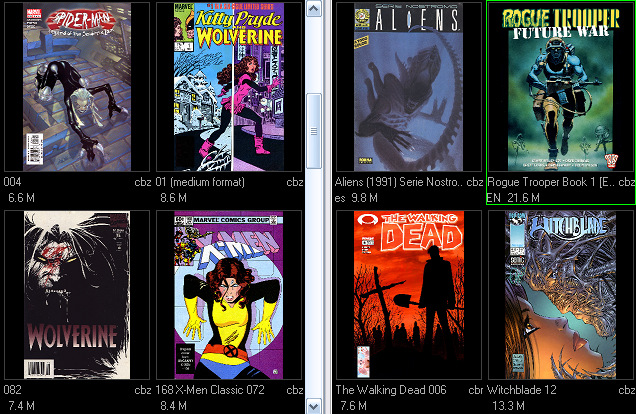
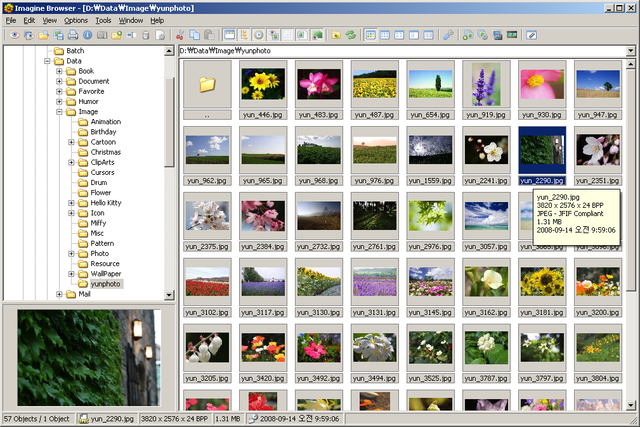
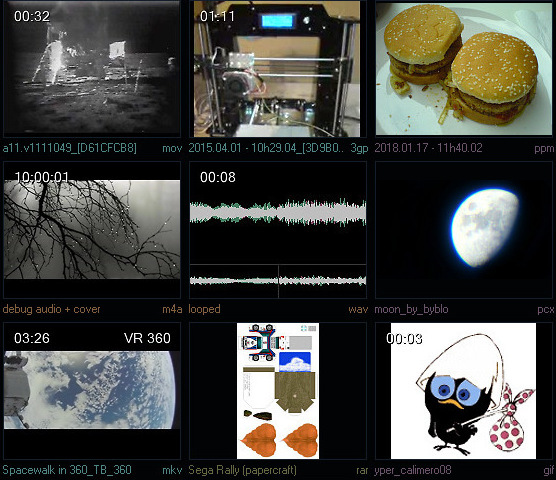
mthumbs is a WLX thumbnail and Lister/Quickview plugin to preview most of various existing Videos, Audios, Images, Comics and Albums formats.- Various extensions are supported (Supporter version only): (more or less exhaustive list: maybe not all are properly supported, send me some feedback in that case)
Videos: 3g2, 3gp, 4xm, anm, apm, asf, av1, avi, avr, avs, bfi, bik, bik2, bk2, bmv, c93, cam, cdg, cdxl, cine, dash, dcr, dfa, dv, dxa, film_cpk, fits, flic, flv, frm, gdv, gif, gxf, h261, h263, h264, hevc, ivf, ivr, jps, jv, kux, lvf, lxf, m2t, m2ts, m4v, mj2, mjpeg, mkv, mod, mov, mp4, mpc, mpeg, mpg, mtv, mv, mvi, mxf, nsv, nut, nuv, ogm, paf, pmp, pns, pva, r3d, rl2, rm, roq, rpl, scc, ser, smk, sup, swf, thp, tmv, tod, ts, ty, vc1, vfw, vivo, vmd, vob, webm, wmv, wtv, wve, xmv, y4m, yop, yuv
Audios: 3ga, aa, aac, ac3, acm, act, adx, aea, afc, aif, aiff, aix, alaw, amr, apc, ape, au, bfstm, bit, brstm, caf, cdr, cpt, dsf, dss, dts, dtshd, eac3, flac, fsb, g722, g726, gsm, hca, hdp, ics, iff, ircam, it, m4a, mlp, mmf, mp3, musx, ogg, oma, opus, pvf, qcp, ram, raw, rf64, rso, sap, sbg, sds, sdx, sf, shn, sid, tak, tta, u8, vag, voc, vqf, w64, wav, wma, wv, xa, xwma
Images: 3fr, ai, apng, arw, b3d, blp, bmp, cgm, clp, cmx, cr2, crw, dcm, dcx, dds, dib, djvu, dng, dwg, dxf, ecw, emf, eps, erf, exr, fit, fpx, g3, ids, iiq, im1, im24, im32, im8, ima, img, iw44, j2k, jls, jng, jp2, jpc, jpe, jpeg, jpf, jpg, jpm, jxr, kdc, lbm, mng, mos, mpo, mrw, nef, nrw, orf, pbm, pcc, pcd, pcx, pdf, pdn, pef, pgm, plt, png, pnm, ppm, ps, psd, psp, raf, ras, rgb, rgba, rle, rw2, rwl, sff, sfw, sgi, srf, sun, svg, tga, tif, tiff, ttf, urt, wbc, wbmp, wbz, wdp, webp, wmf, wsq, x3f, xbm, xcf, xcfbz2, xcfgz, xpm
Comics: cbr, cbz (with shortest image path as output priority)
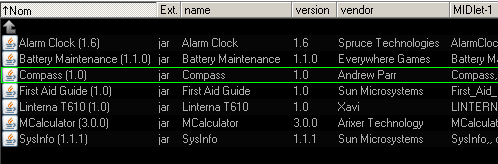
Albums/Archives: apk, epub, jar, rar, waz, zip (with '*cover*', '*folder*' and '*preview*' output priority)
- 3D and VR support with overlay (will show an unique picture instead of left/right or top/bottom)
- Optional sharpening and jpeg picture quality to get better visualization from thumbnails.
- An ini file that will be found in the plugin's folder can allow extensions and settings changes, on the fly (ini file changes is checked by filedate everytime a thumbnail is requested from the main app)
- Since it rely to external tools like Ffmpeg or Irfanview, it does not require any installed codecs on the system to work, while allowing quick updates for supporting new formats.
- Optional ADS support: It can save cached thumbnails using the NTFS ADS system, which gives volatile support, allowing various thumbnail sizes at once (%file%:preview.jpg and %file%:cache.ini. Or for e.g. %file%:p224x176.jpg in case of multiple sizes enabled from settings).
- ADS is also allowing automatic refresh from a thumbnail only when necessary, e.g. if the related format setting from the ini file or the plugin was changed since the last time.
- Using the cm_ReloadSelThumbs on a thumbnail, allows rotating pictures on the fly (see PercentPosition ini entry), in case of an undesired picture is returned from a video (black or intro screen, ect...) If ADS is enabled, the lastest position will be remembered into the %file%:cache.ini file (when not matching the PercentPosition value)
- ADS save will be automatically canceled in case a file is from a read-only path. But if a file has simply a read-only attribute, ADS will work properly by restoring the RO attribute after saving the cached thumbnail.
- Can be also used through Symbolic links without problem.
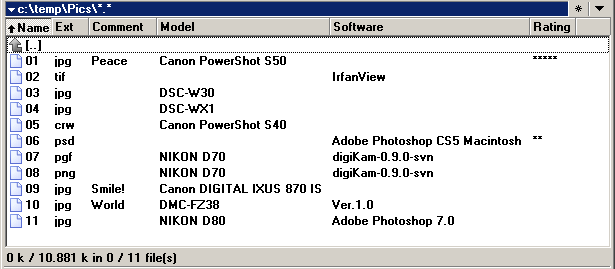
- Some extra info like the video time, height in overlay is optional.
Installation and update:
-----------------------
- Install the plugin where you want to and register it to your main app as usual (TC, DC, ect...)
- Recommended: If you are updating, replace the existing file by the provided ones, including the ini files.
- Download and decompress the external tools (ffmpeg and irfanview) to the plugin's bin\ folders (download links can be found in the bin\*\install_url.txt)
- Remember to give the priority to this plugin: For TC, go to the menu: Configuration -> Plugins -> Configure button for WLX -> then move to the top the listed mthumbs.wlx filepath.
- Ensure the thumbnail filters are set correctly: For TC, go to the menu: Configuration -> Thumbnails -> Enable "Get from Lister plugins for:" and set editbox to: *.*
- For Lister and Quickview support, it is necessary for some extensions like MPG or WAV to add the detection string "MULTIMEDIA" to the detection string (automatic process if you freshly (re)installed the plugin, after 2021.04.01 versions)
- Recommended for Lister and Quickview support: for TC, go to the lister menu: Configuration -> Edit/View -> Configure internal viewer... -> Multimedia -> Check "Use plugins or load bitmap as graphics at startup"
- Check the mthumbs.ini file to see if changes are needed (!!!read first the section "Editing the plugin's settings (mthumbs.ini)" I have seem some people misunderstanding some of the ini entries in forums)
- IMPORTANT: ADS caching is disabled by default. ADS caching was made with volatility/portability and speed as main advantage. Thus if you decide to use it, it is recommended to TURN OFF the internal file manager's caching. (for TC, configuration -> Thumbnails -> Empty the database location) Note: ADS or not, if speed is important for you, i recommend you try to disable the custom fields and fields by type (unless they using some cache). They may be useful but often are way too slow for some formats. Give it a try :)
- Additional note: If you currently using the plugin cbxthumbs.wlx, you can uninstall it since mthumbs is the continuity and offers better functions: now support JPG, PNG, GIF and TGA + albums support.
Usage:
------
- Just turn on the thumbnail mode as usual on your file manager. Lister and Quickview for previewing the file.
- Important: It is recommended to not use your main ffmpeg or irfanview tools for this plugin. Since the needs are not the same, it is probably better to use separated thus dedicated versions. Just use the \bin\ folder from the plugin folder.
- Tip: When using the ffplay.exe on the lister, you can right click to jump at the percentage position. e.g. Right click at 90% horizontaly, to jump to 90% of the total playing time
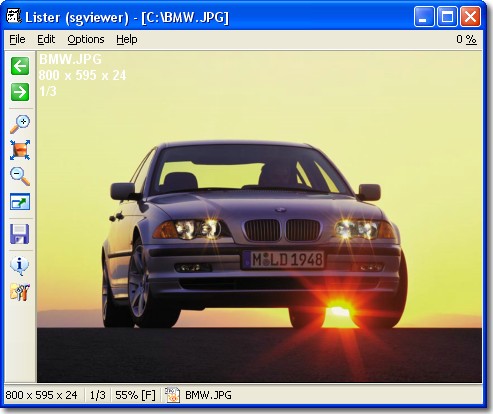
- Tip: When using irfanview on the lister, left click to draw the zooming zone. You can also press CTRL+SHIFT while the mouse is above the picture to enable the magnifier (then mouse wheel to increase/decrease the magnifier magnitude)
- Tip: Some recommended value for thumbnails (hybrid ratio): 176x136 or 224x176 or 304x240
Read mthumbs.readme.txt for more details.
Что нового
v20210405
- Added Lister and Quickview (still experimental) support for videos, audio and images. (maybe comics and albums will be supported later. still undecided what to preview for thoses)
- Finalized (more or less) the supported video extension list: 3g2, 3gp, 4xm, anm, apm, asf, av1, avi, avr, avs, bfi, bik, bik2, bk2, bmv, c93, cam, cdg, cdxl, cine, dash, dcr, dfa, dv, dxa, film_cpk, fits, flic, flv, frm, gdv, gif, gxf, h261, h263, h264, hevc, ivf, ivr, jps, jv, kux, lvf, lxf, m2t, m2ts, m4v, mj2, mjpeg, mkv, mod, mov, mp4, mpc, mpeg, mpg, mtv, mv, mvi, mxf, nsv, nut, nuv, ogm, paf, pmp, pns, pva, r3d, rl2, rm, roq, rpl, scc, ser, smk, sup, swf, thp, tmv, tod, ts, ty, vc1, vfw, vivo, vmd, vob, webm, wmv, wtv, wve, xmv, y4m, yop, yuv
- Finalized (more or less) the supported audio extension list: 3ga, aa, aac, ac3, acm, act, adx, aea, afc, aif, aiff, aix, alaw, amr, apc, ape, au, bfstm, bit, brstm, caf, cdr, cpt, dsf, dss, dts, dtshd, eac3, flac, fsb, g722, g726, gsm, hca, hdp, ics, iff, ircam, it, m4a, mlp, mmf, mp3, musx, ogg, oma, opus, pvf, qcp, ram, raw, rf64, rso, sap, sbg, sds, sdx, sf, shn, sid, tak, tta, u8, vag, voc, vqf, w64, wav, wma, wv, xa, xwma
- Finalized (more or less) the supported images extension list: 3fr, ai, apng, arw, b3d, blp, bmp, cgm, clp, cmx, cr2, crw, dcm, dcx, dds, dib, djvu, dng, dwg, dxf, ecw, emf, eps, erf, exr, fit, fpx, g3, ids, iiq, im1, im24, im32, im8, ima, img, iw44, j2k, jls, jng, jp2, jpc, jpe, jpeg, jpf, jpg, jpm, jxr, kdc, lbm, mng, mos, mpo, mrw, nef, nrw, orf, pbm, pcc, pcd, pcx, pdf, pdn, pef, pgm, plt, png, pnm, ppm, ps, psd, psp, raf, ras, rgb, rgba, rle, rw2, rwl, sff, sfw, sgi, srf, sun, svg, tga, tif, tiff, ttf, urt, wbc, wbmp, wbz, wdp, webp, wmf, wsq, x3f, xbm, xcf, xcfbz2, xcfgz, xpm
- Finalized (more or less) the supported albums extension list: apk, epub, jar, rar, waz, zip
- Added a third text line in video preview, showing the video height in pixels.
- Now the plugin will return the string "MULTIMEDIA" on file manager detection string request. (required by TC to support some extension like MPG, WAV, ect...) If you got the plugin previously installed, it is recommended that you add the "MUTIMEDIA" string manually.
- Added new ini entries: mthumbs Version (internal only: do not modify), Lister extension exclusion(!) list (chars), ffplayPath (chars), ListerSupport (bool), ffplayListerVideoPreInputParams (chars), ffplayListerAudioPreInputParams (chars), irfanviewListerPreInputParams (chars), FontSizeLine3 (int), TextLine3XPos (int), TextLine3YPos (int), ListerDirectorySupport (bool), ListerCloseTempFileSleepTimeInMS (int)
- Fixed a problem to cmd.exe with the /S switch, where before it could not handle spaces properly for external apps like ffpmeg.exe (thanks to DaZoB from TC forum for finding and reporting the problem)
- Some code clearing/optimisation and some small fixes here and there.
- Added Lister and Quickview (still experimental) support for videos, audio and images. (maybe comics and albums will be supported later. still undecided what to preview for thoses)
- Finalized (more or less) the supported video extension list: 3g2, 3gp, 4xm, anm, apm, asf, av1, avi, avr, avs, bfi, bik, bik2, bk2, bmv, c93, cam, cdg, cdxl, cine, dash, dcr, dfa, dv, dxa, film_cpk, fits, flic, flv, frm, gdv, gif, gxf, h261, h263, h264, hevc, ivf, ivr, jps, jv, kux, lvf, lxf, m2t, m2ts, m4v, mj2, mjpeg, mkv, mod, mov, mp4, mpc, mpeg, mpg, mtv, mv, mvi, mxf, nsv, nut, nuv, ogm, paf, pmp, pns, pva, r3d, rl2, rm, roq, rpl, scc, ser, smk, sup, swf, thp, tmv, tod, ts, ty, vc1, vfw, vivo, vmd, vob, webm, wmv, wtv, wve, xmv, y4m, yop, yuv
- Finalized (more or less) the supported audio extension list: 3ga, aa, aac, ac3, acm, act, adx, aea, afc, aif, aiff, aix, alaw, amr, apc, ape, au, bfstm, bit, brstm, caf, cdr, cpt, dsf, dss, dts, dtshd, eac3, flac, fsb, g722, g726, gsm, hca, hdp, ics, iff, ircam, it, m4a, mlp, mmf, mp3, musx, ogg, oma, opus, pvf, qcp, ram, raw, rf64, rso, sap, sbg, sds, sdx, sf, shn, sid, tak, tta, u8, vag, voc, vqf, w64, wav, wma, wv, xa, xwma
- Finalized (more or less) the supported images extension list: 3fr, ai, apng, arw, b3d, blp, bmp, cgm, clp, cmx, cr2, crw, dcm, dcx, dds, dib, djvu, dng, dwg, dxf, ecw, emf, eps, erf, exr, fit, fpx, g3, ids, iiq, im1, im24, im32, im8, ima, img, iw44, j2k, jls, jng, jp2, jpc, jpe, jpeg, jpf, jpg, jpm, jxr, kdc, lbm, mng, mos, mpo, mrw, nef, nrw, orf, pbm, pcc, pcd, pcx, pdf, pdn, pef, pgm, plt, png, pnm, ppm, ps, psd, psp, raf, ras, rgb, rgba, rle, rw2, rwl, sff, sfw, sgi, srf, sun, svg, tga, tif, tiff, ttf, urt, wbc, wbmp, wbz, wdp, webp, wmf, wsq, x3f, xbm, xcf, xcfbz2, xcfgz, xpm
- Finalized (more or less) the supported albums extension list: apk, epub, jar, rar, waz, zip
- Added a third text line in video preview, showing the video height in pixels.
- Now the plugin will return the string "MULTIMEDIA" on file manager detection string request. (required by TC to support some extension like MPG, WAV, ect...) If you got the plugin previously installed, it is recommended that you add the "MUTIMEDIA" string manually.
- Added new ini entries: mthumbs Version (internal only: do not modify), Lister extension exclusion(!) list (chars), ffplayPath (chars), ListerSupport (bool), ffplayListerVideoPreInputParams (chars), ffplayListerAudioPreInputParams (chars), irfanviewListerPreInputParams (chars), FontSizeLine3 (int), TextLine3XPos (int), TextLine3YPos (int), ListerDirectorySupport (bool), ListerCloseTempFileSleepTimeInMS (int)
- Fixed a problem to cmd.exe with the /S switch, where before it could not handle spaces properly for external apps like ffpmeg.exe (thanks to DaZoB from TC forum for finding and reporting the problem)
- Some code clearing/optimisation and some small fixes here and there.