NuCov 1.21.54 Beta RC 2
Описание
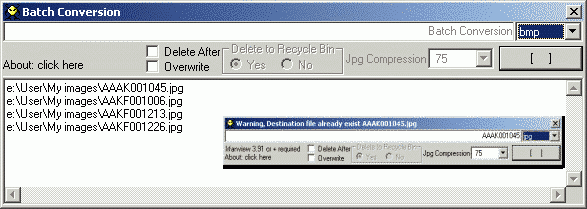
Конвертирует изображения из одного формата в другой используя IrfanView. Для работы нужны IrfanView, Visual Basic 6 Runtimes. Скопируйте nucov.exe в папку к I_VIEW32.EXE, создайте иконку на панели Total Commander (перетащите nucov.exe на свободное место в панели кнопок). Теперь после перетаскивания файла изображения на иконку NuCov открывается диалог быстрого конвертирования.Что нового
Latest News:
Nucov 1.21.54 Beta RC2
+Allow Vertical Resizing
+Allow Multiples Instances 'Thanks C.Ghisler
+Show Percent completed 'Thanks Strike
+New Scroll Bar for Jpg compression
+Fixed Msg when command line empty 'Thanks C.Ghisler
Nucov 1.20.47 RC 2 Hotfix
+Fixed When drop only one file, doesn't show name
Nucov 1.20.46 RC 2
+Added Progress bar for batch conversion (It show files already converted by Irfan)
Nucov 1.20.44 RC 1
+Added Batch Conversion (when %L parameter is used in TC, wich send to nucov a file with your selection)
+Added Few image formats more, already supported by Irfanview
+Added Delete Files Check Box (To recycle bin or directly or delete files without moving them to recycle bin)
+Added Overwrite files Check Box (BEEP when overwrite is not selected, and file already exist)
Special Thanks to(alphabetically)Gerd, Ghisler, Oergon and Strike! And Gral. Geo, Sil and Xboy
Nucov 1.21.54 Beta RC2
+Allow Vertical Resizing
+Allow Multiples Instances 'Thanks C.Ghisler
+Show Percent completed 'Thanks Strike
+New Scroll Bar for Jpg compression
+Fixed Msg when command line empty 'Thanks C.Ghisler
Nucov 1.20.47 RC 2 Hotfix
+Fixed When drop only one file, doesn't show name
Nucov 1.20.46 RC 2
+Added Progress bar for batch conversion (It show files already converted by Irfan)
Nucov 1.20.44 RC 1
+Added Batch Conversion (when %L parameter is used in TC, wich send to nucov a file with your selection)
+Added Few image formats more, already supported by Irfanview
+Added Delete Files Check Box (To recycle bin or directly or delete files without moving them to recycle bin)
+Added Overwrite files Check Box (BEEP when overwrite is not selected, and file already exist)
Special Thanks to(alphabetically)Gerd, Ghisler, Oergon and Strike! And Gral. Geo, Sil and Xboy