Total Commander extDir (Utility) 1.8.3
Описание
Extended directory & file creator utility (F7 replacement) for Total Commander.What is it good for?
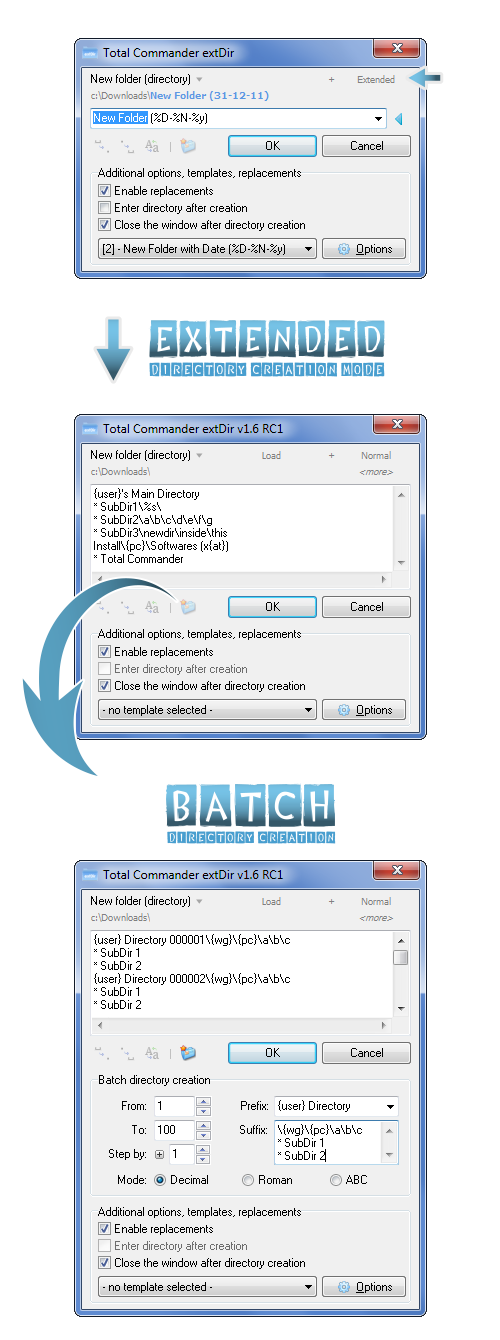
In a few words: This small utility extends your Total Commander's directory & file creating capabilities - after installing it, you can create a bunch of (even multi-leveled) directories and/or files with a single click or keypress, with numerous possibilities...
Main Features:
- [ NEW / 1.8 ] Complete Unicode support
- [ NEW / 1.7 ] File creation capability
- [ NEW / 1.6 ] Ability to create your own plugins (special variables)
- [ NEW / 1.6 ] Ability to set the directory/file attributes
- [ NEW / 1.6 ] Batch directory creation (Decimal / Roman / ABC)
- Normal & Extended directory creation mode
- Full integration to Total Commander (F7, Shift + F7, or any other key combination)
- Support for multi-leveled directory creation (create directories with more than one subdirs)
- Templates - create directory with predefined templates (e.g. "New Directory (%D-%N-%y)")
- Replacements: use environment variables (like %OS% or %USERNAME%) in the name of the directory
- Basic & special variables: use vars like %s (current second), %h (current hour), %x (unix time), {pc} (current PC name) etc
- Built-in installer & uninstaller for easier usage (run the utility out of TC's directory to activate the installator)
- Multi-language support (Translators needed: click here if you'd like to translate the utility to your (native) language)
- English, Hungarian, Russian, Dutch, Spanish, German, Danish, Chinese, Ukrainian, Korean, Polish, Italian, Slovenian language support (built-in)
- Configuration & Template Manager dialogs
- 6 built-in window color themes (optional)
- Ability to create & use your own color themes (more info on the forum)
- Realtime replacements (optional)
- Full portability
- ... and much more! (see the complete list at the official forum topic)
Compatibility:
- >= Total Commander 7.00 (heavily tested under 7.56a & 8.01)
Known bugs, limitations:
- Installation problems? Run this utility with administrator rights directly from Total Commander (out of Total Commander's directory)
- Limitation: lack of Unicode support atm (unicode version is already under development)
- Complete documentation will be ready in the final 1.6.5 version!
Что нового
[04-03-2025] Total Commander extDir 1.8.3
* Fixed: installer - the new languages are properly selectable from the installer as well
* Fixed: installer - the name of the selected language on top was not showing Unicode chars properly (if contains any), fixed
* Fixed: installer - other, unicode-related fixes (affecting the selection of custom Hotkey & uninstall function)
* Fixed: automatic detection of replacement characters in input box was not always working properly (case sensitivity problem)
[28-02-2025] Total Commander extDir 1.8.2
* New: Slovenian language support (translated by Jadran Rudec - thanks!)
* New: Updated Chinese language (thanks to efree)
* New: Updated Dutch language (thanks to Jaap Kramer)
* New: Updated Italian language (thanks to ErreGi)
* Change: some code refactor, detect it faster if the extDir was not being run from TC, and close accordingly
* Fixed: Manage Templates - failed to save new custom user template after apply (unicode-conversion related bug, introduced in 1.8.0)
* Fixed: creating directories with specific attributes (archive, read-only etc) was not working properly (unicode-conversion related bug)
* Fixed: after installation, extDir has always restarted the 32-bit version of TC (TOTALCMD.exe), even if the user was running the installer from the 64-bit version (TOTALCMD64.exe)
* Fixed: Placeholders - the text of the error dialog to fill all placeholder might not be loaded properly
* Fixed: extDir was unable to open the Help file through popup or F1 keypress
* Fixed: some other minor, unicode-related fixes
[25-02-2025] Total Commander extDir 1.8.1
* New: Updated Danish language (thanks to petermad)
* Change: modified/added some new language elements there were previously not yet included, some items were not correctly translated (if you are a translator, please check the updated LNG_ENG.ini file)
* Change: added a more intelligent way to detect TC file path initially (WM_USER + 50), for handling zip & FTP / VirtualPanel scenario
* Fixed: resolved an issue where extDir.ini was accumulating extraneous Unicode characters at the end of the file
* Fixed: in case a file already exists on creation, do not rewrite it automatically, instead show error
[23-02-2025] Total Commander extDir 1.8.0
* New: Unicode support - complete support for creating directories & files with unicode characters
* New: Italian language support (translated by ErreGi - thanks!)
* Change: after creating a new file, now the option also works to "enter" inside the file (open the F4 editor on it), in case the "Enter directory after creation" option is checked
* Fixed: set TC's cursor on the created files as well (was working only for directories)
* Fixed: checking if we are inside an archive on startup was not working properly using TC 8.0B10 path detection method - now its properly calling the internal F7 in case like this
* Fixed: languages with special character codes built into extDir are also working properly & unicode-safe (Chinese, etc)
* Fixed: all control and input supports unicode characters as well
[09-02-2025] Total Commander extDir 1.7.0
* New: Polish language support (translated by dmocha - thanks!)
* New: File creation functionality! (auto-detect if name contains extension, create file/directory accordingly - widely Configurable)
* New: Added two "UserStructure" examples to ini file (applied after first new run/install) - support for creating complex directory structures, supporting wildcards (press Ctrl + O, or click "Load" flat button on top)
* Change: performed some long-overdue code refactoring and cleanup to enhance readability
* Fixed: {os} variable is now ready to recognize Windows 10 & 11 correctly
* Fixed: fixed a problem with placeholders, where a user could apply the form without filling all of them, resulting in an error while creating directories
* Fixed: installer - the new languages are properly selectable from the installer as well
* Fixed: installer - the name of the selected language on top was not showing Unicode chars properly (if contains any), fixed
* Fixed: installer - other, unicode-related fixes (affecting the selection of custom Hotkey & uninstall function)
* Fixed: automatic detection of replacement characters in input box was not always working properly (case sensitivity problem)
[28-02-2025] Total Commander extDir 1.8.2
* New: Slovenian language support (translated by Jadran Rudec - thanks!)
* New: Updated Chinese language (thanks to efree)
* New: Updated Dutch language (thanks to Jaap Kramer)
* New: Updated Italian language (thanks to ErreGi)
* Change: some code refactor, detect it faster if the extDir was not being run from TC, and close accordingly
* Fixed: Manage Templates - failed to save new custom user template after apply (unicode-conversion related bug, introduced in 1.8.0)
* Fixed: creating directories with specific attributes (archive, read-only etc) was not working properly (unicode-conversion related bug)
* Fixed: after installation, extDir has always restarted the 32-bit version of TC (TOTALCMD.exe), even if the user was running the installer from the 64-bit version (TOTALCMD64.exe)
* Fixed: Placeholders - the text of the error dialog to fill all placeholder might not be loaded properly
* Fixed: extDir was unable to open the Help file through popup or F1 keypress
* Fixed: some other minor, unicode-related fixes
[25-02-2025] Total Commander extDir 1.8.1
* New: Updated Danish language (thanks to petermad)
* Change: modified/added some new language elements there were previously not yet included, some items were not correctly translated (if you are a translator, please check the updated LNG_ENG.ini file)
* Change: added a more intelligent way to detect TC file path initially (WM_USER + 50), for handling zip & FTP / VirtualPanel scenario
* Fixed: resolved an issue where extDir.ini was accumulating extraneous Unicode characters at the end of the file
* Fixed: in case a file already exists on creation, do not rewrite it automatically, instead show error
[23-02-2025] Total Commander extDir 1.8.0
* New: Unicode support - complete support for creating directories & files with unicode characters
* New: Italian language support (translated by ErreGi - thanks!)
* Change: after creating a new file, now the option also works to "enter" inside the file (open the F4 editor on it), in case the "Enter directory after creation" option is checked
* Fixed: set TC's cursor on the created files as well (was working only for directories)
* Fixed: checking if we are inside an archive on startup was not working properly using TC 8.0B10 path detection method - now its properly calling the internal F7 in case like this
* Fixed: languages with special character codes built into extDir are also working properly & unicode-safe (Chinese, etc)
* Fixed: all control and input supports unicode characters as well
[09-02-2025] Total Commander extDir 1.7.0
* New: Polish language support (translated by dmocha - thanks!)
* New: File creation functionality! (auto-detect if name contains extension, create file/directory accordingly - widely Configurable)
* New: Added two "UserStructure" examples to ini file (applied after first new run/install) - support for creating complex directory structures, supporting wildcards (press Ctrl + O, or click "Load" flat button on top)
* Change: performed some long-overdue code refactoring and cleanup to enhance readability
* Fixed: {os} variable is now ready to recognize Windows 10 & 11 correctly
* Fixed: fixed a problem with placeholders, where a user could apply the form without filling all of them, resulting in an error while creating directories