| View previous topic :: View next topic |
| Author |
Message |
Orion9

Joined: 01 Jan 2024
Posts: 1282
|
 (Separately) Posted: Sat Nov 29, 2025 20:39 Post subject: (Separately) Posted: Sat Nov 29, 2025 20:39 Post subject: |
 |
|
Собственно, три универсальные функции. Код можно добавить в любой модуль.
 Hidden text | Code: | Func URLDownloadToFile(URL, FileName)
Local hr
hr = DllCall("Urlmon.dll\URLDownloadToFileW", _
"ptr", 0, "wstr", URL, "wstr", FileName, "dword", 0, "ptr", 0, "hresult")
Return hr
EndFunc
Func GetINetECode(nCode)
Local sCode
Switch nCode
Case 0x800C0002 # INET_E_INVALID_URL
sCode = "The URL could not be parsed."
Case 0x800C0003 # INET_E_NO_SESSION
sCode = "No Internet session was established."
Case 0x800C0004 # INET_E_CANNOT_CONNECT
sCode = "The attempt to connect to the Internet has failed."
Case 0x800C0005 # INET_E_RESOURCE_NOT_FOUND
sCode = "The Internet resource was not found."
Case 0x800C0007 # INET_E_DATA_NOT_AVAILABLE
sCode = "An Internet connection was established, but the data cannot be retrieved."
Case 0x800C0008 # INET_E_DOWNLOAD_FAILURE
sCode = "The download has failed (the connection was interrupted)."
Case 0x800C000B # INET_E_CONNECTION_TIMEOUT
sCode = "The Internet connection has timed out."
Case 0x800C000C # INET_E_INVALID_REQUEST
sCode = "The request was invalid."
Case 0x800C000D # INET_E_UNKNOWN_PROTOCOL
sCode = "The protocol is not known and no pluggable protocols have been entered that match."
Case 0x800C000E # INET_E_SECURITY_PROBLEM
sCode = "A security problem was encountered (certificate problems, client authentication, etc.)"
Case 0x800C0019 # INET_E_INVALID_CERTIFICATE
sCode = "The SSL certificate is invalid."
Else
sCode = "No error code description"
EndSwitch
Return sCode
EndFunc
Func WinInetDownloadFile(URL, FileName, Silent = 0, Style = 0)
Static GENERIC_WRITE = 0x40000000, _
CREATE_ALWAYS = 2, FILE_ATTRIBUTE_NORMAL = 128
Static INTERNET_OPEN_TYPE_PRECONFIG = 0, _
INTERNET_FLAG_RELOAD = 0x80000000, _
INTERNET_FLAG_NO_CACHE_WRITE = 0x04000000
# Static INVALID_HANDLE_VALUE = auX64 ? 0xFFFFFFFFFFFFFFFF : 0xFFFFFFFF
Static INVALID_HANDLE_VALUE = auX64 ? 18446744073709551615 : 4294967295
Local hInt, hUrl, nSysErr, sAgent = "Autorun Downloader"
If Not Silent Then
tip("Internet connection.", 1, "Download", Style)
Sleep(200)
EndIf
hInt = DllCall("Wininet.dll\InternetOpenW", _
"wstr", sAgent, "dword", INTERNET_OPEN_TYPE_PRECONFIG, _
"ptr", 0, "ptr", 0, "ptr", 0, "handle")
nSysErr = SYSERROR
If Not (hInt > 0) Then
If Not Silent Then
tip("Error: " & nSysErr & auCRLF & _
"Message: " & GetWinInetError(nSysErr) & auCRLF & URL, 3, "Download", Style)
EndIf
Return nSysErr
EndIf
hUrl = DllCall("Wininet.dll\InternetOpenUrlW", _
"handle", hInt, "wstr", URL, "ptr", 0, _
"dword", 0, "dword", INTERNET_FLAG_RELOAD, _
"dword_ptr", 0, "handle")
nSysErr = SYSERROR
If Not (hUrl > 0) Then
DllCall("Wininet.dll\InternetCloseHandle", "handle", hInt)
If Not Silent Then
tip("Error: " & nSysErr & auCRLF & _
"Message: " & GetWinInetError(nSysErr) & auCRLF & URL, 3, "Download", Style)
EndIf
Return nSysErr
EndIf
# HTTP_QUERY_CONTENT_LENGTH | HTTP_QUERY_FLAG_NUMBER
Local flags = BitOR(5, 0x20000000)
Local size, sz = 8
Local buf = Buffer(sz)
buf.Zero()
If DllCall("Wininet.dll\HttpQueryInfoW", _
"handle", hUrl, "dword", flags, "ptr", buf.ptr, "dword*", @sz, "ptr", 0) Then
size = buf.GetNum(0, "int64")
EndIf
Free(buf)
hFile = DllCall("CreateFileW", _
"wstr", FileName, "dword", GENERIC_WRITE, _
"dword", 0, "ptr", 0, "dword", CREATE_ALWAYS, _
"dword", FILE_ATTRIBUTE_NORMAL, "ptr", 0, "handle")
nSysErr = SYSERROR
If hFile <= 0 Or hFile = INVALID_HANDLE_VALUE Then
DllCall("Wininet.dll\InternetCloseHandle", "handle", hUrl)
DllCall("Wininet.dll\InternetCloseHandle", "handle", hInt)
If Not Silent Then
tip("File can't be created. Error: " & nSysErr & auCRLF & _
GetWinInetError(nSysErr) & auCRLF & FileName, 3, "Download", Style)
EndIf
Return nSysErr
EndIf
Local buf = Buffer(1024*2), bytes, written, total, prc
buf.Zero()
Local T1 = GetUptime(), T2 = T1, T3, nStyle = BitOR(Style, 1)
Do
bRes = DllCall("Wininet.dll\InternetReadFile", _
"handle", hUrl, "ptr", buf.ptr, "dword", buf.size, "dword*", @bytes)
If bRes And bytes > 0 Then
DllCall("WriteFile", "handle", hFile, _
"ptr", buf.ptr, "dword", bytes, "dword*", @written, "ptr", 0)
total += bytes
If Not Silent And size > buf.size Then
T3 = GetUptime()
If Round(T3 - T2, 0) > 500 Then
prc = "Download " & Round(total/size*100,0) & '%'
tip('Загружено: ' & SizeFormat(total, 1, 'M', 2) & ' ' & _
'из ' & SizeFormat(size, 1, 'M', 2), 1, prc, nStyle)
Sleep(10)
T2 = T3
EndIf
EndIf
EndIf
If IsPressed(0x1B) Then bRes = false
Until Not (bRes And bytes > 0)
DllCall("CloseHandle", "handle", hFile)
DllCall("Wininet.dll\InternetCloseHandle", "handle", hUrl)
DllCall("Wininet.dll\InternetCloseHandle", "handle", hInt)
T3 = Round(GetUptime() - T1, 0) / 1000
T3 = "Время операции: " & StrFormat("%.3f", T3) & " sec"
If Not Silent Then
If bRes Then
txt = "Download successful." & auCRLF & FileName & auCRLF & T3
tip(txt, 1, "Download", nStyle)
Else
txt = "Download failed or ended with an error." & auCRLF & T3
tip(txt, 3, "Download", nStyle)
EndIf
EndIf
Return (bRes ? 0 : -1)
EndFunc
Func GetWinInetError(nCode)
Local sMsg
Local hModule = DllCall("GetModuleHandleW", "Wstr", "wininet.dll", "handle")
If Not (hModule > 0) Then
Return "GetModuleHandle failed for wininet.dll. Error: " & SYSERROR
EndIf
Local FORMAT_MESSAGE_FROM_HMODULE = 0x00000800
Local FORMAT_MESSAGE_ALLOCATE_BUFFER = 0x00000100
Local FORMAT_MESSAGE_IGNORE_INSERTS = 0x00000200
Local FORMAT_MESSAGE_FROM_SYSTEM = 0x00001000
Local flags = BitOR(FORMAT_MESSAGE_FROM_HMODULE, _
FORMAT_MESSAGE_IGNORE_INSERTS, _
FORMAT_MESSAGE_FROM_SYSTEM)
Local buf = Buffer(1024)
buf.Zero()
If DllCall("FormatMessageW", "dword", flags, "ptr", hModule, _
"dword", nCode, "dword", 0, "ptr", buf.ptr, "dword", buf.size, "ptr", 0) Then
sMsg = StrTrim(buf.GetStr())
Else
sMsg = "Failed to find error description"
EndIf
Free(buf)
Return sMsg
EndFunc
Global gTipText, gTipX, gTipY,
Global gTipWndProc, gTipWP = Callback("tipwp", "hwnd;uint;wparam;lparam")
#{
nFlags:
1 - Previous window position
2 - Square tooltip window
4 - Inactive tooltip window
0 - Default
#}
Func tip(sText, nIcon = 0, sTitle = "Tip", nFlags = 0)
Static TTM_TRACKACTIVATE = 1041, _
TTM_TRACKPOSITION = 1042, _
TTM_SETMAXTIPWIDTH = 1048, _
TTM_SETTITLE = 1057, _
TTM_ADDTOOL = 1074, _
TTM_UPDATETIPTEXT = 1081
Static txt = Buffer(1026)
Static hTip = 0, buf = Buffer(auX64 ? 56 : 40)
Local nMaxWidth = 200
If hTip = 0 Then
# TTS_BALLOON | TTS_CLOSE | TTS_NOPREFIX
hTip = DllCall("CreateWindowExW", _
"dword", 8, _
"wstr", "tooltips_class32", _
"wstr", "", "dword", 0x00000c2, _
"int", 0, "int", 0, "int", 0, "int", 0, _
"handle", 0, _
"handle", 0, "handle", 0, "ptr", 0, "handle")
If hTip = 0 Then
MsgBox("Не удалось создать окно подсказки")
Return 0
EndIf
gTipWndProc = DllCall("SetWindowLong" & (auX64 ? "PtrW" : "W"), _
"hwnd", hTip, "int", -4, "long_ptr", gTipWP.Ptr, "ptr")
txt.Zero()
txt.SetStr(sTitle & Chr(0))
SendMessage(hTip, TTM_SETTITLE, nIcon, txt.ptr)
buf.Zero()
# TTF_TRACK | TTF_ABSOLUTE
buf.SetNum(0, "uint", buf.size, "uint", 0x00a0)
buf.SetNum(auX64 ? 48 : 36, "ptr", txt.ptr)
SendMessage(hTip, TTM_ADDTOOL, 0, buf.ptr)
SendMessage(hTip, TTM_SETMAXTIPWIDTH, 0, nMaxWidth)
EndIf
If sText = "" Then
SendMessage(hTip, TTM_TRACKACTIVATE, 0, buf.ptr)
Return hTip
EndIf
# cartoon or square
Local op = (BitAND(nFlags, 2) ? 4 : 2)
WinSetStyle(0x0000040, op, hTip)
txt.Zero()
txt.SetStr(sTitle & Chr(0))
SendMessage(hTip, TTM_SETTITLE, nIcon, txt.ptr)
txt.Zero()
txt.SetStr(sText & Chr(0))
# the next call won't fail if the tip is not visible
If WinGetState(2, hTip) = 0 Then
SendMessage(hTip, TTM_TRACKACTIVATE, 0, buf.ptr)
EndIf
SendMessage(hTip, TTM_UPDATETIPTEXT, 0, buf.ptr)
SendMessage(hTip, TTM_TRACKACTIVATE, 1, buf.ptr)
WinGetPos("x", "y", "w", "h", hTip)
# the tip will appear at the mouse pointer by default
If Not BitAND(nFlags, 1) Then MouseGetPos("x","y")
# preventing the tip from going off screen
If x + w > SYSINFO_DESKTOPWIDTH Then x = SYSINFO_DESKTOPWIDTH - w
If y + h > SYSINFO_DESKTOPHEIGHT Then y = SYSINFO_DESKTOPHEIGHT - h
SendMessage(hTip, TTM_TRACKPOSITION, 0, MakeInt(x, y, 0))
gTipX = x
gTipY = y
If Not BitAND(nFlags, 4) Then WinSetState(23, hTip)
Return hTip
EndFunc
Func tipwp(hWnd, uMsg, wParam, lParam)
Static MK_LBUTTON = 0x0001, TTM_TRACKPOSITION = 1042
Static DragWidth = GetSystemMetrics(68) #SM_CXDRAG
Static DragHeight = GetSystemMetrics(69) #SM_CYDRAG
Static IsDrag = 0, StartX = 0, StartY = 0
Local x, y
Static tx, ty, buf = Buffer(8)
Switch uMsg
Case 0x0018 # WM_SHOWWINDOW
Case 0x0201 # WM_LBUTTONDOWN
If IsDrag = 0 Then
buf.Zero()
x = BitAND(lParam, 0xFFFF)
y = BitAND(BitShift(lParam,16), 0xFFFF)
StartX = x
StartY = y
buf.SetNum(0, "int", x, "int", y)
DllCall("ClientToScreen", "hwnd", hWnd, "ptr", buf.ptr)
tx = buf.GetNum(0)
ty = buf.GetNum(4)
IsDrag = 1
DllCall("SetCapture", "hwnd", hWnd, "hwnd")
EndIf
Case 0x0202 # WM_LBUTTONUP
If IsDrag = 1 Then
WinGetPos("gTipX", "gTipY", "", "", hWnd)
IsDrag = 0
DllCall("ReleaseCapture")
EndIf
Case 0x0200 # WM_MOUSEMOVE
If IsDrag = 1 And BitAND(wParam, MK_LBUTTON) Then
x = BitAND(lParam, 0xFFFF)
y = BitAND(BitShift(lParam,16), 0xFFFF)
If Abs(x - startX) > DragWidth Or Abs(y - startY) > DragHeight Then
buf.Zero()
buf.SetNum(0, "int", x, "int", y)
DllCall("ClientToScreen", "hwnd", hWnd, "ptr", buf.ptr)
x = buf.GetNum(0)
y = buf.GetNum(4)
SendMessage(hWnd, TTM_TRACKPOSITION, 0, MakeInt(gTipX+(x-tx), gTipY+(y-ty), 0))
EndIf
EndIf
Case 0x0205 # WM_RBUTTONUP
gTipText = WinGetText(hWnd)
ShowPopupMenu /D /F /I:0 "tipmnu"
Case 0x0100 # WM_KEYDOWN
If wParam = 0x1B Then WinSetState(0, hWnd)
EndSwitch
Return DllCall("CallWindowProcW", _
"ptr", gTipWndProc, "hwnd", hWnd, "uint", uMsg, "wparam", wParam, "lparam", lParam)
EndFunc
Func tipmnu()
Local txt
txt &= 'MENUITEM "Copy text", em_aucmd ' & (gTipText <> "" ? "" : "/D") & ' -1 tipcopy' & auCRLF
Return txt
EndFunc
Func tipcopy()
#ClipPut %"gTipText"
ClipPut(gTipText)
EndFunc |
Первая функция URLDownloadToFile, о ней было выше. Вместо этой функции можно делать прямой DLL-вызов, как было примере.
Вторая функция WinInetDownloadFile - более продвинутый вариант. Есть "тихий" режим и возможность передавать флаги для стиля подсказки.
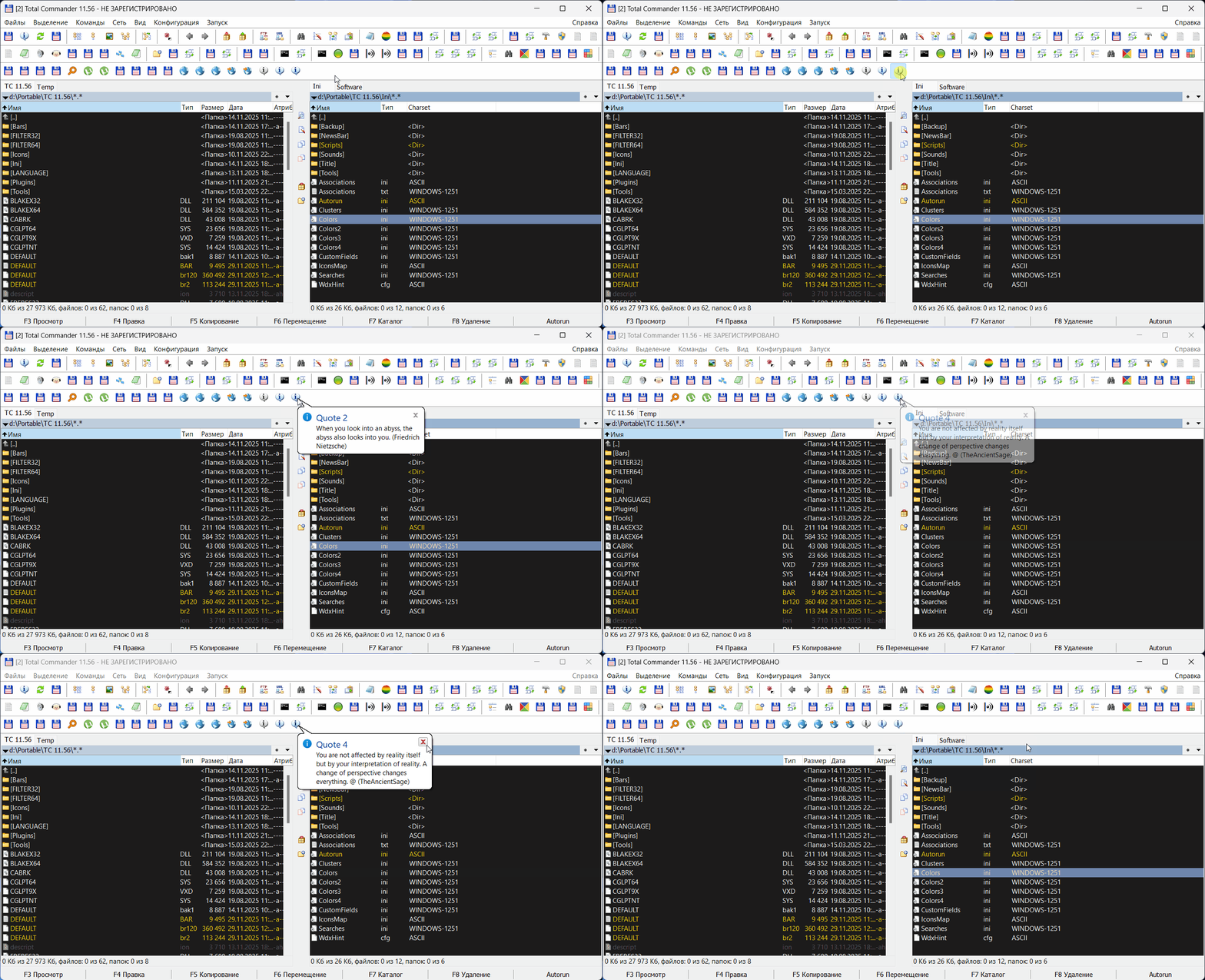
Третья функция tip(). Универсальное окно подсказки типа "балун", которое можно использовать в других целях. При первом вызове tip() создается окно и дескриптор сохраняется до конца сессии. Последующие вызовы tip() скрывают и показывают это окно с обновленным текстом. Чем-то это похоже на функцию ShowHint в Autorun.
По умолчанию подсказка показывается у мыши. Возможность задавать координаты отсутствует, но есть флаг "1", который отображает подсказку на позиции предыдущего вызова, а позицию первого вызова можно задать через MouseSetPos, если это нужно.
Всего действуют три флага, их можно суммировать. Флаг "2" делает окно подсказки квадратным, а флаг "4" не делает окно активным после вызова. Но в последнем случае подсказка не будет закрываться по ESC. Когда окно подсказки активно, ESC ее закрывает.
Также ESC прерывает операцию загрузки у функции WinInetDownloadFile, т.е. операцию загрузки можно в любой момент отменить.
После вызова подсказки скрипт движется дальше. Если необходимо дождаться закрытия окна подсказки и затем продолжить выполнение, можно организовать цикл с проверкой состояния через дескриптор. В примере это есть. Текст подсказки можно скопировать в буфер.
Самый простой пример загрузки нескольких файлов:
Hidden text | Code: | RegisterCommand 60036 "DownloadTest"
Func DownloadTest()
Local URL1 = "https://www.autohotkey.com/download/2.0/version.txt"
Local URL2 = "https://www.mp3tag.de/en/download.html"
Local URL3 = "https://totalcommander.ch/1156/newcert/tcmd1156x64.exe"
Local URL4 = "https://totalcommander.ch/1156/newcert/tcmd1156x32_64.exe"
WinInetDownloadFile(URL1, TEMP & "\ahk2.ver")
Sleep(2000)
WinInetDownloadFile(URL2, TEMP & "\mp3tag.html")
Sleep(2000)
WinInetDownloadFile(URL3, TEMP & "\tcmd1156x64.exe")
Sleep(2000)
WinInetDownloadFile(URL4, TEMP & "\tcmd1156x32_64.exe")
EndFunc |
Более сложный пример с флагами и циклом ожидания:
Hidden text | Code: | RegisterCommand 60037 "DownloadParamTest"
Func DownloadParamTest()
Local Res, Num = 0
Local URL1 = "https://www.autohotkey.com/download/2.0/version.txt"
Local URL2 = "https://www.mp3tag.de/en/download.html"
Local URL3 = "https://totalcommander.ch/1156/newcert/tcmd1156x64.exe"
Local URL4 = "https://totalcommander.ch/1156/newcert/tcmd1156x32_64.exe"
# getting tooltip window handle
Local hTip = tip("")
# default download window:
# cartoon-like, not silent, mouse position
Res = WinInetDownloadFile(URL1, TEMP & "\ahk2.ver")
If Res = 0 Then Num += 1
Sleep(2000)
# keep previous position, param 1
Res = WinInetDownloadFile(URL2, TEMP & "\mp3tag.html", 0, 1)
If Res = 0 Then Num += 1
Sleep(2000)
# square tooltip window, param 2
Res = WinInetDownloadFile(URL3, TEMP & "\tcmd1156x64.exe", 0, 2)
If Res = 0 Then Num += 1
Sleep(2000)
# tooltip window is not active, param 4
Res = WinInetDownloadFile(URL4, TEMP & "\tcmd1156x32_64.exe", 0, 4)
If Res = 0 Then Num += 1
# optional waiting for the tooltip window to close
Local bWait = true
If bWait And hTip > 0 Then
Do
Sleep(50)
Until Not WinGetState(2, hTip)
MsgBox("Operation complete." & auCRLF & auCRLF & _
"Successfully downloaded " & num & " of 4 files.", "Autorun", 64)
EndIf
EndFunc |
Результат
Закачка открывает большие возможности, примеров применения может быть масса. Главное, что теперь не нужно прибегать к сторонним скриптам и утилитам, а делать это сразу из ТС.
Пример проверки страницы плагинов:
Hidden text | Code: | RegisterCommand 60034 "PluginsCheck"
Func PluginsCheck()
Local hr, url, file, txt, items = 20
url = "https://wincmd.ru/directory/" & items & "new.html"
file = TEMP & "\" & items & "plugin.news"
If IsPressed(0x11) Then
tip("Internet connection.", 1, "Urlmon.dll")
Sleep(700)
hr = DllCall("Urlmon.dll\URLDownloadToFileW", _
"ptr", 0, "wstr", url, "wstr", file, "dword", 0, "ptr", 0, "hresult")
If hr <> 0 Then
txt = "An error occured." & auCRLF & url & auCRLF & _
"Error code: " & hr & auCRLF & GetINetECode(hr)
Return tip(txt, 3, "Urlmon.dll")
EndIf
tip("Successful download.", 1, "Urlmon.dll")
PluginsParse(file, 1)
Return
EndIf
hr = WinInetDownloadFile(url, file)
Local updated = (hr = 0 ? 1 : 0)
If FileExist(file) Then PluginsParse(file, updated)
EndFunc
Func PluginsParse(Filename, Updated)
Local rex, out, small, i = 0
Local txt = FileRead(Filename)
rex = RegExp('<h3 class="name"><a href="(.*?)">(.*?)</a></h3>(?:.*?)<small>(.*?)</small></p>', txt)
If rex.Exec() Then
Do
i += 1
out &= StrReplace(rex.Match[2], " ", " ") & auCRLF
out &= rex.Match[1] & auCRLF
small = StrReplace(rex.Match[3], " ", " ")
small = StrReplace(small, "<b>", "")
small = StrReplace(small, "</b>", "")
out &= small & auCRLF & auCRLF
Until not rex.ExecNext()
out = (Updated ? "Обновлено" : "Не обновлено") & auCRLF & auCRLF & out
EndIf
Free(rex)
MsgBox(out, "Plugins " & i, Updated ? 64 : 48)
EndFunc |
То же самое, что и парсинг rss-ленты, но загрузка html имеет свои плюсы.
Пример запроса к API метео-сайта и получение csv-файла:
Hidden text | Code: | RegisterCommand 60035 "MeteoSwissReport"
Func MeteoSwissReport()
Local hr, url, file, txt, code, msg
url = "https://api.open-meteo.com/v1/forecast?latitude=47.37&longitude=8.55&" & _
"daily=temperature_2m_max,temperature_2m_min&models=meteoswiss_icon_ch1&" & _
"current=temperature_2m,relative_humidity_2m,cloud_cover&timezone=auto&forecast_days=1&format=csv"
file = TEMP & "\meteo.csv"
If IsPressed(0x11) Then
hr = DllCall("Urlmon.dll\URLDownloadToFileW", _
"ptr", 0, "wstr", url, "wstr", file, "dword", 0, "ptr", 0, "hresult")
If hr <> 0 Then
txt = "An error occured." & auCRLF & url & auCRLF & _
"Error code: " & hr & auCRLF & GetINetECode(hr)
Return tip(txt, 3)
EndIf
EndIf
# silent mode, param 1
code = WinInetDownloadFile(url, file, 1)
If code = -1 Then
msg = "Updating from the Internet was interrupted or failed"
tip(msg, 3)
Return
ElseIf code > 0 Then
msg = "Updating from the Internet failed. Error: " & code & auCRLF
msg &= GetWinInetError(code)
tip(msg, 3)
Return
EndIf
If Not FileExist(file) Then Return MsgBox("File missing " & file)
# local file processing
Local lst = List()
lst.LoadFromFile(file)
If lst.count < 7 Then Return MsgBox("File corrupted " & file)
Local gps = Round(StrPart(lst[1], ",", 1), 2) & ", " & Round(StrPart(lst[1], ",", 2), 2)
Local elv = StrPart(lst[1], ",", 3) & " meters"
Local tmz = StrPart(lst[1], ",", 5) & ", " & StrPart(lst[1], ",", 6)
Local ltm = StrPart(lst[4], ",", 1)
Local tmp = StrPart(lst[4], ",", 2) & "°C"
Local ext = StrPart(lst[4], ",", 3) & "%, Clouds: " & StrPart(lst[4], ",", 4) & "%"
Local max = StrPart(lst[7], ",", 2) & "°C"
Local min = StrTrim(StrPart(lst[7], ",", 3)) & "°C"
Local ltm = StrReplace(ltm, "T", " ")
txt = "GPS: " & gps & auCRLF
txt &= "Elevation: " & elv & auCRLF
txt &= "Timezone: " & tmz & auCRLF
txt &= "Local time: " & ltm & auCRLF
txt &= "Temperature: " & tmp & auCRLF
txt &= "Humidity: " & ext & auCRLF
txt &= "Max for the day: " & max & " Min: " & min
Free(lst)
ShowHint(txt)
ClipPut(txt)
EndFunc |
Ну, и на десерт - загрузка рандомных цитат из разных источников:
Hidden text | Code: | RegisterCommand 71110 "OneQuote"
Func OneQuote()
Local hr, url, file, txt
Local u1 = "https://api.forismatic.com/api/1.0/?method=getQuote&format=text"
Local u2 = "https://www.quoterism.com/api/quotes/random"
Local u3 = "https://zenquotes.io/api/random"
Local u4 = "https://stoic.tekloon.net/stoic-quote"
# https://favqs.com/api/qotd
Static c = 0
c += 1
If c > 4 Then c = 1
url = Eval("u" & c)
file = TEMP & "\quote.one"
hr = DllCall("Urlmon.dll\URLDownloadToFileW", _
"ptr", 0, "wstr", url, "wstr", file, "dword", 0, "ptr", 0, "hresult")
If hr = 0 Then
txt = FileRead(file, 1024)
If ERROR = 1 Then Return MsgBox("Ошибка чтения " & file, "Quote", 16)
Local q, a
If c = 2 Then
q = RegExpGet(txt, '"text":"(.*?)"', "$1")
a = RegExpGet(txt, '"name":"(.*?)"', "$1")
ElseIf c = 3 Then
q = RegExpGet(txt, '"q":"(.*?)"', "$1")
a = RegExpGet(txt, '"a":"(.*?)"', "$1")
ElseIf c = 4 Then
q = RegExpGet(txt, '"quote":"(.*?)"', "$1")
a = RegExpGet(txt, '"author":"(.*?)"', "$1")
EndIf
If a <> "" Then a = " (" & a & ")"
If c > 1 Then txt = q & a
If txt = '' Then Return MsgBox("Файл поврежден " & file, "Quote", 16)
tip(txt, 1, "Quote " & c)
Else
txt = "An error occured." & auCRLF & url & auCRLF & _
"Error code: " & hr & auCRLF & GetINetECode(hr)
tip(txt, 3, "Quote")
EndIf
EndFunc |
Hidden text
Hidden text Задержка на видео связана с тем, что я действительно пытался читать  Правильно. Глядишь может и поумнею. Там ведь цитаты великих людей попадаются - Мэрлин Монро и Коко Шанель, а то я всё Сара Коннор да Сара Коннор.
Какую функцию лучше использовать, наверное WinInetDownloadFile, она более продвинутая. Но и на URLDownloadToFile многое может работать.
Кнопки:
Hidden text TOTALCMD#BAR#DATA
60033
Shell32.dll,13
RSS Check
-1
Hidden text TOTALCMD#BAR#DATA
60034
Shell32.dll,13
Wincmd.ru Plugins|CTRL - Use Urlmon.dll
-1
Hidden text TOTALCMD#BAR#DATA
60035
Shell32.dll,13
Meteo Swiss Test|CTRL - Use Urlmon.dll
-1
Hidden text TOTALCMD#BAR#DATA
60036
Shell32.dll,135
Download Test
-1
Hidden text TOTALCMD#BAR#DATA
60037
Shell32.dll,135
Download Test
-1
Hidden text TOTALCMD#BAR#DATA
71110
Shell32.dll,13
One quote
-1 |
|
| Back to top |
|
 |
Orion9
Joined: 01 Jan 2024
Posts: 1282
|
| (Separately) Posted: Sun Nov 30, 2025 14:04 Post subject: |
|
|
Сразу всего не охватишь, поэтому дополню чуть-чуть с вашего позволения.
Loopback
Поменял местами и всё заработало:
Hidden text | Code: | If gBindDiskWnd Then
Global gDiskWP = Callback("DiskWndProc", "hwnd;uint;wparam;lparam")
hDiskWnd = WinFind(AUTORUN_TCHANDLE, _
AUTORUN_TCARCH = 32 ? "TMyPanel" : "Window", AUTORUN_TCARCH = 32 ? 6 : 10)
If hDiskWnd > 0 Then
gDiskWndProc = DllCall("SetWindowLong" & (auX64 ? "PtrW" : "W"), _
"hwnd", hDiskWnd, "int", -4, "long_ptr", gDiskWP.Ptr, "ptr")
EndIf
EndIf
ControlSetMouseAction /R 15 DrivesMenu
ControlSetMouseAction /K:S /R 15 DrivesMenu
ControlSetMouseAction /K:C /R 15 DrivesMenu |
Т.е ControlSetMouseAction выполняется теперь после SetWindowLong. Похоже, ТС х64 именно это не нравилось.
| Loopback wrote: | | Создаёт с указанным размером, 256. Размер 255 просто чтобы записанная строка гарантированно завершалось нулем. |
Т.е. Wstr:256 создает буфер размером в 256 юникодных символов, что = 512 байт, так следует понимать? В общем, не стал загоняться и сделал как у вас.
Hidden text | Code: | DllCall("GetVolumeInformationW", _
"wstr", sDrive, "wstr:256", @sName, "dword", 255, "ptr", 0, "ptr", 0, "ptr", 0, "wstr:256", @sFS, "dword", 255)
If bBuffer Then
Static nam = Buffer(512), fs = Buffer(512)
nam.Zero()
fs.Zero()
DllCall("GetVolumeInformationW", _
"wstr", sDrive, "ptr", nam.ptr, "dword", 255, "ptr", 0, "ptr", 0, "ptr", 0, "ptr", fs.ptr, "dword", 255)
sName = nam.GetStr()
sFS = fs.GetStr()
EndIf |
| Loopback wrote: | | Вот и хорошо, и не нужно обвес для статистики городить. |
Да, функционал мне понравился. Точнее сказать, он меня пока устраивает. В последнее время часто приходилось выделять новые диапазоны команд для модулей и хотелась сразу видеть все RegisterCommand. Но и SetHotkeyAction теперь можно быстро посмотреть вместе с ControlSetMouseAction. Правда я не сразу заметил, что ошибся в регулярном выражении. Дожно быть | Code: | RegExp("(.)(" & cmd & ".*?)\r", text) |
а не | Code: | RegExp("(.)(" & cmd & ".*?)\r\n", text) |
иначе команды расположенные вместе пропускаются.
Такую же мелкую оплошность допустил в модуле MediaInfo. Там должно быть
Hidden text | Code: | ms = DllCall(pGet, "Ptr", hMI, "Int", 0, "Int", 0, _
"Wstr", "Duration", "Int", 1, "Int", 0, "Wstr")
vc = DllCall(pGet, "Ptr", hMI, "Int", 0, "Int", 0, _
"Wstr", "VideoCount", "Int", 1, "Int", 0, "Wstr")
ac = DllCall(pGet, "Ptr", hMI, "Int", 0, "Int", 0, _
"Wstr", "AudioCount", "Int", 1, "Int", 0, "Wstr")
If ms > 0 And vc = "" And ac = "" Then
DurationLogString("Duration.Warning:" & aFiles[i])
Continue
EndIf |
вместо
Hidden text | Code: | vc = DllCall(pGet, "Ptr", hMI, "Int", 0, "Int", 0, _
"Wstr", "VideoCount", "Int", 1, "Int", 0, "Wstr")
ac = DllCall(pGet, "Ptr", hMI, "Int", 0, "Int", 0, _
"Wstr", "AudioCount", "Int", 1, "Int", 0, "Wstr")
If vc = "" And ac = "" Then
DurationLogString("Duration.Warning:" & aFiles[i])
Continue
EndIf
ms = DllCall(pGet, "Ptr", hMI, "Int", 0, "Int", 0, _
"Wstr", "Duration", "Int", 1, "Int", 0, "Wstr") |
иначе вместо Duration.Empty всегда будет Duration.Warning на немедиа файлах.
| Loopback wrote: | | Без кастомной отрисовки нет. |
А если через прозрачную иконку реализовать?
| Loopback wrote: | | По обрезке не знаю |
Текст обрезался. Именно поэтому в меню функции tip() я оставил комментарий, чтобы не забыть об этом сообщить | Code: | Func tipmnu()
Local txt
txt &= 'MENUITEM "Copy text", em_aucmd ' & (gTipText <> "" ? "" : "/D") & ' -1 tipcopy' & auCRLF
Return txt
EndFunc
Func tipcopy()
#ClipPut %"gTipText"
ClipPut(gTipText)
EndFunc |
ведь tipcopy() это просто костыль, изначально было | Code: | txt &= 'MENUITEM "Copy text", em_aucmd ' & (gTipText <> "" ? "" : "/D") & ' -1 ClipPut %"gTipText"' & auCRLF |
но текст в буфере резался.
Также для этой цели закомментировал | Code: | # Static INVALID_HANDLE_VALUE = auX64 ? 0xFFFFFFFFFFFFFFFF : 0xFFFFFFFF
Static INVALID_HANDLE_VALUE = auX64 ? 18446744073709551615 : 4294967295 |
поскольку запись 0xFFFFFFFFFFFFFFFF не работала в TC x64.
Когда освободитесь, посмотрите, пожалуйста, в чем может быть дело. |
|
| Back to top |
|
|
Orion9
Joined: 01 Jan 2024
Posts: 1282
|
| (Separately) Posted: Thu Dec 04, 2025 00:39 Post subject: |
|
|
Добавил к функции tip() флаг TTF_PARSELINKS, позволяющий вставлять в текст подсказки гиперссылки. Функцию пришлось немного доработать, чтобы она могла самостоятельно перехватывать клики по ссылкам. Последняя версия:
Hidden text | Code: | Global gTipText, gTipX, gTipY, gTipMenuItems
Global gTipWndProc, gTipWP = Callback("tipwp", "hwnd;uint;wparam;lparam")
#{
nFlags:
1 - Previous window position
2 - Square tooltip window
4 - Inactive tooltip window
0 - Default
#}
Func tip(sText, nIcon = 0, sTitle = "Tip", nFlags = 0, sMenuItems = "")
Static TTM_TRACKACTIVATE = 1041, _
TTM_TRACKPOSITION = 1042, _
TTM_SETMAXTIPWIDTH = 1048, _
TTM_SETTITLE = 1057, _
TTM_ADDTOOL = 1074, _
TTM_UPDATETIPTEXT = 1081
Static txt = Buffer(1024*2)
Static hTip = 0, buf = Buffer(auX64 ? 56 : 40)
Local nMaxWidth = 200
If hTip = 0 Then
# TTS_BALLOON | TTS_CLOSE | TTS_NOPREFIX
hTip = DllCall("CreateWindowExW", _
"dword", 8, _
"wstr", "tooltips_class32", _
"wstr", "", "dword", 0x00000c2, _
"int", 0, "int", 0, "int", 0, "int", 0, _
"handle", 0, _
"handle", 0, "handle", 0, "ptr", 0, "handle")
If hTip = 0 Then
MsgBox("Не удалось создать окно подсказки")
Return 0
EndIf
gTipWndProc = DllCall("SetWindowLong" & (auX64 ? "PtrW" : "W"), _
"hwnd", hTip, "int", -4, "long_ptr", gTipWP.Ptr, "ptr")
txt.Zero()
txt.SetStr(sTitle & Chr(0))
SendMessage(hTip, TTM_SETTITLE, nIcon, txt.ptr)
buf.Zero()
# TTF_TRACK | TTF_ABSOLUTE | TTF_PARSELINKS
buf.SetNum(0, "uint", buf.size, "uint", 0x10a0, "hwnd", hTip)
buf.SetNum(auX64 ? 48 : 36, "ptr", txt.ptr)
SendMessage(hTip, TTM_ADDTOOL, 0, buf.ptr)
SendMessage(hTip, TTM_SETMAXTIPWIDTH, 0, nMaxWidth)
EndIf
If sText = "" Then
SendMessage(hTip, TTM_TRACKACTIVATE, 0, buf.ptr)
Return hTip
EndIf
# additional menu items
gTipMenuItems = sMenuItems
# cartoon or square
Local op = (BitAND(nFlags, 2) ? 4 : 2)
WinSetStyle(0x0000040, op, hTip)
txt.Zero()
txt.SetStr(sTitle & Chr(0))
SendMessage(hTip, TTM_SETTITLE, nIcon, txt.ptr)
txt.Zero()
txt.SetStr(sText & Chr(0))
# the next call won't fail if the tip is not visible
If WinGetState(2, hTip) = 0 Then
SendMessage(hTip, TTM_TRACKACTIVATE, 0, buf.ptr)
EndIf
SendMessage(hTip, TTM_UPDATETIPTEXT, 0, buf.ptr)
SendMessage(hTip, TTM_TRACKACTIVATE, 1, buf.ptr)
WinGetPos("x", "y", "w", "h", hTip)
# the tip will appear at the mouse pointer by default
If Not BitAND(nFlags, 1) Then MouseGetPos("x","y")
# preventing the tip from going off screen
If x + w > SYSINFO_DESKTOPWIDTH Then x = SYSINFO_DESKTOPWIDTH - w
If y + h > SYSINFO_DESKTOPHEIGHT Then y = SYSINFO_DESKTOPHEIGHT - h
SendMessage(hTip, TTM_TRACKPOSITION, 0, MakeInt(x, y, 0))
gTipX = x
gTipY = y
If Not BitAND(nFlags, 4) Then WinSetState(23, hTip)
Return hTip
EndFunc
Func tipwp(hWnd, uMsg, wParam, lParam)
Static MK_LBUTTON = 0x0001, TTM_TRACKPOSITION = 1042
Static DragWidth = GetSystemMetrics(68) #SM_CXDRAG
Static DragHeight = GetSystemMetrics(69) #SM_CYDRAG
Static IsDrag = 0, StartX = 0, StartY = 0
Local x, y
Static tx, ty, buf = Buffer(8)
#OutputDebugString("uMsg " & uMsg)
Switch uMsg
Case 0x004E # WM_NOTIFY
Static tag = 16 + _
48*2 + _
(2048 + 32 + 3)*2
hdr = Buffer(tag + (auX64 ? 24 : 12), lParam)
code = hdr.GetNum(auX64 ? 16 : 8, "uint")
If code = 0xFFFFFDF5 Then
link = hdr.GetStr(auX64 ? 136 : 124)
If StrPos(link, "://") Then
# MsgBox("Open the link?" & auCRLF & auCRLF & link, "Autorun", 3+32+0+262144)
# If EXTENDED <> 6 Then Return
ShellExec(link)
Else
Eval(link)
EndIf
EndIf
Case 0x0018 # WM_SHOWWINDOW
If wParam = 0 Then gTipMenuItems = ""
Case 0x0201 # WM_LBUTTONDOWN
If IsDrag = 0 Then
buf.Zero()
x = BitAND(lParam, 0xFFFF)
y = BitAND(BitShift(lParam,16), 0xFFFF)
StartX = x
StartY = y
buf.SetNum(0, "int", x, "int", y)
DllCall("ClientToScreen", "hwnd", hWnd, "ptr", buf.ptr)
tx = buf.GetNum(0)
ty = buf.GetNum(4)
IsDrag = 1
DllCall("SetCapture", "hwnd", hWnd, "hwnd")
EndIf
Case 0x0202 # WM_LBUTTONUP
If IsDrag = 1 Then
WinGetPos("gTipX", "gTipY", "", "", hWnd)
IsDrag = 0
DllCall("ReleaseCapture")
EndIf
Case 0x0200 # WM_MOUSEMOVE
If IsDrag = 1 And BitAND(wParam, MK_LBUTTON) Then
x = BitAND(lParam, 0xFFFF)
y = BitAND(BitShift(lParam,16), 0xFFFF)
If Abs(x - startX) > DragWidth Or Abs(y - startY) > DragHeight Then
buf.Zero()
buf.SetNum(0, "int", x, "int", y)
DllCall("ClientToScreen", "hwnd", hWnd, "ptr", buf.ptr)
x = buf.GetNum(0)
y = buf.GetNum(4)
SendMessage(hWnd, TTM_TRACKPOSITION, 0, MakeInt(gTipX+(x-tx), gTipY+(y-ty), 0))
EndIf
EndIf
Case 0x0205 # WM_RBUTTONUP
gTipText = WinGetText(hWnd)
ShowPopupMenu /D /F /I:0 "tipmnu"
Case 0x0100 # WM_KEYDOWN
If wParam = 0x1B Then WinSetState(0, hWnd)
EndSwitch
Return DllCall("CallWindowProcW", _
"ptr", gTipWndProc, "hwnd", hWnd, "uint", uMsg, "wparam", wParam, "lparam", lParam)
EndFunc
Func tipmnu()
Local txt
txt &= 'MENUITEM "Copy text", em_aucmd ' & (gTipText <> "" ? "" : "/D") & ' -1 tipcopy' & auCRLF
If gTipMenuItems <> "" Then
txt &= 'MENUITEM SEPARATOR' & auCRLF
txt &= gTipMenuItems
EndIf
Return txt
EndFunc
Func tipcopy()
#ClipPut %"gTipText"
ClipPut(gTipText)
EndFunc |
Если в тексте есть гиперссылки, созданные стандартным тегом <a ref>, они будут открываться в браузере. Пример | Code: | <a href="www.example.com">Link</a> |
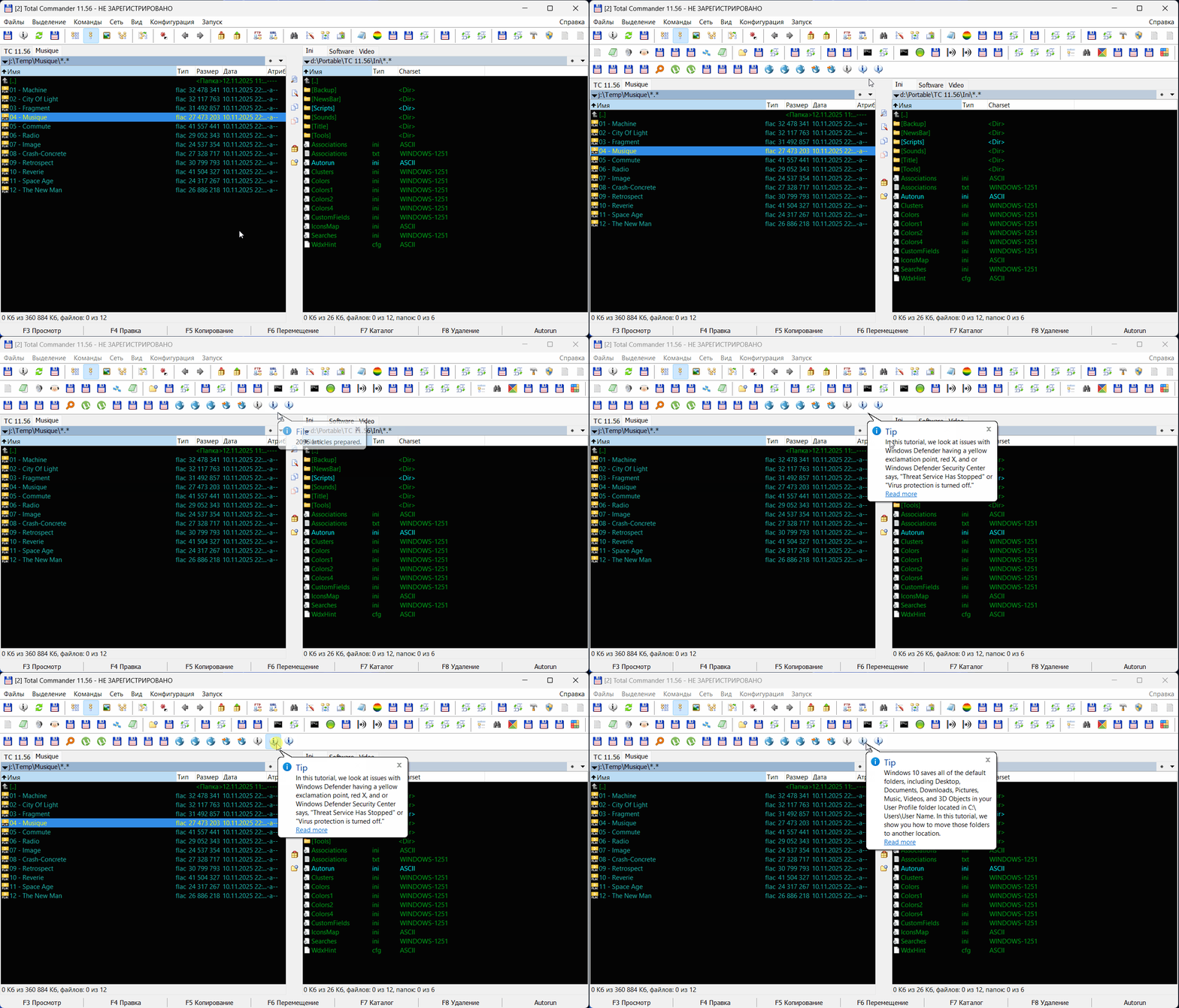
Клики по ссылкам, конечно, еще открывают некоторые возможности. Например, можно сделать что-то вроде советчика, который будет время от времени вызывать окно подсказки, предлагая ознакомиться с той или иной статьей в интернете. Алгоритм такого советчика не должен быть сложным: достаточно загрузить файл, подготовить его к работе, подсчитать количество статей и выбирать переодически соучайный номер с помощью регулярного выражения. Небольшая зарисовка на основе цикла статей www.majorgeeks.com:
Hidden text
Hidden text | Code: | RegisterCommand 71120 "HowToUpdate"
Func HowToUpdate()
Static c = 0, i = 0, text
Local link = "https://www.majorgeeks.com"
Local file = TEMP & "\how_to.html", res, txt
If Not FileExist(file) Then
res = WinInetDownloadFile(link & "/content/overview/how_to.html", file)
If res <> 0 Then Return
Sleep(1000)
tip(file, 1, "Processing")
Sleep(500)
txt = FileRead(file)
txt = StrReplace(txt, """, '"')
txt = StrReplace(txt, "'", "'")
txt = StrReplace(txt, "&#039;", "'")
txt = StrReplace(txt, "&", "&")
txt = StrReplace(txt, ">", ">")
txt = StrReplace(txt, "<", "<")
FileWrite(file, txt)
c = 0
EndIf
Local rex
c += 1
If c = 1 Then
i = 0
text = FileRead(file)
rex = RegExp('(<a href="(.*?)">(.*?)</a>)</b><br />\R(.*?)<br />', text)
If rex.Exec() Then
Do
i += 1
Until not rex.ExecNext()
EndIf
Free(rex)
If i = 0 Then
MsgBox("File doesn't contain data " & file, "Autorun", 48)
Return
Else
tip(i & " articles prepared.", 1, "File")
Sleep(1000)
EndIf
EndIf
If i = 0 Then Return tip("No data or corrupt file", 3)
rex = RegExpGet(text, '(<a href="(.*?)">(.*?)</a>)</b><br />\R(.*?)<br />', _
'$4\n<a href="' & link & '/$2">Read more</a>', Random(1, i, 1))
tip(rex, 1)
EndFunc |
А если есть локальный файл, который не нужно загружать с интернета, всё вообще можно свести к 5-6 строкам кода, поскольку количество статей заранее известно (в примере это 2096):
Hidden text | Code: | Local link = "https://www.majorgeeks.com"
Local file = COMMANDER_PATH & "\Ini\Backup\how-to.html"
Static rex, txt = FileRead(file)
rex = RegExpGet(txt, '(<a href="(.*?)">(.*?)</a>)</b><br />\R(.*?)<br />', _
'$4\n<a href="' & link & '/$2">Read more</a>', Random(1, 2096, 1))
tip(rex, 1) |
Завтра будет еще пара примеров, нужно только кое-какие нюансы утрясти, а так все готово. |
|
| Back to top |
|
|
Orion9
Joined: 01 Jan 2024
Posts: 1282
|
| (Separately) Posted: Thu Dec 04, 2025 19:37 Post subject: |
|
|
Loopback
Пока не забыл, лучше сразу напишу. В будущих версиях хотелось бы видеть следущее:
- ShowHint
- ShowPopupMenu
У подсказки хотелось бы фиксировать ширину окна (об этом я уже писал), а также хотелось бы, чтобы окно могло висеть и изменять текст без закрытия (об этом я тоже писал). А вот о чем я не писал, так это об отступе. Не лишним было бы иметь такую возможность. Пока я выхожу из положения заданием пустых строк сверху и снизу и пробелами по краям, но идеальной пропорции добиться не получается | Code: | ShowHint(auCRLF & " " & HintText & " " & auCRLF, 0, 0, 1000, 1) |
В ShowPopupMenu с параметром /F хочется передовать дополнительный параметр, а не только имя функции. И хотелось бы, чтобы ShowPopupMenu могла возвращать индекс выбранного элемента.
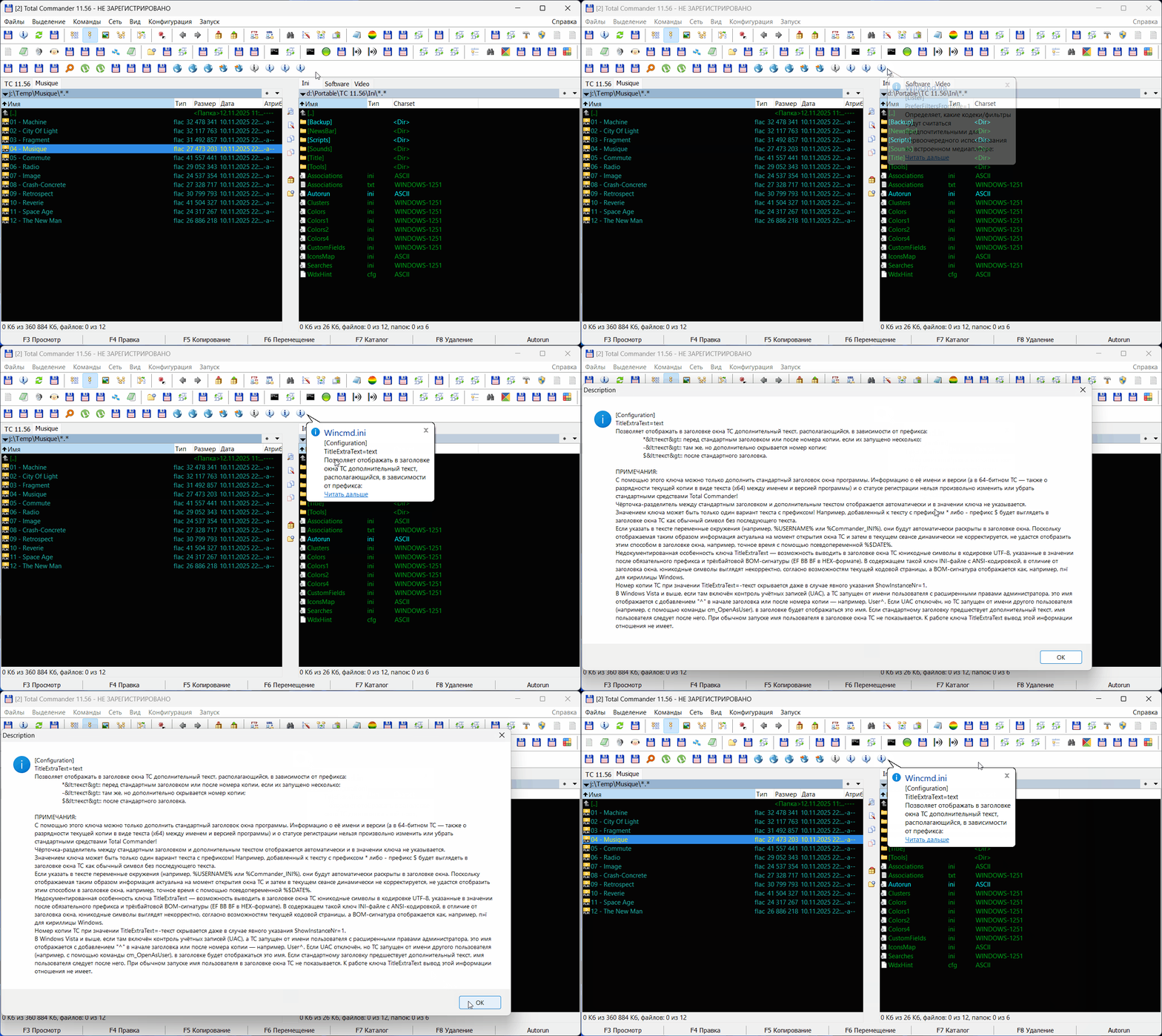
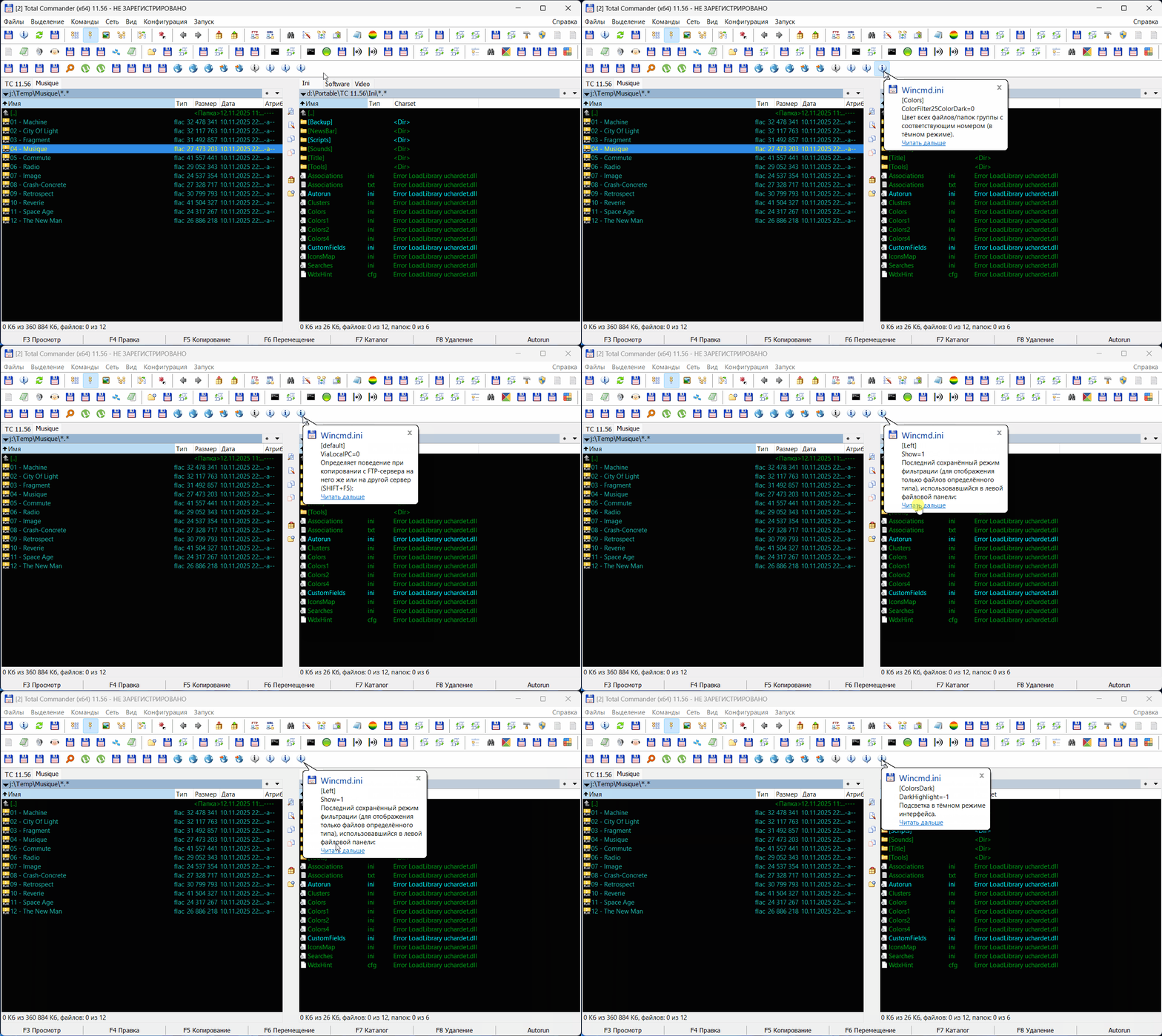
Теперь об упомянутых примерах. Еще один вариант советчика может получиться из файла Russian.cedf. Работать с локальным файлом удобно: он редко изменяется. Единственная сложность, в нем содержится информация не только о ключах, но и секциях, это немного нарушает структуру, как и слишком большой текст некоторых статей. Но при желании все можно учесть. Ниже представлен очень сырой, я бы сказал, "топорный" вариант выборки статей из этого файла:
Hidden text
Hidden text | Code: | RegisterCommand 71130 "CedfRandomKey"
Global gCedfDesc, gCedfHistory, gCedfData = COMMANDER_PATH & "\Ini\Backup\Russian.cedf"
Func CedfRandomKey()
Static hIco, WM_GETICON = 0x7f, bIcon = false
Local file = gCedfData
Local obj = BinaryFile(file)
If ERROR Then
MsgBox("Error reading file " & file, "Autorun", 16)
Return
EndIf
If bIcon Then
hIco = SendMessage(AUTORUN_TCHANDLE, WM_GETICON, 2, 0)
Else
hIco = 1
EndIf
Local block = 1024*20, blocks = Ceil(obj.Size/1024), rand = Random(1, blocks - 20, 1)
obj.Pos = rand*1024
txt = obj.ReadStr(block, "ANSI")
rex = RegExpGet(txt, _
'<key name="(.*?)" file="(.*?)" section="(.*?)" default="(.*?)" version="(.*?)".*?' & _
'<description>(.*?)</description>', '[$3\]\n$1=$4\n$6')
If ERROR Then
rex = RegExpGet(txt, '<section title="(.*?)" name="(.*?)" file="(.*?)" version="(.*?)".*?' & _
'<description>(.*?)</description>', '[$2\]\n$1\nVersion=$4\n$5')
EndIf
Local lst = List(), dbg = ""
dbg &= 'MENUITEM "Block = ' & rand & '/' & blocks & '", em_aucmd /D' & auCRLF
dbg &= 'MENUITEM "Position = ' & obj.Pos & '", em_aucmd /D' & auCRLF
dbg &= 'MENUITEM "Filesize = ' & obj.Size & '", em_aucmd /D' & auCRLF
dbg &= 'MENUITEM SEPARATOR' & auCRLF
dbg &= 'MENUITEM "History", em_aucmd -1 CedfRandHistory' & auCRLF
gCedfHistory &= "Block:" & rand & '/' & blocks & ", Pos: " & obj.Pos & auCRLF
lst.Text = rex
If lst.Count < 2 Then
lst.Count = 3
lst[0] = "Error:"
lst[1] = "Block: " & rand & "/" & blocks
lst[2] = "Position: " & obj.Pos
EndIf
txt = lst[0] & auCRLF & lst[1] & auCRLF
txt = StrReplace(txt, "[[", "[")
txt = StrReplace(txt, "]]", "]")
If StrLen(lst[2]) > 640 - StrLen(txt) Then
txt &= StrLeft(lst[2], 640 - StrLen(txt)) & "..."
Else
txt &= lst[2]
EndIf
gCedfDesc = lst.Text
Free(obj, lst)
txt &= auCRLF & '<a href="CedfReadDesc()">Читать дальше</a>'
tip(txt, hIco, "Wincmd.ini", 0, dbg)
EndFunc
Func CedfReadDesc()
MsgBox(gCedfDesc, "Description", 64+65536+262144)
EndFunc
Func CedfRandHistory()
MsgBox(gCedfHistory, "History", 64+65536+262144)
EndFunc |
Для обработки клика в тэге <a ref> используется не ссылка, а имя функции, которая вызывает MsgBox.
| Code: | <a href="CedfReadDesc()">Читать дальше</a>
Func CedfReadDesc()
MsgBox(gCedfDesc, "Description", 64+65536+262144)
EndFunc |
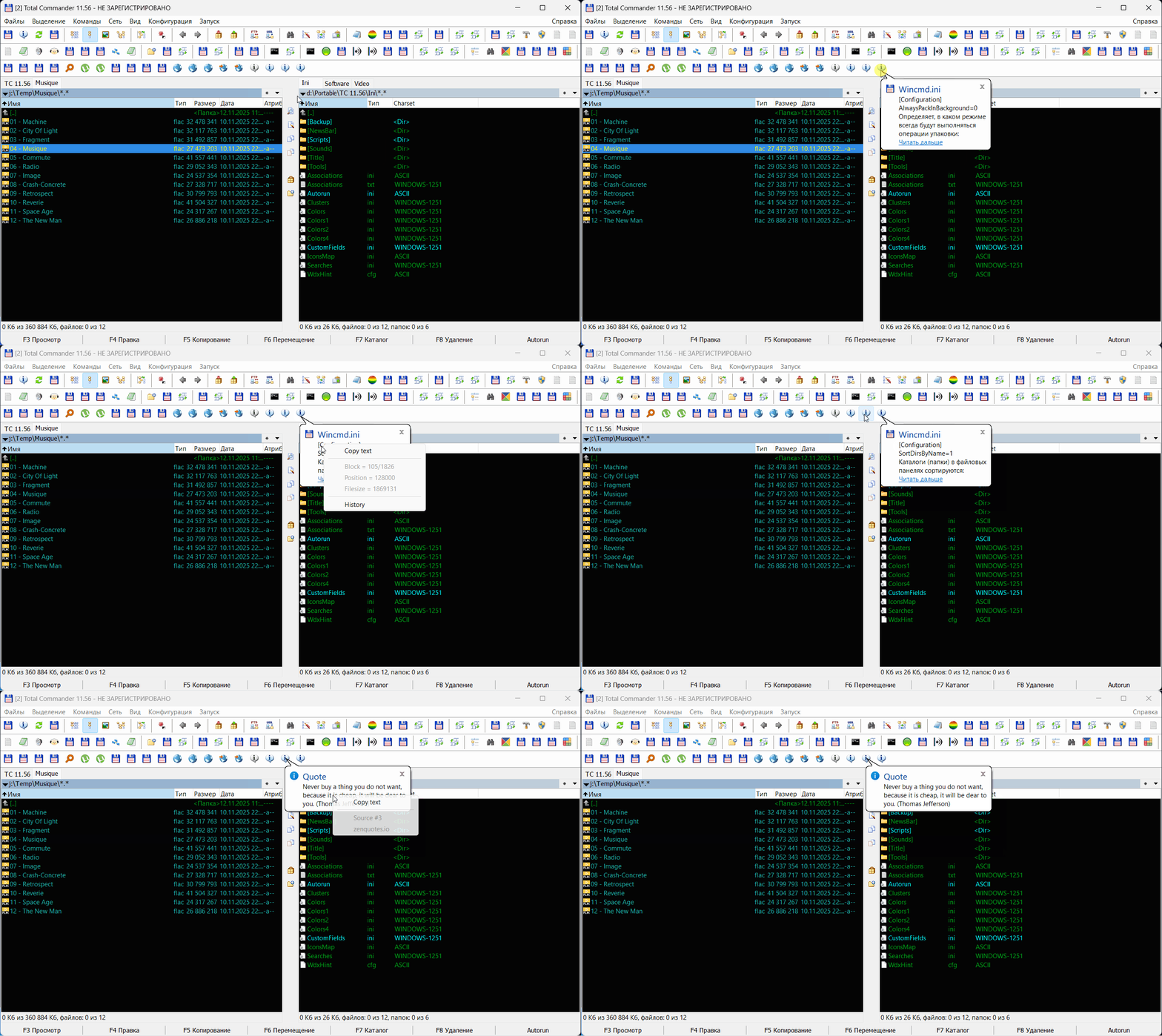
Еще одно отличие от предыдущего примера: в функцию tip() передаются дополнительные пункты меню, которые используются здесь для отладки, но которые в принципе могут использоваться и для других целей.
Hidden text
А еще вместо стандартных значков по номеру от 0 до 6 в функцию можно передать дескриптор иконки. Самый простой способ его получить через WM_GETICON от самого окна ТС, но смотрится так себе, нужна другая иконка
Hidden text
В общем, пример далек от совершенства. Для выборки используется объект BinaryFile с изменением позиции в файле, что чревато большим количеством повторений одних статей и пропуском других. Но это только пример. Если делать серьезно, нужно использовать другие алгоритмы. В следующем примере будет использован объект List с последовательны удалением и перемешиванием элементов. |
|
| Back to top |
|
|
Orion9
Joined: 01 Jan 2024
Posts: 1282
|
| (Separately) Posted: Fri Dec 05, 2025 00:35 Post subject: |
|
|
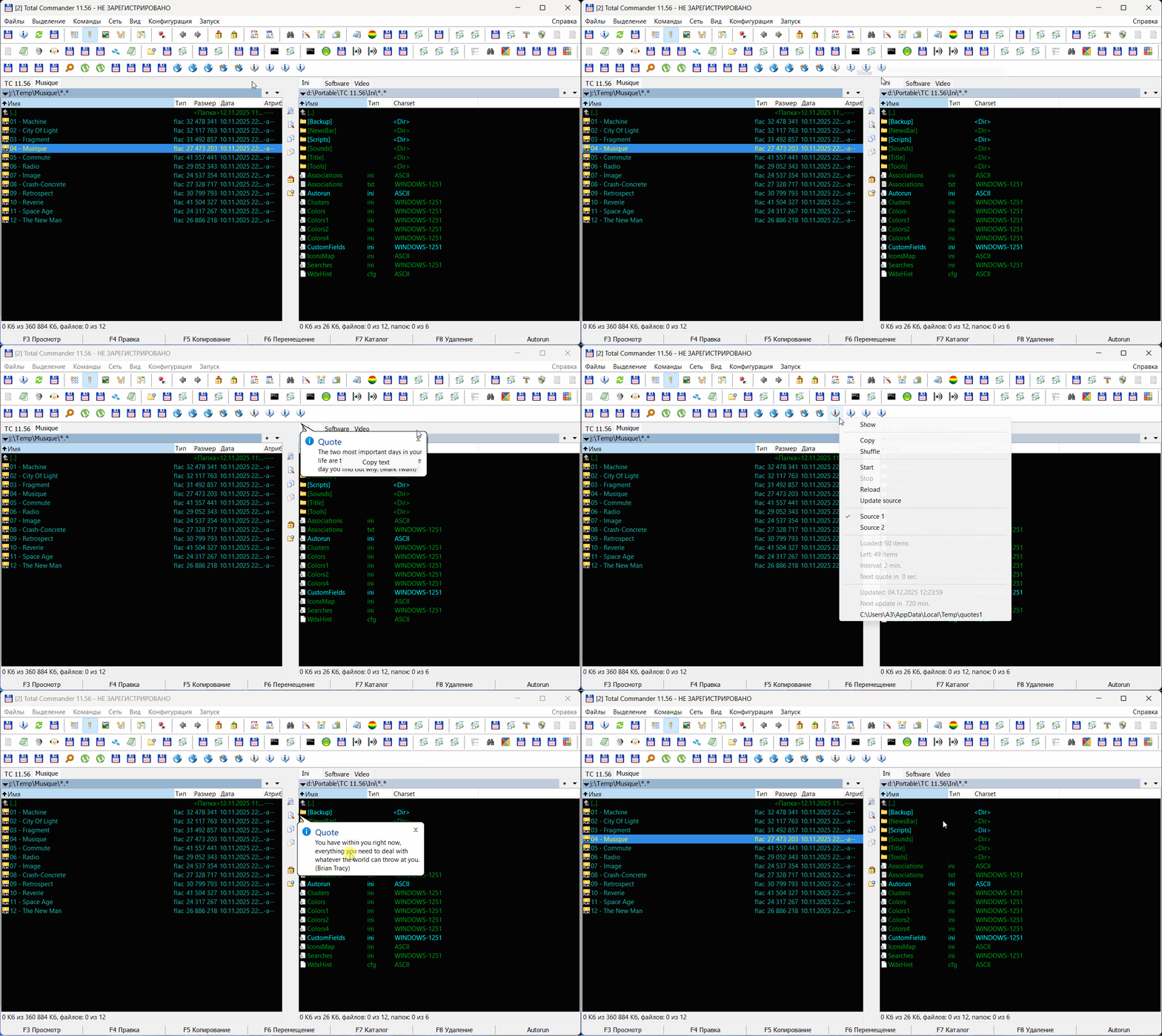
Ну вот и последний пример из этой серии. Главное отличие - отдельное меню для управления заданием и его параметрами.
Hidden text
Некоторые сайты дают доступ не к одной случайной цитате, а к нескольким. Это нужно использовать. Файл скачивается, загружается в объект List и отдает по одной цитате. Можно запустить отдельное задание в потоке, чтобы цитаты самостоятельно скачивались и всплывали через отведенный период. Сейчас стоит 2 минуты, но это только для отладки, интервал можно изменить.
Функция разбита на несколько блоков, поэтому лучше сразу скинуть весь модуль.
Tips.aucfg | Code: | Pragma IncludeOnce
# 71100-71199
RegisterCommand 71100 "Quotes"
RegisterCommand 71101 "QuotesGet"
RegisterCommand 71102 "QuotesTask"
RegisterCommand 71103 "QuotesSource"
RegisterCommand 71104 "QuotesUpdate"
RegisterCommand 71110 "OneQuote"
RegisterCommand 71120 "HowToUpdate"
RegisterCommand 71130 "CedfRandomKey"
Global gCedfDesc, gCedfHistory, gCedfData = COMMANDER_PATH & "\Ini\Backup\Russian.cedf"
Global gQuotesUrl, gQuotesSource1, gQuotesSource2
Global gQuotesFile, gQuotesFile1, gQuotesFile2, gQuotesList = List(), gQuotesUpd = 0
Global gQuotesTask, gQuotesTime, gQuotesLoaded = 0, gQuotesNext = 0, gQuotesInterval = 2
gQuotesFile1 = TEMP & "\quotes1"
gQuotesFile2 = TEMP & "\quotes2"
gQuotesSource1 = "https://zenquotes.io/api/quotes"
gQuotesSource2 = "https://thequoteshub.com/api/tags/inspirational?page=1&page_size=75&format=json"
gQuotesUrl = gQuotesSource1
gQuotesFile = gQuotesFile1
Func Quotes()
If IsPressed(0x11) Then Return QuotesGet(0)
ShowPopupMenu /D /F /I:0 "QuotesMenu"
EndFunc
Func QuotesGet(UpdateQuotes)
Local hr, txt, url
Static c = 0
If UpdateQuotes Then c = 0
c += 1
If c > 1 Then
If gQuotesList.Count > 0 Then
txt = gQuotesList[0]
gQuotesList.Remove(0)
tip(txt, 1, "Quote")
Return
Else
c = 1
EndIf
EndIf
# data update branch
gQuotesUpd = QuotesNextUpdate()
Local file = gQuotesFile, url = gQuotesUrl
If Not FileExist(file) Or gQuotesUpd = 0 Then
hr = DllCall("Urlmon.dll\URLDownloadToFileW", _
"ptr", 0, "wstr", url, "wstr", file, "dword", 0, "ptr", 0, "hresult")
If hr <> 0 Then
txt = "An error occured." & auCRLF & url & auCRLF & _
"Error code: " & hr & auCRLF & GetINetECode(hr)
tip(txt, 3, "Quote")
Sleep(1500)
EndIf
EndIf
If Not FileExist(file) Then
tip("File doesn't exist " & file, 3, "Quote")
c = 0
Return
EndIf
# local data
gQuotesLoaded = 0
gQuotesList.Count = 0
txt = FileRead(file)
If ERROR = 1 Then
tip("Error reading " & file, 3, "Quote")
c = 0
Return
EndIf
Local q, a, i, rex
If url = gQuotesSource1 Then
rex = RegExp('"q":"(.*?)","a":"(.*?)"', txt)
Else
rex = RegExp('"text":"(.*?)","author":"(.*?)"', txt)
EndIf
If rex.Exec() Then
Do
i += 1
q = rex.Match[1]
a = rex.Match[2]
If a <> "" Then a = " (" & a & ")"
gQuotesList.Add(q & a)
Until not rex.ExecNext()
Free(rex)
gQuotesLoaded = i
txt = i & " quotes are loaded."
tip(txt, 1, "Quote")
Sleep(1500)
txt = gQuotesList[0]
gQuotesList.Remove(0)
tip(txt, 1, "Quote")
Return
Else
c = 0
Free(rex)
tip("File corruped or has no required data " & file, 3, "Quote")
EndIf
EndFunc
Func QuotesNextUpdate()
gQuotesTime = ""
If FileExist(gQuotesFile) Then gQuotesTime = FileGetTime(gQuotesFile)
If gQuotesTime <> "" And IsInt(gQuotesTime) Then
Local diff = Floor((Now() - gQuotesTime) / 10000000 / 60)
diff = 12*60 - diff
If diff < 0 Then diff = 0
Return diff
Else
Return 0
EndIf
EndFunc
Func QuotesMenu()
Local txt
Static ico1, ico2, ico3
ico1 = COMMANDER_EXE & ",37"
gQuotesUpd = QuotesNextUpdate()
If FileExist(gQuotesFile) Then gQuotesTime = FileGetTime(gQuotesFile)
If gQuotesTime <> "" Then gQuotesTime = Date('', gQuotesTime) & ' ' & Time('', gQuotesTime)
txt &= 'MENUITEM "Show", 71101' & auCRLF
txt &= 'MENUITEM SEPARATOR' & auCRLF
txt &= 'MENUITEM "Copy", em_aucmd ' & (gQuotesList.Count ? "" : "/D") & ' -1 QuotesCopy' & auCRLF
txt &= 'MENUITEM "Shuffle", em_aucmd ' & (gQuotesList.Count > 5 ? "" : "/D") & ' -1 QuotesShuffle' & auCRLF
txt &= 'MENUITEM SEPARATOR' & auCRLF
txt &= 'MENUITEM "Start", em_aucmd ' & (gQuotesTask ? "/D" : "") & ' -1 QuotesTask 1' & auCRLF
txt &= 'MENUITEM "Stop", em_aucmd ' & (gQuotesTask ? "" : "/D") & ' -1 QuotesTask 0' & auCRLF
txt &= 'MENUITEM "Reload", em_aucmd ' & ' -1 QuotesGet 1' & auCRLF
txt &= 'MENUITEM "Update source", em_aucmd ' & (FileExist(gQuotesFile) ? "" : "/D") & ' -1 QuotesUpdate' & auCRLF
txt &= 'MENUITEM SEPARATOR' & auCRLF
txt &= 'MENUITEM "Source 1", em_aucmd ' & (gQuotesUrl = gQuotesSource1 ? "/C" : "") & ' -1 QuotesSource 1' & auCRLF
txt &= 'MENUITEM "Source 2", em_aucmd ' & (gQuotesUrl = gQuotesSource2 ? "/C" : "") & ' -1 QuotesSource 2' & auCRLF
txt &= 'MENUITEM SEPARATOR' & auCRLF
txt &= 'MENUITEM "Loaded: ' & gQuotesLoaded & ' items", em_aucmd /D' & auCRLF
txt &= 'MENUITEM "Left: ' & gQuotesList.Count & ' items", em_aucmd /D' & auCRLF
txt &= 'MENUITEM "Interval: ' & gQuotesInterval & ' min.", em_aucmd /D' & auCRLF
txt &= 'MENUITEM "Next quote in ' & gQuotesNext & ' sec.", em_aucmd /D' & auCRLF
txt &= 'MENUITEM SEPARATOR' & auCRLF
txt &= 'MENUITEM "Updated: ' & gQuotesTime & '", em_aucmd /D' & auCRLF
txt &= 'MENUITEM "Next update in ' & gQuotesUpd & ' min.", em_aucmd /D' & auCRLF
txt &= 'MENUITEM "' & gQuotesFile & '", em_aucmd -1 QuotesGoto ' & auCRLF
Return txt
EndFunc
Func QuotesTask(Task)
If Task Then
If Not gQuotesTask Then RunThread QuotesThread
Else
gQuotesTask = false
EndIf
EndFunc
Func QuotesThread()
gQuotesTask = true
tip("Quotes task has started.", 1, "Quotes")
Sleep(1000)
tip("")
Local wait = 2*60*gQuotesInterval
While gQuotesTask
QuotesGet(0)
For i = 1 To wait
Sleep(500)
If Not gQuotesTask Then Break
If Mod(i, 2) = 0 Then gQuotesNext = (wait - i) / 2
Next
Wend
gQuotesNext = 0
tip("Quotes task has stopped.", 2, "Quotes")
Sleep(1000)
tip("")
EndFunc
Func QuotesUpdate()
If FileExist(gQuotesFile) Then
MsgBox("Local file will be deleted" & auCRLF & auCRLF & _
gQuotesFile & auCRLF & auCRLF & "Continue?", "Autorun", 3+32+0)
If EXTENDED <> 6 Then Return
FileDelete(gQuotesFile)
If ERROR = 1 Then
MsgBox("Error deleting file " & gQuotesFile & auCRLF & auCRLF & _
"Make sure the file is not in use and has no permission issues", "Autorun", 16)
Return
EndIf
EndIf
QuotesGet(1)
EndFunc
Func QuotesShuffle()
Local idx, c = gQuotesList.Count
If c < 5 Then Return
Local lst = List()
tmp = gQuotesList.Clone()
While tmp.Count > 0
idx = Random(0, tmp.Count - 1, 1)
lst.Add(tmp[idx])
tmp.Remove(idx)
Wend
gQuotesList.Count = 0
gQuotesList = lst.Clone()
Free(lst, tmp)
MsgBox(c & " elements have been shuffled.", "Quotes", 64)
EndFunc
Func QuotesCopy()
If gQuotesList.Count > 0 Then
ClipPut(gQuotesList.Text)
MsgBox(gQuotesList.Count & " elements are copied.", "Quotes", 64)
EndIf
EndFunc
Func QuotesSource(nSource)
gQuotesUrl = nSource = 1 ? gQuotesSource1 : gQuotesSource2
gQuotesFile = nSource = 1 ? gQuotesFile1 : gQuotesFile2
MsgBox("Source has been set to: " & auCRLF & auCRLF & _
gQuotesUrl & auCRLF & auCRLF & _
"Reload?", "Autorun", 3+32+0)
If EXTENDED <> 6 Then Return
QuotesGet(1)
EndFunc
Func QuotesGoto()
If FileExist(gQuotesFile) Then
If RequestInfo(1000) = 1 Then
CommandExec /CD %'gQuotesFile'
Else
CommandExec /CD '' %'gQuotesFile'
Endif
Else
MsgBox("Файл не существует " & gQuotesFile)
EndIf
EndFunc
Func OneQuote()
Local hr, url, file, txt, mnu
Local u1 = "https://api.forismatic.com/api/1.0/?method=getQuote&format=text"
Local u2 = "https://www.quoterism.com/api/quotes/random"
Local u3 = "https://zenquotes.io/api/random"
Local u4 = "https://stoic.tekloon.net/stoic-quote"
Static c = 0
c += 1
If c > 4 Then c = 1
url = Eval("u" & c)
file = TEMP & "\quote.one"
hr = DllCall("Urlmon.dll\URLDownloadToFileW", _
"ptr", 0, "wstr", url, "wstr", file, "dword", 0, "ptr", 0, "hresult")
If hr = 0 Then
txt = FileRead(file, 1024)
If ERROR = 1 Then Return MsgBox("Ошибка чтения " & file, "Quote", 16)
Local q, a
If c = 2 Then
q = RegExpGet(txt, '"text":"(.*?)"', "$1")
a = RegExpGet(txt, '"name":"(.*?)"', "$1")
ElseIf c = 3 Then
q = RegExpGet(txt, '"q":"(.*?)"', "$1")
a = RegExpGet(txt, '"a":"(.*?)"', "$1")
ElseIf c = 4 Then
q = RegExpGet(txt, '"quote":"(.*?)"', "$1")
a = RegExpGet(txt, '"author":"(.*?)"', "$1")
EndIf
If a <> "" Then a = " (" & a & ")"
If c > 1 Then txt = q & a
If txt = '' Then
MsgBox("Файл поврежден " & file, "Quote", 16)
Return
EndIf
url = RegExpGet(url, "https://(.*?)/", "$1")
mnu = 'MENUITEM "Source #' & c & '", em_aucmd /D' & auCRLF
mnu &= 'MENUITEM "' & url & '", em_aucmd /D' & auCRLF
tip(txt, 1, "Quote", 0, mnu)
Else
txt = "An error occured." & auCRLF & url & auCRLF & _
"Error code: " & hr & auCRLF & GetINetECode(hr)
tip(txt, 3, "Quote")
EndIf
EndFunc
Func HowTo()
Local link = "https://www.majorgeeks.com"
Local file = COMMANDER_PATH & "\Ini\Backup\how-to.html"
Static rex, txt = FileRead(file)
rex = RegExpGet(txt, '(<a href="(.*?)">(.*?)</a>)</b><br />\R(.*?)<br />', _
'$4\n<a href="' & link & '/$2">Read more</a>', Random(1, 2096, 1))
#rex &= '<a href="' & link & '">www.majorgeeks.com</a>'
tip(rex, 1)
EndFunc
Func HowToUpdate()
Static c = 0, i = 0, text
Local link = "https://www.majorgeeks.com"
Local file = TEMP & "\how_to.html", res, txt
If Not FileExist(file) Then
res = WinInetDownloadFile(link & "/content/overview/how_to.html", file)
If res <> 0 Then Return
Sleep(1000)
tip(file, 1, "Processing")
Sleep(500)
txt = FileRead(file)
txt = StrReplace(txt, """, '"')
txt = StrReplace(txt, "'", "'")
txt = StrReplace(txt, "&#039;", "'")
txt = StrReplace(txt, "&", "&")
txt = StrReplace(txt, ">", ">")
txt = StrReplace(txt, "<", "<")
FileWrite(file, txt)
c = 0
EndIf
Local rex
c += 1
If c = 1 Then
i = 0
text = FileRead(file)
rex = RegExp('(<a href="(.*?)">(.*?)</a>)</b><br />\R(.*?)<br />', text)
If rex.Exec() Then
Do
i += 1
Until not rex.ExecNext()
EndIf
Free(rex)
If i = 0 Then
MsgBox("File doesn't contain data " & file, "Autorun", 48)
Return
Else
tip(i & " articles prepared.", 1, "File")
Sleep(1000)
EndIf
EndIf
If i = 0 Then Return tip("No data or corrupt file", 3)
rex = RegExpGet(text, '(<a href="(.*?)">(.*?)</a>)</b><br />\R(.*?)<br />', _
'$4\n<a href="' & link & '/$2">Read more</a>', Random(1, i, 1))
tip(rex, 1)
EndFunc
Func CedfRandomKey()
Static hIco, WM_GETICON = 0x7f, bIcon = false
Local file = gCedfData
Local obj = BinaryFile(file)
If ERROR Then
MsgBox("Error reading file " & file, "Autorun", 16)
Return
EndIf
If bIcon Then
hIco = SendMessage(AUTORUN_TCHANDLE, WM_GETICON, 2, 0)
Else
hIco = 1
EndIf
Local block = 1024*20, blocks = Ceil(obj.Size/1024), rand = Random(1, blocks - 20, 1)
obj.Pos = rand*1024
txt = obj.ReadStr(block, "ANSI")
rex = RegExpGet(txt, _
'<key name="(.*?)" file="(.*?)" section="(.*?)" default="(.*?)" version="(.*?)".*?' & _
'<description>(.*?)</description>', '[$3\]\n$1=$4\n$6')
If ERROR Then
rex = RegExpGet(txt, '<section title="(.*?)" name="(.*?)" file="(.*?)" version="(.*?)".*?' & _
'<description>(.*?)</description>', '[$2\]\n$1\nVersion=$4\n$5')
EndIf
Local lst = List(), dbg = ""
dbg &= 'MENUITEM "Block = ' & rand & '/' & blocks & '", em_aucmd /D' & auCRLF
dbg &= 'MENUITEM "Position = ' & obj.Pos & '", em_aucmd /D' & auCRLF
dbg &= 'MENUITEM "Filesize = ' & obj.Size & '", em_aucmd /D' & auCRLF
dbg &= 'MENUITEM SEPARATOR' & auCRLF
dbg &= 'MENUITEM "History", em_aucmd -1 CedfRandHistory' & auCRLF
gCedfHistory &= "Block:" & rand & '/' & blocks & ", Pos: " & obj.Pos & auCRLF
lst.Text = rex
If lst.Count < 2 Then
lst.Count = 3
lst[0] = "Error:"
lst[1] = "Block: " & rand & "/" & blocks
lst[2] = "Position: " & obj.Pos
EndIf
txt = lst[0] & auCRLF & lst[1] & auCRLF
txt = StrReplace(txt, "[[", "[")
txt = StrReplace(txt, "]]", "]")
If StrLen(lst[2]) > 640 - StrLen(txt) Then
txt &= StrLeft(lst[2], 640 - StrLen(txt)) & "..."
Else
txt &= lst[2]
EndIf
gCedfDesc = lst.Text
Free(obj, lst)
txt &= auCRLF & '<a href="CedfReadDesc()">Читать дальше</a>'
tip(txt, hIco, "Wincmd.ini", 0, dbg)
EndFunc
Func CedfReadDesc()
MsgBox(gCedfDesc, "Description", 64+65536+262144)
EndFunc
Func CedfRandHistory()
MsgBox(gCedfHistory, "History", 64+65536+262144)
EndFunc |
|
|
| Back to top |
|
|
A55555
Joined: 06 Feb 2011
Posts: 72
|
| (Separately) Posted: Fri Dec 05, 2025 17:38 Post subject: |
|
|
Orion9
Здравствуйте.
Разрешите ещё один вопрос по Torrent.aucfg
Есть ли возможность реализовать обратный подход к поиску, наоборот, через имя файла/папки найти его .torrent файл через который он скачивался?
Указываешь папку, где лежат твои .torrent файлы, выделяешь в другом месте файл или папку в случае Blu-Ray диска и оно просматривает содержимое описанное в каждом torrent файле по указанному ранее пути, не само имя torrent файла, а то что в нем внутри прописано.
Если есть совпадение по имени, то выделяет этот torrent файл на противоположной панели.
Естественно подразумевается, что пользователь не менял имена скачанных файлов и понимает необходимость выделить максимально уникальный по имени файл/папку, а не что-то вроде 0001.m2ts внутри Blu-Ray папки. |
|
| Back to top |
|
|
Orion9
Joined: 01 Jan 2024
Posts: 1282
|
| (Separately) Posted: Sat Dec 06, 2025 00:41 Post subject: |
|
|
A55555
Если икать по размеру папки или файла, то просто. Если делать более тщательный анализ содержимого, то сложнее.
Второй вариант в ближайшее время я сделать не смогу, а первый пожалуйста:
Hidden text | Code: | SetHotkeyAction /K:A /H:9 SearchForTorrents
Func SearchForTorrents()
Local sTorrents = "d:\Portable\uTorrent\torrents"
Local sPath = RequestCopyDataInfo("SP")
Local sName = RequestCopyDataInfo("SN")
Local sFile = sPath & sName
If Not FileExist(sFile) Then
ShowHint("Файл не существует " & sFile)
Return
EndIf
Local torrents = StrTrim(FileFind(sTorrents, "*.torrent", 1))
If torrents = "" Then
MsgBox("Каталог не содержит файлов .torrent" & auCRLF & auCRLF & sTorrents, "Autorun", 48)
Return
EndIf
Local obj = Plugin("TCTorrent")
If ERROR <> 0 Then
MsgBox("TCTorrent.wdx plugin error " & ERROR, "Autorun", 48)
Return
Endif
Local lst = List()
lst.Text = torrents
Local sFound = ""
WinFindTorrentData(0)
Local size
If StrPos(FileGetAttr(sFile), "D") Then
size = FileFind(sFile, "*.*", 1, 0, "TotalSize")
Else
size = FileGetSize(sFile)
EndIf
For i = 0 To lst.Count - 1
WinSetText(lst[i], h_WinFindTorr)
obj.FileName = lst[i]
If size = obj.GetValue(2,0) Then
sFound = lst[i]
Break
EndIf
Next
Free(lst, obj)
g_FindTorrTask = 0
SendMessage(h_WinFindTorr, 0x0010, 0, 0)
If sFound = "" Then
MsgBox("Найдено: 0" & auCRLF & auCRLF & _
"Каталог: " & sTorrents & auCRLF & _
"Torrent файлов: " & i & auCRLF & auCRLF & _
"Искомый объект: " & auCRLF & auCRLF & sFile & auCRLF & _
"Размер: " & size, "Autorun", 48)
Return
EndIf
ShowRedHint("Автопереход к найденному")
GoToPathFromMsg(sFound)
If FileExist(sFound) Then SendCommand(2002)
EndFunc |
Вызов - Alt+9. Если TCTorrent у вас не используется как wcx, то уберите последнюю строчку.
Собрал последний бандл всех скриптов. В модуле Test.aucfg оставил только то, что действительно может пригодиться.
https://www.upload.ee/files/18870187/TC_11.56.7z.html
Думаю, 13 косолапых далеко не предел для Autorun. И если он всё ещё не скриптовый язык, то я китайский летчик. |
|
| Back to top |
|
|
yahuu
Joined: 22 Jun 2023
Posts: 40
|
| (Separately) Posted: Sat Dec 06, 2025 15:24 Post subject: |
|
|
| Часть после точки в папке также будет считаться расширением. Например, если папка называется aaa.bbb, то FileGetBaseName вернет aaa. |
|
| Back to top |
|
|
A55555
Joined: 06 Feb 2011
Posts: 72
|
| (Separately) Posted: Sun Dec 07, 2025 02:35 Post subject: |
|
|
| Orion9 wrote: | A55555
Если икать по размеру папки или файла, то просто. Если делать более тщательный анализ содержимого, то сложнее.
Второй вариант в ближайшее время я сделать не смогу, а первый пожалуйста:
Hidden text | Code: | SetHotkeyAction /K:A /H:9 SearchForTorrents
Func SearchForTorrents()
Local sTorrents = "d:\Portable\uTorrent\torrents"
Local sPath = RequestCopyDataInfo("SP")
Local sName = RequestCopyDataInfo("SN")
Local sFile = sPath & sName
If Not FileExist(sFile) Then
ShowHint("Файл не существует " & sFile)
Return
EndIf
Local torrents = StrTrim(FileFind(sTorrents, "*.torrent", 1))
If torrents = "" Then
MsgBox("Каталог не содержит файлов .torrent" & auCRLF & auCRLF & sTorrents, "Autorun", 48)
Return
EndIf
Local obj = Plugin("TCTorrent")
If ERROR <> 0 Then
MsgBox("TCTorrent.wdx plugin error " & ERROR, "Autorun", 48)
Return
Endif
Local lst = List()
lst.Text = torrents
Local sFound = ""
WinFindTorrentData(0)
Local size
If StrPos(FileGetAttr(sFile), "D") Then
size = FileFind(sFile, "*.*", 1, 0, "TotalSize")
Else
size = FileGetSize(sFile)
EndIf
For i = 0 To lst.Count - 1
WinSetText(lst[i], h_WinFindTorr)
obj.FileName = lst[i]
If size = obj.GetValue(2,0) Then
sFound = lst[i]
Break
EndIf
Next
Free(lst, obj)
g_FindTorrTask = 0
SendMessage(h_WinFindTorr, 0x0010, 0, 0)
If sFound = "" Then
MsgBox("Найдено: 0" & auCRLF & auCRLF & _
"Каталог: " & sTorrents & auCRLF & _
"Torrent файлов: " & i & auCRLF & auCRLF & _
"Искомый объект: " & auCRLF & auCRLF & sFile & auCRLF & _
"Размер: " & size, "Autorun", 48)
Return
EndIf
ShowRedHint("Автопереход к найденному")
GoToPathFromMsg(sFound)
If FileExist(sFound) Then SendCommand(2002)
EndFunc |
Вызов - Alt+9. Если TCTorrent у вас не используется как wcx, то уберите последнюю строчку. |
Orion9
большое спасибо.
Кажется работает, по крайней мере на том, что успел протестировать.
Можно ли прописать не одно, а например 2 места, где лежат мои .torrent
файлы?
Под более сложным вариантом это вы имеете ввиду, чтоб и для частично скачанных находило их .torrent файл? |
|
| Back to top |
|
|
Orion9
Joined: 01 Jan 2024
Posts: 1282
|
| (Separately) Posted: Mon Dec 08, 2025 00:41 Post subject: |
|
|
| A55555 wrote: | Можно ли прописать не одно, а например 2 места, где лежат мои .torrent
файлы? |
Можно, конечно, это напрашивалось сразу. Казалось бы мелочь, но кода получилось бы в два раза больше. В тот момент не мог себе это позволить, т.к. параллельно скрипты собирал и не хотел отвлекаться. Функция была только для теста, я даже команду не стал регистрировать. Вы, кстати, сами можете это сделать, если вам привычнее назначать горячие клавиши через wincmd.ini.
| A55555 wrote: | | Под более сложным вариантом это вы имеете ввиду, чтоб и для частично скачанных находило их .torrent файл? |
Да, и сначала я подумал, что кода получится строк на 300, помня о функции FindTorrentParts, которая чем-то в этом смысле похожа, но можно сделать и проще, правда с некоторыми ограничениями.
Hidden text | Code: | SetHotkeyAction /K:A /H:9 SearchForTorrents
Func SearchForTorrents()
Local sTorDirs = COMMANDER_PATH & "\Ini\Torrent.txt"
Local sPath = RequestCopyDataInfo("SP")
Local sName = RequestCopyDataInfo("SN")
Local sFile = sPath & sName
If Not FileExist(sFile) Then
ShowHint("Файл не существует " & sFile)
Return
EndIf
If Not FileExist(sTorDirs) Then
ShowHint("Файл не существует " & sTorDirs)
Return
EndIf
Static aTorDirs = List()
aTorDirs.Count = 0
aTorDirs.LoadFromFile(sTorDirs)
If aTorDirs.Count = 0 Then
MsgBox("Файл не содержит данных." & auCRLF & auCRLF & sTorDirs, "Autorun", 48)
Return
EndIf
Local sLegit, sIgnore
For i = 0 To aTorDirs.Count - 1
sDir = aTorDirs[i]
If FileExist(sDir) And StrPos(FileGetAttr(sDir), "D") Then
sLegit &= sDir & auCRLF
Else
sIgnore &= sDir & auCRLF
EndIf
Next
sLegit = StrTrim(sLegit)
sIgnore = StrTrim(sIgnore)
If sLegit = "" Then
MsgBox("Нет существующих путей." & auCRLF & auCRLF & sTorDirs, "Autorun", 48)
Return
EndIf
Local sTorrs
aTorDirs.Count = 0
aTorDirs.Text = sLegit
For i = 0 To aTorDirs.Count - 1
sTorrs &= StrTrim(FileFind(aTorDirs[i], "*.torrent", 0)) & auCRLF
Next
sTorrs = StrTrim(sTorrs)
If sTorrs = "" Then
sTorrs = "Каталоги поиска: " & auCRLF & sLegit & auCRLF & auCRLF & _
(sIgnore = "" ? "" : "Не существуют: " & auCRLF & sIgnore)
MsgBox("Не найдены .torrent файлы." & auCRLF & auCRLF & sTorrs, "Autorun", 48)
Return
EndIf
Local obj = Plugin("TCTorrent")
If ERROR <> 0 Then
MsgBox("TCTorrent.wdx plugin error " & ERROR, "Autorun", 48)
Return
Endif
Local lst = List(), sFound = ""
lst.Text = sTorrs
WinFindTorrentData(0)
Local size
If StrPos(FileGetAttr(sFile), "D") Then
Sleep(10)
WinSetText("Подсчёт размера...", h_WinFindTorr)
size = FileFind(sFile, "*.*", 1, 0, "TotalSize")
Else
size = FileGetSize(sFile)
EndIf
For i = 0 To lst.Count - 1
WinSetText(lst[i], h_WinFindTorr)
obj.FileName = lst[i]
If size = obj.GetValue(2,0) Then
sFound = lst[i]
Break
EndIf
If g_FindTorrTask = 0 Then Break
Next
Free(lst, obj)
If g_FindTorrTask = 0 Then
MsgBox("Операция прервана", "Autorun", 48)
Return
EndIf
g_FindTorrTask = 0
SendMessage(h_WinFindTorr, 0x0010, 0, 0)
If sFound = "" Then
MsgBox("Не найдено." & auCRLF & auCRLF & _
"Каталоги поиска: " & auCRLF & sLegit & auCRLF & auCRLF & _
(sIgnore = "" ? "" : "Не существуют: " & auCRLF & sIgnore & auCRLF & auCRLF) & _
"Файлов .torrent: " & i & auCRLF & auCRLF & _
"Искомый объект: " & auCRLF & sFile & auCRLF & _
"Размер: " & size & " байт" & auCRLF & auCRLF & _
"Искать по имени и размеру?", "Autorun", 3+0+48)
If EXTENDED <> 6 Then Return
If StrPos(FileGetAttr(sFile), "D") Then
MsgBox("Объект является каталогом. Поиск по имени и размеру доступен только для файлов.", "Autorun", 48)
Return
EndIf
sFound = DeepSearchForTorrents(sFile, sTorrs)
If sFound = "" Then Return
EndIf
Local bUseEm = 1
ShowRedHint("Автопереход к найденному")
If bUseEm Then
SetEnv("COMMANDER_GOTO", sFound)
CommandExec("em_torrents_goto")
#CommandExec("em_torrents_goto", sFound)
Else
GoToPathFromMsg(sFound)
If FileExist(sFound) Then SendCommand(2002)
EndIf
EndFunc
Func DeepSearchForTorrents(sFile, sTorrs)
Static sLibName = "TCTorrent.wlx" & (auX64 ? "64" : "")
Static sLibPath = COMMANDER_PATH & "\Plugins\wlx\TCTorrent\" & sLibName
Local hDll = DllCall("LoadLibrary", "wstr", sLibPath, "handle")
If hDll = 0 Then
MsgBox("Can't load " & sLibPath, "Autorun", 48)
Return
EndIf
WinFindTorrentData(0)
Local nSkip = 0, nError = 0, sName, sSize, sLog
Local i, j, ht, sTorr, sFound, lst = List(), nCount = 0
Local name = FileGetName(sFile), size = FileGetSize(sFile)
lst.Text = sTorrs
For i = 0 To lst.Count - 1
sTorr = lst[i]
#OutputDebugString(sTorr)
WinSetText(sTorr, h_WinFindTorr)
ht = DllCall(sLibName & "\TorrentOpen", "wstr", sTorr, "handle")
If ht = 0 Then
nSkip += 1
nError += 1
sLog &= "Can't open " & sTorr & auCRLF
Continue
EndIf
nCount = DllCall(sLibName & "\TorrentCountGet", "handle", ht, "wstr", "File", "uint")
If nCount < 2 Then
nSkip += 1
If nCount < 1 Then
nError += 1
sLog &= "Corrupt " & sTorr & auCRLF
Else
sLog &= "Single " & sTorr & auCRLF
EndIf
DllCall(sLibName & "\TorrentClose", "handle", ht)
Continue
EndIf
For j = 0 To nCount - 1
sName = DllCall(sLibName & "\TorrentGet", "handle", ht, "wstr", "File", "int", j, "wstr")
sSize = DllCall(sLibName & "\TorrentGet", "handle", ht, "wstr", "FileSize", "int", j, "wstr")
If name = FileGetName(sName) And size = sSize Then
sFound = sTorr
Break
EndIf
If g_FindTorrTask = 0 Then Break
Next
DllCall(sLibName & "\TorrentClose", "handle", ht)
If sFound <> "" Then Break
If g_FindTorrTask = 0 Then Break
Next
Free(lst)
If g_FindTorrTask = 0 Then
DllCall("FreeLibrary", "handle", hDll)
MsgBox("Операция прервана", "Autorun", 48)
Return
EndIf
g_FindTorrTask = 0
SendMessage(h_WinFindTorr, 0x0010, 0, 0)
DllCall("FreeLibrary", "handle", hDll)
If sFound = "" Then
MsgBox("Не найдено." & auCRLF & auCRLF & _
"Файлов: " & i & auCRLF & _
"Пропущено: " & nSkip & auCRLF & _
"Ошибок: " & nError & auCRLF & auCRLF & _
"Искомый файл: " & auCRLF & sFile & auCRLF & _
"Размер: " & size & " байт" & auCRLF & auCRLF & _
"Показать пропущенные?", "Autorun", 3+0+48)
If EXTENDED <> 6 Then Return
If sLog = "" Then
MsgBox("Нет пропущенных", "Autorun", 64)
Else
MsgBox(sLog, "Autorun", 64)
EndIf
Return
EndIf
Return sFound
EndFunc |
В usercmd.ini нужно добавить пару команд чтобы избавиться временно от входа в torrent-файлы как архивы при автопереходе.
| Code: | [em_torrents_goto]
cmd=cm_FocusTrg,em_commander_cd
[em_commander_cd_param]
cmd=CD
param=?%A0
[em_commander_cd]
cmd=CD %COMMANDER_GOTO% |
Это временное решение, нужно поинтересоваться у автора плагина, как сделать, чтобы команда CommandExec /CD %'Target' не заходила в файл при переходе и чтобы не было необходимости посылать вслед SendCommand(2002). А также заодно спросить, почему CommandExec("em_torrents_goto", sFound) теряет юникод.
Но это потом.
В общем, создайте файл COMMANDER_PATH & "\Ini\Torrent.txt" с путями. Например:
| Code: | d:\Portable\uTorrent\torrents
d:\Temp\Test
d:\Temp
d:\Temp\Software
d:\Test\TorrentData |
Глубина каталогов не учитывается. Попробуйте, как все работает. Думаю, смысла нет подробно описывать работу функционала, там вроде все прозрачно. |
|
| Back to top |
|
|
A55555
Joined: 06 Feb 2011
Posts: 72
|
| (Separately) Posted: Mon Dec 08, 2025 02:34 Post subject: |
|
|
Orion9
спасибо, работает очень лихо. Не смог найти проблем пока что.
Такой механизм заслуживает кнопки на панели TC.
И получается теперь можно и для частично скачанного найти .torrent файл, указав именно файл (не папку) для частично скачанного случая. Спасибо. |
|
| Back to top |
|
|
Orion9
Joined: 01 Jan 2024
Posts: 1282
|
| (Separately) Posted: Mon Dec 08, 2025 13:20 Post subject: |
|
|
| A55555 wrote: | | Такой механизм заслуживает кнопки на панели TC. |
Пожалуй, да. Кнопку сделать можно, и это несложно. В топике примеры были. Нужно зарегистровать команду и добавить хоткей в секцию Shortcuts, вероятно, так будет лучше.
| Code: | RegisterCommand 70509 "SearchForTorrents" |
| Code: | [Shortcuts]
A+M=em_torrents_search |
| Code: | [em_torrents_search]
cmd=70509 |
И так действительно лучше: сохраняется гибкость в настройке комбинаций средствами самого ТС + зарегистрованный код получает em_имя, которое можно использовать где угодно.
| A55555 wrote: | | И получается теперь можно и для частично скачанного найти .torrent файл, указав именно файл (не папку) для частично скачанного случая. |
Да теперь работает в обе стороны: поиск торрент-данных по торрент-файлу и поиск торрент-файла по торрент-данным.
А папку можно искать только корневую, здесь вы правы. Думаю, искать подпапки во вложениях смысла нет - только создаст дополнительные сложности в реализации, а точности не прибавит.
Можно подумать, как разделить поиск по размеру (первый проход) и поиск по имени файла (второй проход). Думаете, есть смысл разделить функцию на два отдельных поиска? Просто я не уверен, что это сильно нужно, если только не приходится часто искать именно глубоким поиском, а не просто по размеру раздачи. |
|
| Back to top |
|
|
A55555
Joined: 06 Feb 2011
Posts: 72
|
| (Separately) Posted: Mon Dec 08, 2025 18:35 Post subject: |
|
|
| Orion9 wrote: | | Можно подумать, как разделить поиск по размеру (первый проход) и поиск по имени файла (второй проход). Думаете, есть смысл разделить функцию на два отдельных поиска? Просто я не уверен, что это сильно нужно, если только не приходится часто искать именно глубоким поиском, а не просто по размеру раздачи. |
Orion9
оно так шустро ищет, что мое мнение не нужно ничего разделять, так как сейчас даже лучше, что вместе. Подходит и для стандартного случая полностью скачанного, так и для редкого случая частично скачанного. |
|
| Back to top |
|
|
Orion9
Joined: 01 Jan 2024
Posts: 1282
|
| (Separately) Posted: Tue Dec 09, 2025 00:33 Post subject: |
|
|
A55555
Я понял. Не буду пока ничего трогать. Но если что-то еще потребуется, сообщайте. Когда найду время, сделаю инструкцию. Просто такие вещи отнимают столько же времени и усилий, что и написание кода. Но модуль получается классный, надо будет сделать к нему описание. |
|
| Back to top |
|
|
Orion9
Joined: 01 Jan 2024
Posts: 1282
|
| (Separately) Posted: Wed Dec 10, 2025 18:33 Post subject: |
|
|
Небольшая оберка к TaskDialogIndirect
Hidden text | Code: | #{
Icon:
1 - Warning
2 - Error
3 - Information
4 - Shield
ByRef: List() of 1-3 elements
Returns: 1001-1003, 2 for cancel
#}
Func MsgBoxLinks(Icon, Header, Message, ByRef Links)
If Abs(Icon) > 4 Then Icon = 2
Icon = 65536 - Icon
If Links.Count = 0 Then Return MsgBox("Links not specified")
Local Res, Ret
Local buf = Buffer(auX64 ? 160 : 96), _
ttl = Buffer(16), _
hdr = Buffer(StrLen(Header)*2+2), _
msg = Buffer(StrLen(Message)*2+2), _
lnk = Buffer(auX64 ? 48 : 24)
ttl.SetStr("Autorun" & Chr(0))
hdr.SetStr(Header & Chr(0))
msg.SetStr(Message & Chr(0))
Local b1 = Buffer(512), b2 = Buffer(512), b3 = Buffer(512)
b1.Zero()
b2.Zero()
b3.Zero()
b1.SetStr(Links[0] & Chr(0))
If Links.Count > 1 Then b2.SetStr(Links[1] & Chr(0))
If Links.Count > 2 Then b3.SetStr(Links[2] & Chr(0))
lnk.Zero()
lnk.SetNum(0, "int", 1001, _
"ptr", b1.ptr, _
"int", 1002, _
"ptr", b2.ptr, _
"int", 1003, _
"ptr", b3.ptr)
buf.Zero()
buf.SetNum(0, "uint", buf.size, _
"hwnd", AUTORUN_TCHANDLE, _
"handle", 0, _
"dword", 0x0019, _
"dword", 0x0008, _
"ptr", ttl.ptr, _
"ptr", Icon, _
"ptr", hdr.ptr, _
"ptr", msg.ptr, _
"uint", Links.Count, _
"ptr", lnk.ptr)
Res = DllCall("TaskDialogIndirect", _
"ptr", buf.ptr, _
"int*", @Ret, _
"int*", 0, _
"bool*", 0, "hresult")
Free(buf, ttl, hdr, msg, lnk, b1, b2, b3)
Return Ret
EndFunc |
На мой взгляд, нужная вещь, и точно пригодится.
Вместо кнопок стандартного далога можно использовать 1-3 командные ссылки, в этом примере ссылок две:
Hidden text
Текст передается через объект List. Символ перевода строки auLF разделяет строку на основное и дополнительное сообщение. Реальный пример использования:
Hidden text | Code: | Func HowToUpdate()
Static c = 0, i = 0, text, Ret
Local link = "https://www.majorgeeks.com"
Local file = TEMP & "\how_to.html", res, txt
Local backup = COMMANDER_PATH & "\Ini\Backup\how_to.html"
If Not FileExist(file) Then
Local x, y, lst = List()
lst.Add("Restore from the backup" & auLF & COMMANDER_PATH & "\Ini\Backup\how_to.html")
lst.Add("Download from the Internet" & auLF & "https://www.majorgeeks.com/content/overview/how_to.html")
#lst.Add("Default" & auLF & "Default action")
MouseGetPos("x", "y")
Ret = MsgBoxLinks(1, "File missing", "Local copy of MajorGeeks is required.", lst)
Free(lst)
If Ret = 2 Then Return
If Ret = 1001 Then
If FileExist(backup) Then
FileCopy(backup, file)
Else
MsgBox("The backup file doesn't exist" & auCRLF & backup, "Autorun", 48)
Return
EndIf
EndIf
MouseSetPos(x, y)
EndIf
If Not FileExist(file) Then
res = WinInetDownloadFile(link & "/content/overview/how_to.html", file)
If res <> 0 Then Return
Sleep(1000)
tip(file, 1, "Processing")
Sleep(500)
txt = FileRead(file)
txt = StrReplace(txt, """, '"')
txt = StrReplace(txt, "'", "'")
txt = StrReplace(txt, "&#039;", "'")
txt = StrReplace(txt, "&", "&")
txt = StrReplace(txt, ">", ">")
txt = StrReplace(txt, "<", "<")
FileWrite(file, txt)
c = 0
EndIf
Local rex
c += 1
If c = 1 Then
i = 0
text = FileRead(file)
rex = RegExp('(<a href="(.*?)">(.*?)</a>)</b><br />\R(.*?)<br />', text)
If rex.Exec() Then
Do
i += 1
Until not rex.ExecNext()
EndIf
Free(rex)
If i = 0 Then
MsgBox("File doesn't contain data " & file, "Autorun", 48)
Return
Else
tip(i & " articles prepared.", 1, "Local File")
Sleep(1000)
EndIf
EndIf
If i = 0 Then Return tip("No data or corrupt file", 3)
rex = RegExpGet(text, '(<a href="(.*?)">(.*?)</a>)</b><br />\R(.*?)<br />', _
'$4\n<a href="' & link & '/$2">Read more</a>', Random(1, i, 1))
tip(rex, 1)
EndFunc |
Кстати, тема с подсказчиком еще как зашла. Люблю, когда в фоне что-то всплывает, сообщает и информирует ) |
|
| Back to top |
|
|
|
|
You cannot post new topics in this forum
You cannot reply to topics in this forum
You cannot edit your posts in this forum
You cannot delete your posts in this forum
You cannot vote in polls in this forum
|
Powered by phpBB © 2001, 2005 phpBB Group
|

 Rules
Rules Search
 FAQ
FAQ Memberlist
 Usergroups
 Register
 Profile
 Log in to check your private messages
 Log in