SnipClip 1.8
Описание
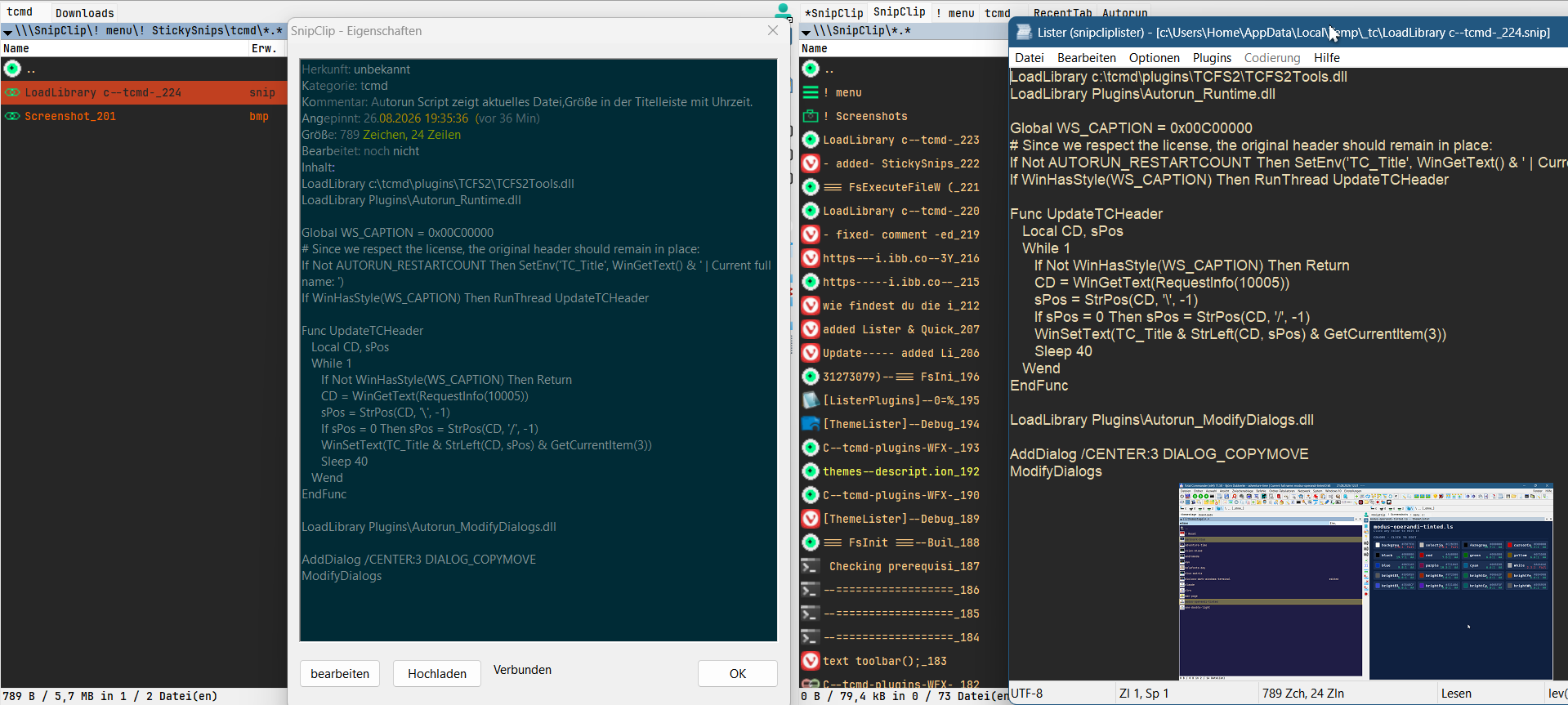
SnipClip transforms Total Commander’s clipboard into a searchable, permanent virtual panel — without the need for a separate tool or tray icon. Important clips can be pinned as StickySnips, multiple text fragments can be merged into a single unit (text block), and screenshots are automatically captured and can optionally be linked to a note. A dedicated list editor (F3) allows you to make corrections that are written directly back to the clipboard, whilst the actual clipboard history remains unchanged. If you wish, you can upload screenshots to ImgBB or text to Pastebin — directly from the Alt+Enter dialogue, though this is disabled by default. Fully localised (German/English/Russian/Ukrainian), with its own dark ‘Alien Blood’ theme or, optionally, gruvbox/everforest/solarized.Что нового
- added a network-panel icon
- added upload to "Pastebin" and "ImgBB" via API (needs your own free API key, see ini)
- Enter now copies the entry back to clipboard directly, instead of opening Lister
- added StickySnips with a linked screenshot now show both together in the F3/QV window. Click the image to open it in original size.
- added Ukrainian language via TC.ForumUser "beb"
- clipboard capture now survives sleep/resume without needing to refocus the SnipClip tab
- added toggleable capture notifications (small on-screen popup with a preview, off by default)
- notifications: configurable corner, font size, and an option to ignore the theme (always white)
- The 32-bit plug-in could not be loaded
- The Ukrainian language was ignored
New
- Full translation support: all rows, folders, dialogs and the Lister status bar follow Total Commander's language (WCMD_xxx.LNG) - included: English, German, Russian, Ukrainian (by BEB), Danish. Override with [Settings] Language=
- Row names are recognized in every language, so directory hotlist paths keep working after switching TC's language
- Screenshot capture that also works with FastStone Capture & co.: [image_capture] FishImage=1 captures every image except from programs in - Exclude= - even when the source program has already closed
- Optional capture popup: small preview of each capture in a screen corner ([notifications])
- Optional cloud upload from Alt+Enter: screenshots to ImgBB, text to Pastebin, URL goes to the clipboard ([cloud_upload], your own API keys)
- Linked screenshots are shown below their note in the Lister (read mode), click opens the full image
- StickySnips: F6 moves a pinned snip or screenshot to another category, F5 creates an independent copy
- Pinned snips can be dropped into "Draft" as text-block fragments
- Alt+Enter on screenshots shows source, time, category and size
- New settings: [history] max_chars (skip huge copies), [image_capture] dedup_consecutive (same image twice = stored once)
- "! Clear history" now asks for confirmation; deleting several entries asks only once
- Overview shows disk usage for history, StickySnips/text blocks and screenshots
- "! menu" hides itself when all commands are pinned to the root
- Plugin icon in the Network Neighborhood, version information in both DLLs
- SnipClip.example.ini with every setting and its default - your own SnipClip.ini is never overwritten by an update
Improved
- Better clip names: indentation and line breaks are collapsed, so the preview shows actual content
- Much faster with many entries (settings cached, entries found by ID, listings built once)
- Live refresh works from the very first copy and only refreshes the panel that actually shows SnipClip
- Files copied into StickySnips/text blocks: encoding is detected automatically
- Comments are stored in their own files - quotes or special characters in a comment no longer break anything (old comments are migrated automatically)
- All data files are written safely (temp file + rename), write errors are detected
Fixed
- Settings in the first section of an ini saved as "UTF-8 with BOM" were ignored (e.g. name_preview_length)
- Items in "! Textbaustein\Entwurf" could not be opened, viewed or deleted
- Screenshots: Enter/Alt+Enter gave an error
- Pinned/linked screenshots could be deleted by the storage limits
- After a restart, a screenshot could wrongly appear as linked (settings "bled" between entries)
- Alt+Enter showed UTC instead of local time
- F5 into a real folder overwrote existing files without asking and left ".range" files behind
- Text-block highlight of the last appended part was shifted on multi-line text
- Lister search: "Find next" always stuck at the first hit, searching backwards didn't work
- A failed clipboard write in the Lister could swallow the next real copy; Ctrl+S without changes no longer marks the entry as edited
- Some screenshots (BI_BITFIELDS) were saved shifted/garbled
- ImgBB upload copied a broken URL (with backslashes)
- Several crash risks when closing or reloading the Lister
Antivirus
#Release is now a proper optimized build with version information - VirusTotal went from 30/67 to 0-1 per file; the #remaining heuristic detections (Microsoft ML on 32-bit, one Bitdefender heuristic on the 64-bit Lister) are #reported as false positives
"Microsoft has checked the file; neither the scanners nor the telemetry have detected anything, and the VirusTotal hit is simply a false positive from the AI heuristics."
>>Analyst comments:
Our scanners show no positive detection, and we have no telemetry indicators for the file(s) submitted either.
As such, this submission will be closed with no further action pending.<<
Upgrade notes
- Replace all files; keep your SnipClip.ini and compare it with SnipClip.example.ini for new settings
- The old SnipClip_lang.ini is no longer needed (SnipClip.lng replaces it)
- Update both DLLs together (WFX and Lister talk to each other via a new message)
- Upload keys: never share your SnipClip.ini
- added upload to "Pastebin" and "ImgBB" via API (needs your own free API key, see ini)
- Enter now copies the entry back to clipboard directly, instead of opening Lister
- added StickySnips with a linked screenshot now show both together in the F3/QV window. Click the image to open it in original size.
- added Ukrainian language via TC.ForumUser "beb"
- clipboard capture now survives sleep/resume without needing to refocus the SnipClip tab
- added toggleable capture notifications (small on-screen popup with a preview, off by default)
- notifications: configurable corner, font size, and an option to ignore the theme (always white)
- The 32-bit plug-in could not be loaded
- The Ukrainian language was ignored
New
- Full translation support: all rows, folders, dialogs and the Lister status bar follow Total Commander's language (WCMD_xxx.LNG) - included: English, German, Russian, Ukrainian (by BEB), Danish. Override with [Settings] Language=
- Row names are recognized in every language, so directory hotlist paths keep working after switching TC's language
- Screenshot capture that also works with FastStone Capture & co.: [image_capture] FishImage=1 captures every image except from programs in - Exclude= - even when the source program has already closed
- Optional capture popup: small preview of each capture in a screen corner ([notifications])
- Optional cloud upload from Alt+Enter: screenshots to ImgBB, text to Pastebin, URL goes to the clipboard ([cloud_upload], your own API keys)
- Linked screenshots are shown below their note in the Lister (read mode), click opens the full image
- StickySnips: F6 moves a pinned snip or screenshot to another category, F5 creates an independent copy
- Pinned snips can be dropped into "Draft" as text-block fragments
- Alt+Enter on screenshots shows source, time, category and size
- New settings: [history] max_chars (skip huge copies), [image_capture] dedup_consecutive (same image twice = stored once)
- "! Clear history" now asks for confirmation; deleting several entries asks only once
- Overview shows disk usage for history, StickySnips/text blocks and screenshots
- "! menu" hides itself when all commands are pinned to the root
- Plugin icon in the Network Neighborhood, version information in both DLLs
- SnipClip.example.ini with every setting and its default - your own SnipClip.ini is never overwritten by an update
Improved
- Better clip names: indentation and line breaks are collapsed, so the preview shows actual content
- Much faster with many entries (settings cached, entries found by ID, listings built once)
- Live refresh works from the very first copy and only refreshes the panel that actually shows SnipClip
- Files copied into StickySnips/text blocks: encoding is detected automatically
- Comments are stored in their own files - quotes or special characters in a comment no longer break anything (old comments are migrated automatically)
- All data files are written safely (temp file + rename), write errors are detected
Fixed
- Settings in the first section of an ini saved as "UTF-8 with BOM" were ignored (e.g. name_preview_length)
- Items in "! Textbaustein\Entwurf" could not be opened, viewed or deleted
- Screenshots: Enter/Alt+Enter gave an error
- Pinned/linked screenshots could be deleted by the storage limits
- After a restart, a screenshot could wrongly appear as linked (settings "bled" between entries)
- Alt+Enter showed UTC instead of local time
- F5 into a real folder overwrote existing files without asking and left ".range" files behind
- Text-block highlight of the last appended part was shifted on multi-line text
- Lister search: "Find next" always stuck at the first hit, searching backwards didn't work
- A failed clipboard write in the Lister could swallow the next real copy; Ctrl+S without changes no longer marks the entry as edited
- Some screenshots (BI_BITFIELDS) were saved shifted/garbled
- ImgBB upload copied a broken URL (with backslashes)
- Several crash risks when closing or reloading the Lister
Antivirus
#Release is now a proper optimized build with version information - VirusTotal went from 30/67 to 0-1 per file; the #remaining heuristic detections (Microsoft ML on 32-bit, one Bitdefender heuristic on the 64-bit Lister) are #reported as false positives
"Microsoft has checked the file; neither the scanners nor the telemetry have detected anything, and the VirusTotal hit is simply a false positive from the AI heuristics."
>>Analyst comments:
Our scanners show no positive detection, and we have no telemetry indicators for the file(s) submitted either.
As such, this submission will be closed with no further action pending.<<
Upgrade notes
- Replace all files; keep your SnipClip.ini and compare it with SnipClip.example.ini for new settings
- The old SnipClip_lang.ini is no longer needed (SnipClip.lng replaces it)
- Update both DLLs together (WFX and Lister talk to each other via a new message)
- Upload keys: never share your SnipClip.ini