Total Commander extDir (Utility) 1.8.3
Описание
Утилита для расширенного создания каталогов и файлов (замена F7) для Total Commander.Для чего она нужна?
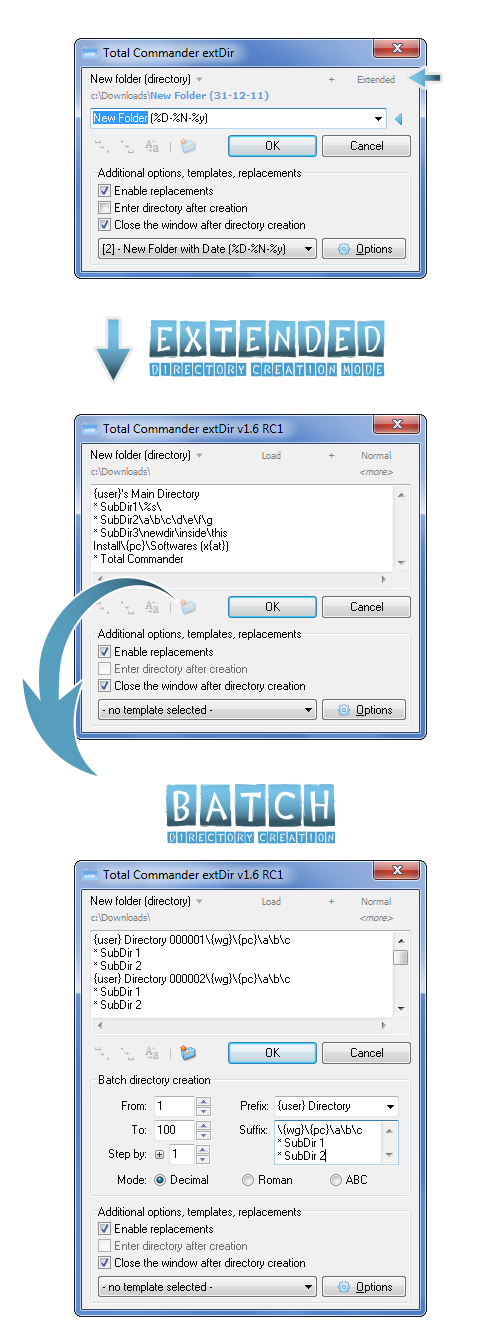
Вкратце: эта небольшая утилита расширяет возможности Total Commander по созданию каталогов и файлов - после установки вы сможете создавать множество (даже многоуровневых) каталогов и/или файлов одним щелчком мыши или нажатием клавиши, с множеством возможностей...
Основные возможности:
- [ NEW / 1.8 ] Полная поддержка Unicode
- [ NEW / 1.7 ] Возможность создания файлов
- [ NEW / 1.6 ] Возможность создавать собственные плагины (специальные переменные)
- [ NEW / 1.6 ] Возможность задавать атрибуты каталогов/файлов
- [ NEW / 1.6 ] Пакетное создание каталогов (десятичные / римские / ABC)
- Обычный и расширенный режимы создания каталогов
- Полная интеграция с Total Commander (F7, Shift + F7 или любое другое сочетание клавиш)
- Поддержка создания многоуровневых каталогов (создание каталогов с более чем одним подкаталогом)
- Шаблоны - создание каталога по заранее заданным шаблонам (например, "New Directory (%D-%N-%y)")
- Замены: используйте переменные среды (например, %OS% или %USERNAME%) в имени каталога
- Основные и специальные переменные: используйте переменные вроде %s (текущая секунда), %h (текущий час), %x (время unix), {pc} (имя текущего компьютера) и т. д.
- Встроенные установщик и деинсталлятор для удобства использования (запустите утилиту вне каталога TC, чтобы активировать установщик)
- Поддержка нескольких языков (нужны переводчики: нажмите здесь, если хотите перевести утилиту на ваш (родной) язык)
- Встроенная поддержка языков: английский, венгерский, русский, голландский, испанский, немецкий, датский, китайский, украинский, корейский, польский, итальянский, словенский
- Диалоги настройки и менеджера шаблонов
- 6 встроенных цветовых тем окна (по желанию)
- Возможность создавать и использовать собственные цветовые темы (подробнее на форуме)
- Замены в реальном времени (по желанию)
- Полная переносимость
- ... и многое другое! (полный список см. в официальной теме на форуме)
Совместимость:
- >= Total Commander 7.00 (тщательно протестировано в 7.56a и 8.01)
Известные ошибки, ограничения:
- Проблемы с установкой? Запустите эту утилиту с правами администратора прямо из Total Commander (вне каталога Total Commander)
- Ограничение: пока нет поддержки Unicode (unicode-версия уже разрабатывается)
- Полная документация будет готова в финальной версии 1.6.5!
Что нового
[04-03-2025] Total Commander extDir 1.8.3
* Fixed: installer - the new languages are properly selectable from the installer as well
* Fixed: installer - the name of the selected language on top was not showing Unicode chars properly (if contains any), fixed
* Fixed: installer - other, unicode-related fixes (affecting the selection of custom Hotkey & uninstall function)
* Fixed: automatic detection of replacement characters in input box was not always working properly (case sensitivity problem)
[28-02-2025] Total Commander extDir 1.8.2
* New: Slovenian language support (translated by Jadran Rudec - thanks!)
* New: Updated Chinese language (thanks to efree)
* New: Updated Dutch language (thanks to Jaap Kramer)
* New: Updated Italian language (thanks to ErreGi)
* Change: some code refactor, detect it faster if the extDir was not being run from TC, and close accordingly
* Fixed: Manage Templates - failed to save new custom user template after apply (unicode-conversion related bug, introduced in 1.8.0)
* Fixed: creating directories with specific attributes (archive, read-only etc) was not working properly (unicode-conversion related bug)
* Fixed: after installation, extDir has always restarted the 32-bit version of TC (TOTALCMD.exe), even if the user was running the installer from the 64-bit version (TOTALCMD64.exe)
* Fixed: Placeholders - the text of the error dialog to fill all placeholder might not be loaded properly
* Fixed: extDir was unable to open the Help file through popup or F1 keypress
* Fixed: some other minor, unicode-related fixes
[25-02-2025] Total Commander extDir 1.8.1
* New: Updated Danish language (thanks to petermad)
* Change: modified/added some new language elements there were previously not yet included, some items were not correctly translated (if you are a translator, please check the updated LNG_ENG.ini file)
* Change: added a more intelligent way to detect TC file path initially (WM_USER + 50), for handling zip & FTP / VirtualPanel scenario
* Fixed: resolved an issue where extDir.ini was accumulating extraneous Unicode characters at the end of the file
* Fixed: in case a file already exists on creation, do not rewrite it automatically, instead show error
[23-02-2025] Total Commander extDir 1.8.0
* New: Unicode support - complete support for creating directories & files with unicode characters
* New: Italian language support (translated by ErreGi - thanks!)
* Change: after creating a new file, now the option also works to "enter" inside the file (open the F4 editor on it), in case the "Enter directory after creation" option is checked
* Fixed: set TC's cursor on the created files as well (was working only for directories)
* Fixed: checking if we are inside an archive on startup was not working properly using TC 8.0B10 path detection method - now its properly calling the internal F7 in case like this
* Fixed: languages with special character codes built into extDir are also working properly & unicode-safe (Chinese, etc)
* Fixed: all control and input supports unicode characters as well
[09-02-2025] Total Commander extDir 1.7.0
* New: Polish language support (translated by dmocha - thanks!)
* New: File creation functionality! (auto-detect if name contains extension, create file/directory accordingly - widely Configurable)
* New: Added two "UserStructure" examples to ini file (applied after first new run/install) - support for creating complex directory structures, supporting wildcards (press Ctrl + O, or click "Load" flat button on top)
* Change: performed some long-overdue code refactoring and cleanup to enhance readability
* Fixed: {os} variable is now ready to recognize Windows 10 & 11 correctly
* Fixed: fixed a problem with placeholders, where a user could apply the form without filling all of them, resulting in an error while creating directories
* Fixed: installer - the new languages are properly selectable from the installer as well
* Fixed: installer - the name of the selected language on top was not showing Unicode chars properly (if contains any), fixed
* Fixed: installer - other, unicode-related fixes (affecting the selection of custom Hotkey & uninstall function)
* Fixed: automatic detection of replacement characters in input box was not always working properly (case sensitivity problem)
[28-02-2025] Total Commander extDir 1.8.2
* New: Slovenian language support (translated by Jadran Rudec - thanks!)
* New: Updated Chinese language (thanks to efree)
* New: Updated Dutch language (thanks to Jaap Kramer)
* New: Updated Italian language (thanks to ErreGi)
* Change: some code refactor, detect it faster if the extDir was not being run from TC, and close accordingly
* Fixed: Manage Templates - failed to save new custom user template after apply (unicode-conversion related bug, introduced in 1.8.0)
* Fixed: creating directories with specific attributes (archive, read-only etc) was not working properly (unicode-conversion related bug)
* Fixed: after installation, extDir has always restarted the 32-bit version of TC (TOTALCMD.exe), even if the user was running the installer from the 64-bit version (TOTALCMD64.exe)
* Fixed: Placeholders - the text of the error dialog to fill all placeholder might not be loaded properly
* Fixed: extDir was unable to open the Help file through popup or F1 keypress
* Fixed: some other minor, unicode-related fixes
[25-02-2025] Total Commander extDir 1.8.1
* New: Updated Danish language (thanks to petermad)
* Change: modified/added some new language elements there were previously not yet included, some items were not correctly translated (if you are a translator, please check the updated LNG_ENG.ini file)
* Change: added a more intelligent way to detect TC file path initially (WM_USER + 50), for handling zip & FTP / VirtualPanel scenario
* Fixed: resolved an issue where extDir.ini was accumulating extraneous Unicode characters at the end of the file
* Fixed: in case a file already exists on creation, do not rewrite it automatically, instead show error
[23-02-2025] Total Commander extDir 1.8.0
* New: Unicode support - complete support for creating directories & files with unicode characters
* New: Italian language support (translated by ErreGi - thanks!)
* Change: after creating a new file, now the option also works to "enter" inside the file (open the F4 editor on it), in case the "Enter directory after creation" option is checked
* Fixed: set TC's cursor on the created files as well (was working only for directories)
* Fixed: checking if we are inside an archive on startup was not working properly using TC 8.0B10 path detection method - now its properly calling the internal F7 in case like this
* Fixed: languages with special character codes built into extDir are also working properly & unicode-safe (Chinese, etc)
* Fixed: all control and input supports unicode characters as well
[09-02-2025] Total Commander extDir 1.7.0
* New: Polish language support (translated by dmocha - thanks!)
* New: File creation functionality! (auto-detect if name contains extension, create file/directory accordingly - widely Configurable)
* New: Added two "UserStructure" examples to ini file (applied after first new run/install) - support for creating complex directory structures, supporting wildcards (press Ctrl + O, or click "Load" flat button on top)
* Change: performed some long-overdue code refactoring and cleanup to enhance readability
* Fixed: {os} variable is now ready to recognize Windows 10 & 11 correctly
* Fixed: fixed a problem with placeholders, where a user could apply the form without filling all of them, resulting in an error while creating directories