Services2 0.8.1
Описание
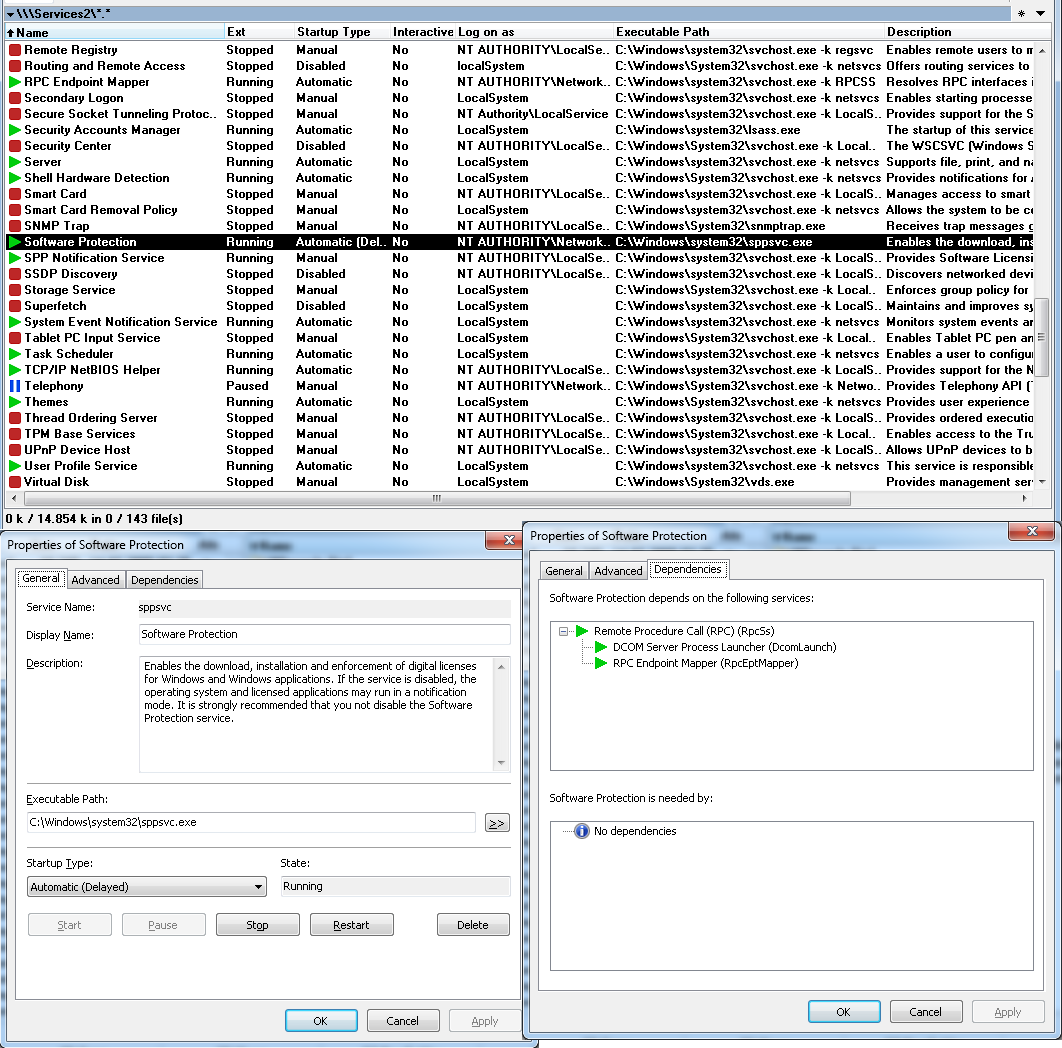
Services2 is a file-system plugin that can list, control and manage the services registered in the system.Features:
- List services registered in the system
- Control service states
- Edit service properties
- Delete services from the system
- Analyze service executables with internal and external tools (version 0.5.0 or higher)
- Manage services on remote systems (version 0.6.0 or higher)
- Show service PIDs (process IDs) (version 0.8.0 or higher)
System Requirements:
- Windows 2000 or later, both 32 and 64 bit
- Total Commander 7.50 or later, both 32 and 64 bit.
It is an alternative to the existing Services plugin (Version 2.4) written by Serge Kandakov (KaSA).
Advantages over Services 2.4:
-----------------------------
* Show correct executable information in the file list of Total Commander (32 bit) on Windows 64 bit, i.e. file date/time and sizes. Services 2.4 always shows the information of the files in C:\Windows\SysWow64 instead of C:\Windows\system32.
* Unicode capable (this should be implemented correctly).
* 64 Bit version of this plugin to use in Total Commander x64.
* Translation to other languages possible (Chinese, Danish, Dutch, German, Hungarian, Italian, Polish and Russian are included in the package).
* Support for custom columns, including default view.
* Show services in Total Commander's file list in all states, not just running, stopped and paused but all transitional states (pause/continue/start/stop pending) as well.
* Additional startup type "Automatic (Delayed)" on Vista and higher.
* Delete a service by pressing F8 or DEL in Total Commander's file list. This feature can be turned off. See section "Plugin settings" in readme.txt.
* Show some additional information when pressing F3 on a service:
- startup type
- if a service is allowed to interact with the user's desktop
- if a service uses a shared process or its own
- the user account name the service logs on with
- the service process ID (PID)
- the service DLL
* Show driver services as such in the dependencies/dependents trees.
* Show load order groups in the dependencies tree (but not their members).
* Show warning if not all of the service's dependencies could be retrieved, e.g. when the user executing the plugin doesn't have administrative privileges that are necessary to get the dependents of some services. Namely these are DcomLaunch, RpcSs, RpcEptMapper and pla (on Windows 7/8), but there may be other services. Services 2.4 just shows "No dependencies found" in this case which isn't necessarily true.
Что нового
Version 0.8.1 [2019-06-07]
[+] Added \remote subdir containing scripts and other
files that can help enable remote service management.
See new section 5 "Remote service management" in
Readme file.
[*] Updated Readme to include a whole new section about
Remote service management and the caveats that come
with it.
[+] Plugin now shows service DLL in service properties
dialog, F3 function and custom columns
[+] Added new placeholder {SvcDll} for internal/external
tools
[*] Fixed: Plugin wasn't able to work with services with
a colon in their name, despite it returned them as
such to TC.
Now every special character except backslash should
work.
[*] Service properties dialog, Advanced tab: Plugin
checks for the validity of the specified account
first and now shows correct error message if it's
invalid.
[+] Service properties dialog, Advanced tab: Added
checkbox that shows if a service runs under
virtual/managed service account (Win7 and higher).
[*] Fixed: Plugin wasn't able to set any properties of
services that used virtual accounts or managed
service accounts (e.g. MSSQL server services).
Sorry for the inconvenience.
[+] Added new option DisablePanelAutoRefresh to
[Services2] section. See Readme and/or
Services2.sample.ini for details.
[*] Improved number of keyboard shortcuts available to
internal and external tools significantly by
supporting ENTER, UP/DOWN/LEFT/RIGHT and many more.
See Readme for details.
[+] Added configuration for keyboard shortcuts for
internal tools, allowing to override/disable the F3
key that was hardcoded so far. See Readme for
details on the new shortcut options.
[*] Expanded default custom columns view to include
service name and PID
[*] Changed/corrected processorArchitecture in plugin
manifest
[*] Some smaller bug fixes, code cleanup and optimization
[*] Updated Danish translation, thanks to petermad!
[+] Added Polish translation, thanks to dmocha!
Version 0.8.0 [2016-12-05]
[!] No public release!
[+] Added service PID to service properties dialog, F3
function and custom columns
[*] Fixed: plugin was not able to start services that
depend on service groups (e.g. apcupsd). Sorry for
the inconvenience.
Version 0.7.1 [2015-12-18]
[*] Fixed a potential buffer overflow in FsContentGetValue
interface function
[*] Return FS_FILE_EXISTS in FsGetFile so TC can ask the
user whether to overwrite existing files
[*] Sanitize filenames in FsGetFile, i.e. replace
illegal/special characters, so that all files can be
copied to the local file-system
Version 0.7.0 [2015-11-20]
[+] Added option Monitor to [Services2] section. See
readme for details
[*] Fixed an error that caused the plugin to open the
wrong service from TC's search window, especially
when services on different (remote) computers were
found. Note that this bugfix required a rewrite of
a small portion of the plugin's code - which might
have introduced new bugs; please report any bugs,
errors and so on.
[+] Plugin settings dialog: The translator's name (or
more precisely the contents of the Translator key) of
every language file will now be shown next to the
language file name
Version 0.6.2 [2015-11-08]
[!] No public release!
[*] Return icons to TC in requested size. Previously, the
plugin's internal icons were always large, all others
were small.
[*] Fixed wrong placement of dialogs on multi-monitor
systems. Previously the dialogs were placed on the
primary monitor, now they will be placed on the active
monitor (the one TC is displayed on)
Version 0.6.1 [2015-06-21]
[+] Service properties dialog, Advanced tab: Added button
to launch MMC snap-in (services.msc) with either local
or remote system. This is an option that allows to
edit service properties this plugin doesn't provide
(e.g. Recovery).
[+] Try harder to find service executables by searching
for them in directories specified in %PATH% to be able
to show file details in TC panel. That even works for
"unusual" command lines like "system32\VBoxService.exe"
[*] Plugin settings dialog: Repositioned two of the
checkboxes that were moved by mistake in v0.6.0
[*] Updated Danish translation, thanks to petermad!
[*] Updated Russian translation, thanks to Alexander
Gvaramiya (Nero Wolfe)!
[*] Updated Italian translation, thanks to squeeze69!
[*] Updated Chinese translation, thanks to SunX!
[*] Updated Hungarian translation, thanks to Bluestar!
[*] Updated Dutch translation, thanks to Jaap Kramer!
[*] Smaller changes and optimization
Version 0.6.0 [2015-04-25]
[+] Added remote computer management. Please note that
this feature has some limitations, see section
"Limitations" in Readme for details.
[*] Fixed: Delayed autostart couldn't be set on some
services. The plugin now behaves like the MMC snap-in
(services.msc) which means that you may see a warning
if delayed autostart couldn't be set (error 87)
[*] Made options available in settings dialog:
AddSvcNameToDependencyTrees and ShowIcons
(section Services2.Tools)
[*] Fixed a memory leak regarding icons
[*] Fixed an access violation when a service without an
executable was deleted in TC's panel
[+] Added: Pressing Shift+Enter on a service now opens
the path of the service executable in a new tab and
sets the cursor on the executable (TC 8.0+)
[+] Added feature to rename services directly in TC's
panel. Note: this is limited to the display name and
will be ignored if service names instead of display
names are shown in TC's panel
[*] Internal code cleanup and optimization
Version 0.5.1 [2015-03-20]
[!] No public release!
[*] Updated Danish translation, thanks to petermad!
[+] Added option to show service name instead of display
name in TC's panel
Version 0.5.0 [2015-03-18]
[+] Added support for internal and external tools,
accessible via a button in the
service properties dialog. It allows to
- view the executable's properties (like Alt+Enter)
- view the executable in TC's lister
- open the default browser to search for the service
name or its executable name
- open any user-defined external tool with the service
executable
This feature is really helpful to examine unknown
services and their executables, especially in
conjunction with TC Lister plugins like FileInfo and
PEViewer, and external analysis tools like anti-virus
scanners, hex editors, debuggers and so on. See
Readme for a detailed description.
[+] Added a lot more custom columns to show information
about the service executables, e.g. Copyright,
Company name, File version and so on.
[+] Added experimental support for WOW64 services, and a
new checkbox to service properties dialog to show
whether a service is a WOW64 service (see FAQ section
in the Readme)
[*] Changed the default button of the plugin's delete
confirmation dialog (called by service properties
dialog) to "No" to avoid the accidental deletion of
services. Please note that plugins can't change the
default button in TC's delete confirmation dialog,
which is shown when a file is deleted in TC's file list!
[*] Reduced the plugin size by ~10% by using different
linker/compiler settings
[*] Service properties dialog: Reduced the update
interval of the progress bar to 200ms
[+] Service properties dialog, Dependency page: Added
service names to the dependency trees (can be disabled
with the new option AddSvcNameToDependencyTrees, see below)
[+] Added some new options (not available in settings dialog)
See Services2.sample.ini for their description
- AddSvcNameToDependencyTrees
- ShowIcons (section Services2.Tools)
- AutoDetectArch (section Services2.Tools)
[+] Plugin settings dialog: Added a button to open plugin
settings file in editor that is set in TC, so users
can edit it directly without the need to navigate to
it by hand
[*] All ANSI functions are now returning an error when
called. Previously they were just returning the same
as the Unicode functions
[*] Renamed Services2.ini.sample to Services2.sample.ini
so that syntax highlighting works in editors that
support it
[*] Rewritten the Readme in HTML format to allow better
formatting
[*] Some internal optimizations
Version 0.4.3 [2014-10-04]
[!] No public release!
[+] Added Dutch translation, thanks to Jaap Kramer!
[*] Some more exception handling to avoid certain crashes.
This should increase stability, and it additionally
fixes a definite crash on the Windows 10 Tech Preview
[+] Added a note to the service properties dialog that is
shown if there was an error while querying the service
config
[*] Changed manifest to include compatibility with Win8,
Win8.1 and Win10. Not that it helps much as TC plugins
depend on TC's manifest...
Version 0.4.2 [2014-07-25]
[+] Added Chinese translation, thanks to SunX!
[+] Added Russian translation, thanks to Alexander
Gvaramiya (Nero Wolfe)!
[+] Added translation_instructions.txt which contains some
instructions for translators. I hope the pluginst.inf
and Services2.lng files are not forgotten that often
anymore ;)
[*] (Hopefully) Fixed the issue that the icon of a service
didn't reflect its real state when the option "Show
service state in the extension column of TC's panel"
was disabled
[*] Service properties dialog, Advanced page:
Repositioned the controls and made some of them
wider to allow longer strings for translations
[*] Fixed: Restart service function (in the service
properties dialog) didn't show confirmation dialog to
stop dependent services
[*] Changed "file download": string padding is now based
on the longest (translated) string in the whole "file"
instead of a fixed value of 20 characters. I hope this
is better for translations.
[+] Added a new option (not available in settings dialog)
AddTxtExtensionOnDownload, see Services2.ini.sample
for explanation
[*] Some internal optimizations
Version 0.4.1 [2014-04-21]
[+] Added Hungarian translation, thanks to Bluestar!
[+] Added Danish translation, thanks to petermad!
[+] Added Italian translation, thanks to squeeze69!
[*] Made the settings dialog and plugin properties dialog
wider to allow longer strings for translations
[*] Return icon state strings in FsExtractCustomIcon
properly to allow TC to cache them only once per
state (should decrease memory consumption)
[+] Added \remote subdir containing scripts and other
files that can help enable remote service management.
See new section 5 "Remote service management" in
Readme file.
[*] Updated Readme to include a whole new section about
Remote service management and the caveats that come
with it.
[+] Plugin now shows service DLL in service properties
dialog, F3 function and custom columns
[+] Added new placeholder {SvcDll} for internal/external
tools
[*] Fixed: Plugin wasn't able to work with services with
a colon in their name, despite it returned them as
such to TC.
Now every special character except backslash should
work.
[*] Service properties dialog, Advanced tab: Plugin
checks for the validity of the specified account
first and now shows correct error message if it's
invalid.
[+] Service properties dialog, Advanced tab: Added
checkbox that shows if a service runs under
virtual/managed service account (Win7 and higher).
[*] Fixed: Plugin wasn't able to set any properties of
services that used virtual accounts or managed
service accounts (e.g. MSSQL server services).
Sorry for the inconvenience.
[+] Added new option DisablePanelAutoRefresh to
[Services2] section. See Readme and/or
Services2.sample.ini for details.
[*] Improved number of keyboard shortcuts available to
internal and external tools significantly by
supporting ENTER, UP/DOWN/LEFT/RIGHT and many more.
See Readme for details.
[+] Added configuration for keyboard shortcuts for
internal tools, allowing to override/disable the F3
key that was hardcoded so far. See Readme for
details on the new shortcut options.
[*] Expanded default custom columns view to include
service name and PID
[*] Changed/corrected processorArchitecture in plugin
manifest
[*] Some smaller bug fixes, code cleanup and optimization
[*] Updated Danish translation, thanks to petermad!
[+] Added Polish translation, thanks to dmocha!
Version 0.8.0 [2016-12-05]
[!] No public release!
[+] Added service PID to service properties dialog, F3
function and custom columns
[*] Fixed: plugin was not able to start services that
depend on service groups (e.g. apcupsd). Sorry for
the inconvenience.
Version 0.7.1 [2015-12-18]
[*] Fixed a potential buffer overflow in FsContentGetValue
interface function
[*] Return FS_FILE_EXISTS in FsGetFile so TC can ask the
user whether to overwrite existing files
[*] Sanitize filenames in FsGetFile, i.e. replace
illegal/special characters, so that all files can be
copied to the local file-system
Version 0.7.0 [2015-11-20]
[+] Added option Monitor to [Services2] section. See
readme for details
[*] Fixed an error that caused the plugin to open the
wrong service from TC's search window, especially
when services on different (remote) computers were
found. Note that this bugfix required a rewrite of
a small portion of the plugin's code - which might
have introduced new bugs; please report any bugs,
errors and so on.
[+] Plugin settings dialog: The translator's name (or
more precisely the contents of the Translator key) of
every language file will now be shown next to the
language file name
Version 0.6.2 [2015-11-08]
[!] No public release!
[*] Return icons to TC in requested size. Previously, the
plugin's internal icons were always large, all others
were small.
[*] Fixed wrong placement of dialogs on multi-monitor
systems. Previously the dialogs were placed on the
primary monitor, now they will be placed on the active
monitor (the one TC is displayed on)
Version 0.6.1 [2015-06-21]
[+] Service properties dialog, Advanced tab: Added button
to launch MMC snap-in (services.msc) with either local
or remote system. This is an option that allows to
edit service properties this plugin doesn't provide
(e.g. Recovery).
[+] Try harder to find service executables by searching
for them in directories specified in %PATH% to be able
to show file details in TC panel. That even works for
"unusual" command lines like "system32\VBoxService.exe"
[*] Plugin settings dialog: Repositioned two of the
checkboxes that were moved by mistake in v0.6.0
[*] Updated Danish translation, thanks to petermad!
[*] Updated Russian translation, thanks to Alexander
Gvaramiya (Nero Wolfe)!
[*] Updated Italian translation, thanks to squeeze69!
[*] Updated Chinese translation, thanks to SunX!
[*] Updated Hungarian translation, thanks to Bluestar!
[*] Updated Dutch translation, thanks to Jaap Kramer!
[*] Smaller changes and optimization
Version 0.6.0 [2015-04-25]
[+] Added remote computer management. Please note that
this feature has some limitations, see section
"Limitations" in Readme for details.
[*] Fixed: Delayed autostart couldn't be set on some
services. The plugin now behaves like the MMC snap-in
(services.msc) which means that you may see a warning
if delayed autostart couldn't be set (error 87)
[*] Made options available in settings dialog:
AddSvcNameToDependencyTrees and ShowIcons
(section Services2.Tools)
[*] Fixed a memory leak regarding icons
[*] Fixed an access violation when a service without an
executable was deleted in TC's panel
[+] Added: Pressing Shift+Enter on a service now opens
the path of the service executable in a new tab and
sets the cursor on the executable (TC 8.0+)
[+] Added feature to rename services directly in TC's
panel. Note: this is limited to the display name and
will be ignored if service names instead of display
names are shown in TC's panel
[*] Internal code cleanup and optimization
Version 0.5.1 [2015-03-20]
[!] No public release!
[*] Updated Danish translation, thanks to petermad!
[+] Added option to show service name instead of display
name in TC's panel
Version 0.5.0 [2015-03-18]
[+] Added support for internal and external tools,
accessible via a button in the
service properties dialog. It allows to
- view the executable's properties (like Alt+Enter)
- view the executable in TC's lister
- open the default browser to search for the service
name or its executable name
- open any user-defined external tool with the service
executable
This feature is really helpful to examine unknown
services and their executables, especially in
conjunction with TC Lister plugins like FileInfo and
PEViewer, and external analysis tools like anti-virus
scanners, hex editors, debuggers and so on. See
Readme for a detailed description.
[+] Added a lot more custom columns to show information
about the service executables, e.g. Copyright,
Company name, File version and so on.
[+] Added experimental support for WOW64 services, and a
new checkbox to service properties dialog to show
whether a service is a WOW64 service (see FAQ section
in the Readme)
[*] Changed the default button of the plugin's delete
confirmation dialog (called by service properties
dialog) to "No" to avoid the accidental deletion of
services. Please note that plugins can't change the
default button in TC's delete confirmation dialog,
which is shown when a file is deleted in TC's file list!
[*] Reduced the plugin size by ~10% by using different
linker/compiler settings
[*] Service properties dialog: Reduced the update
interval of the progress bar to 200ms
[+] Service properties dialog, Dependency page: Added
service names to the dependency trees (can be disabled
with the new option AddSvcNameToDependencyTrees, see below)
[+] Added some new options (not available in settings dialog)
See Services2.sample.ini for their description
- AddSvcNameToDependencyTrees
- ShowIcons (section Services2.Tools)
- AutoDetectArch (section Services2.Tools)
[+] Plugin settings dialog: Added a button to open plugin
settings file in editor that is set in TC, so users
can edit it directly without the need to navigate to
it by hand
[*] All ANSI functions are now returning an error when
called. Previously they were just returning the same
as the Unicode functions
[*] Renamed Services2.ini.sample to Services2.sample.ini
so that syntax highlighting works in editors that
support it
[*] Rewritten the Readme in HTML format to allow better
formatting
[*] Some internal optimizations
Version 0.4.3 [2014-10-04]
[!] No public release!
[+] Added Dutch translation, thanks to Jaap Kramer!
[*] Some more exception handling to avoid certain crashes.
This should increase stability, and it additionally
fixes a definite crash on the Windows 10 Tech Preview
[+] Added a note to the service properties dialog that is
shown if there was an error while querying the service
config
[*] Changed manifest to include compatibility with Win8,
Win8.1 and Win10. Not that it helps much as TC plugins
depend on TC's manifest...
Version 0.4.2 [2014-07-25]
[+] Added Chinese translation, thanks to SunX!
[+] Added Russian translation, thanks to Alexander
Gvaramiya (Nero Wolfe)!
[+] Added translation_instructions.txt which contains some
instructions for translators. I hope the pluginst.inf
and Services2.lng files are not forgotten that often
anymore ;)
[*] (Hopefully) Fixed the issue that the icon of a service
didn't reflect its real state when the option "Show
service state in the extension column of TC's panel"
was disabled
[*] Service properties dialog, Advanced page:
Repositioned the controls and made some of them
wider to allow longer strings for translations
[*] Fixed: Restart service function (in the service
properties dialog) didn't show confirmation dialog to
stop dependent services
[*] Changed "file download": string padding is now based
on the longest (translated) string in the whole "file"
instead of a fixed value of 20 characters. I hope this
is better for translations.
[+] Added a new option (not available in settings dialog)
AddTxtExtensionOnDownload, see Services2.ini.sample
for explanation
[*] Some internal optimizations
Version 0.4.1 [2014-04-21]
[+] Added Hungarian translation, thanks to Bluestar!
[+] Added Danish translation, thanks to petermad!
[+] Added Italian translation, thanks to squeeze69!
[*] Made the settings dialog and plugin properties dialog
wider to allow longer strings for translations
[*] Return icon state strings in FsExtractCustomIcon
properly to allow TC to cache them only once per
state (should decrease memory consumption)