TCNewPlus 1.2.0
Описание
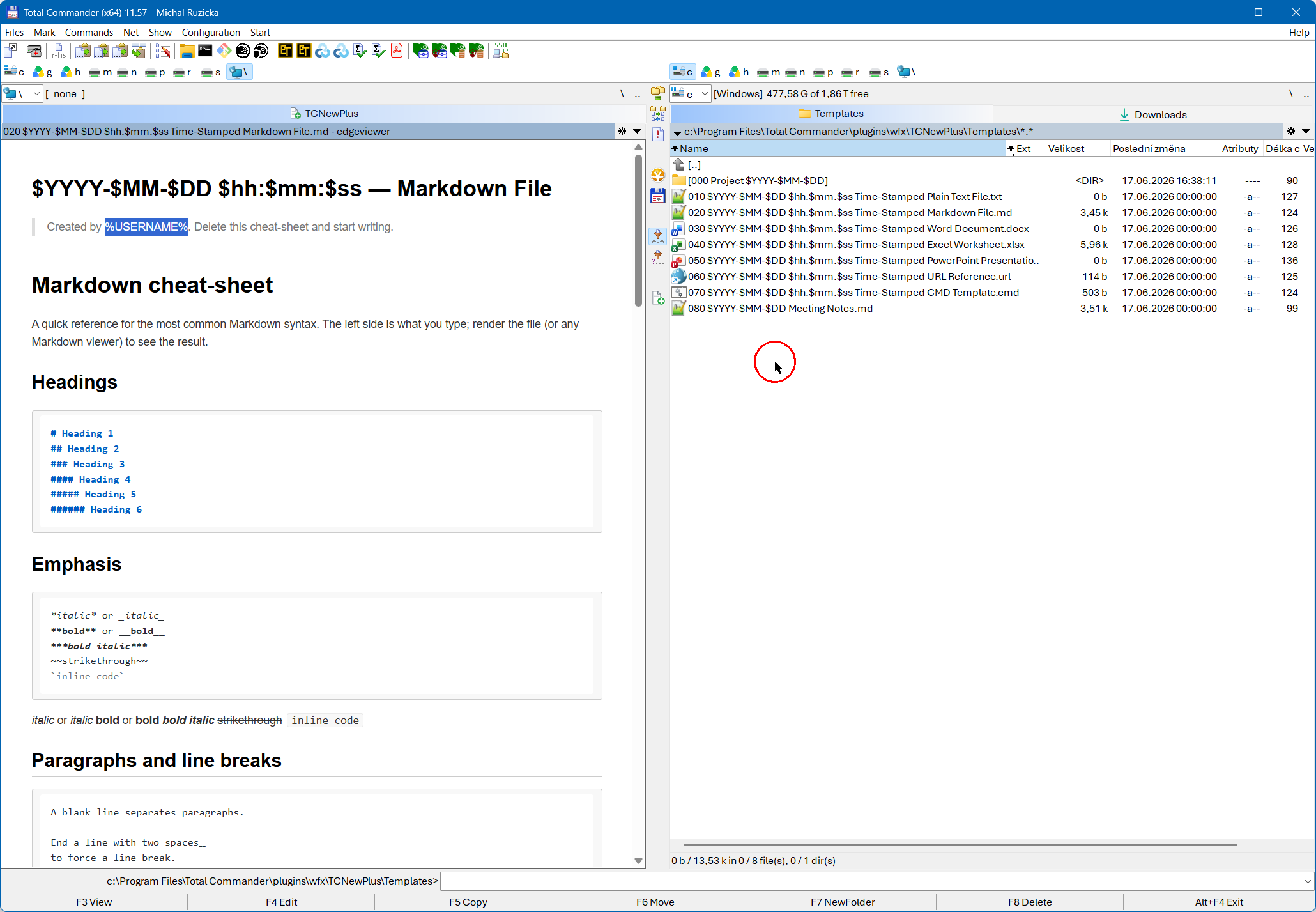
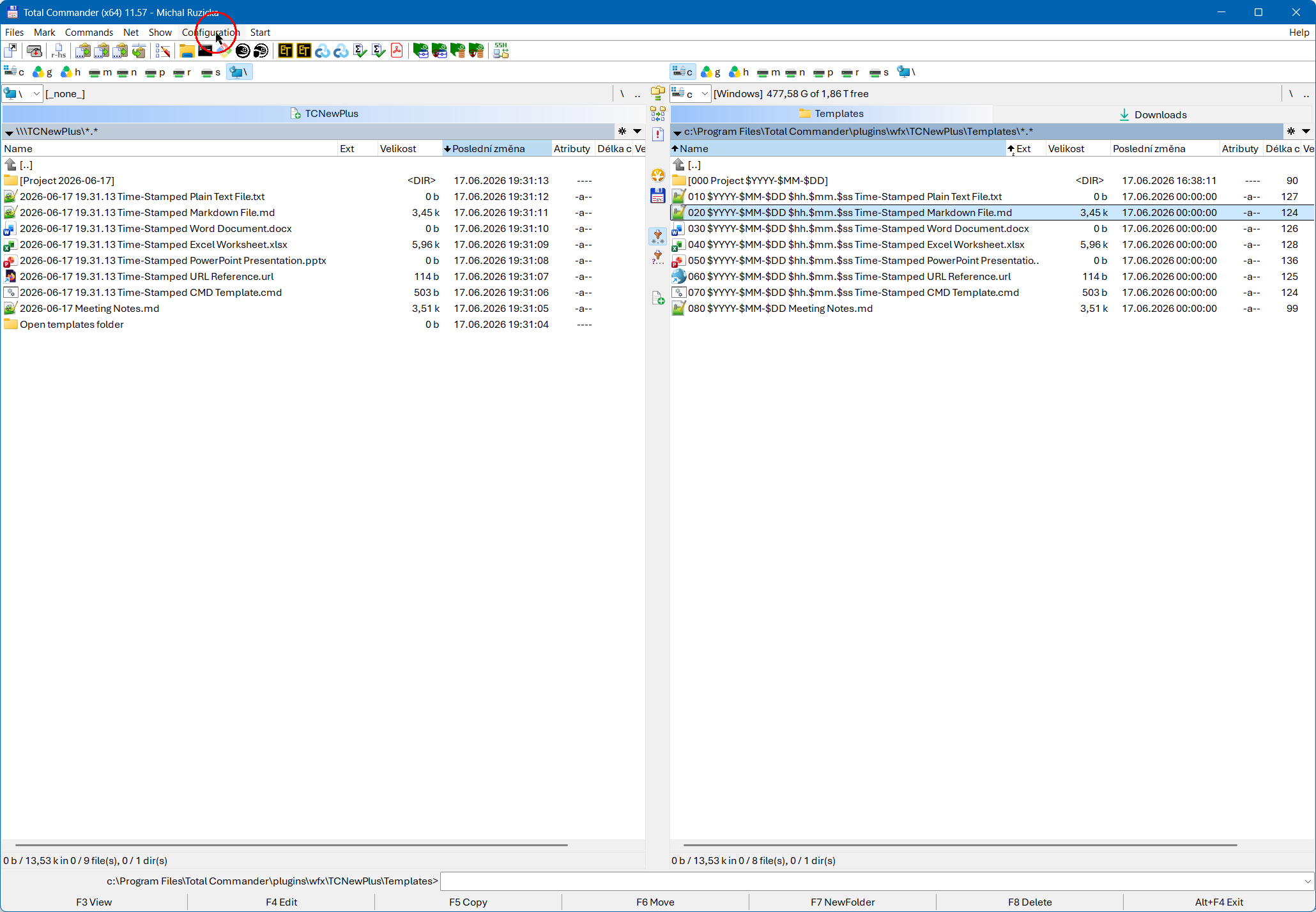
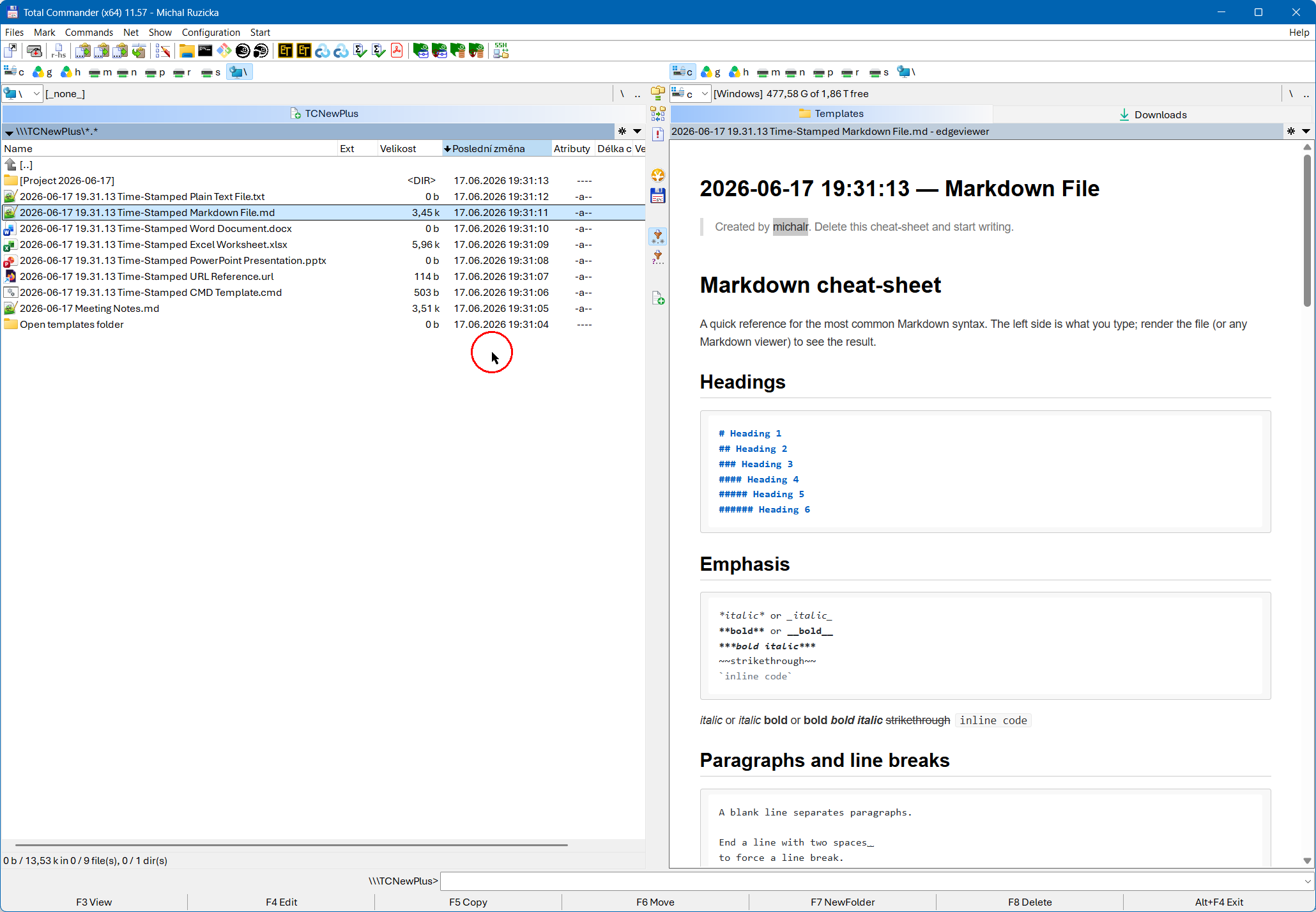
Системный плагин (WFX) для Total Commander, который переносит принцип работы PowerToys New+ в Total Commander: создание новых файлов и папок из личной коллекции шаблонов с подстановкой переменных даты и времени в имена в момент создания.Плагин предоставляет виртуальную файловую систему только для чтения — \\\TCNewPlus — в которой отображается содержимое вашей папки шаблонов. Каждое имя показано так, как его создал бы New+: префиксы сортировки (начальные цифры, пробелы и точки) скрыты, а переменные вроде $YYYY-$MM-$DD или %USERNAME% уже заменены текущими значениями. Чтобы создать новый файл или папку из шаблона, просто скопируйте его по F5 в каталог, открытый в другой панели — копия будет создана с подставленным именем и новыми метками времени, точно так, как если бы её создал New+.
В качестве шаблона подойдёт что угодно: простые текстовые файлы, документы Office, целые структуры папок проектов. Шаблоны — это обычные файлы в обычной папке, в той же, которую использует PowerToys New+, если вы хотите пользоваться одной коллекцией и в контекстном меню Проводника, и в Total Commander.
Сверх возможностей PowerToys New+: в качестве необязательного расширения, которого нет в PowerToys New+, TCNewPlus может также подставлять переменные внутри содержимого файлов (а не только в именах) для выбранных расширений файлов — см. Variable Expansion Inside File Contents. По умолчанию эта функция отключена, поэтому плагин остаётся точным аналогом New+, пока вы сами её не включите.
Что нового
## [v1.2.0] – 2026-06-17
### Added
- **Ordering via modification time** (`[Templates]
UseTimestampsToIndicateOrdering`, off by default) — a workaround for the
fact that a file-system plugin cannot set the panel's sort order. When on it
implies `SetTimestampsToCurrentTime` and steps each entry's displayed
modification time one second earlier than the previous one, in the order the
templates sort by their real (prefixed) name — the New+ menu order. Sorting
`\\\TCNewPlus` by modification time then reproduces that order. Applied per
directory and to the `ShowLinkToTemplatesDir` entry; times step only
backwards, and the steps affect display only — name/content substitution
uses the listing snapshot, and copied-out file timestamps are governed
solely by `SetTimestampsToCurrentTime` (so with it off, a copy keeps the
template's real times while the panel shows the stepped ordering times).
- **Optional current-time timestamps** (`[Templates]
SetTimestampsToCurrentTime`, off by default). When enabled, every entry
under `\\\TCNewPlus` is shown with the current created/modified/accessed
time instead of the physical template's, keeping the displayed times
consistent with the date/time substituted into names and contents (the
templates-folder link is included; otherwise it mirrors the templates
folder).
- **`Alt+Enter` (Properties) now also reports the active configuration** —
which `TCNewPlus.ini` is actually in effect (and whether it exists) plus the
parsed value of every setting. Makes it obvious when a per-user
`%APPDATA%\GHISLER\TCNewPlus.ini` is shadowing the plugin-dir INI, or when a
key was put in the wrong section.
### Changed
- **A copied-out file now carries the same timestamps shown for it in the
panel** instead of always the current time: the template file's own times
by default, or the current time when `SetTimestampsToCurrentTime` is on.
- **A single snapshot per listing now drives names, contents and timestamps.**
On every directory refresh the plugin captures one instant (local time +
environment block) and reuses it for that panel: the substituted names, the
later substitution inside copied-out file contents, and the copy timestamps
all use the same values. Previously contents and timestamps were resolved at
copy time, so a `$ss` or a `%VAR%` could differ between a file's name and its
contents when the clock ticked or a system variable changed between listing
and copy.
## [v1.1.0] – 2026-06-17
### Added
- **Optional link to the templates folder** (`[Templates]
ShowLinkToTemplatesDir`), similar to the *Open templates folder* item in the
PowerToys New+ menu. When set to a label, an extra entry appears in
`\\\TCNewPlus`; pressing Enter on it switches the panel to the real
templates folder (`FS_EXEC_SYMLINK`). The label goes through the usual
naming rules (variable expansion + `HideStartingDigits`) and must be a valid
file name; empty/absent (the default) shows no link.
### Fixed
- **Non-ASCII paths in `TCNewPlus.ini` are now read correctly.** The INI is
parsed as UTF-8 (a UTF-8 or UTF-16 byte-order mark is also honoured) instead
of via `GetPrivateProfileString`, which treats a BOM-less file as ANSI and
mangled values such as a `TemplatesPath` pointing at a folder named
`Osobní`. A trailing path separator on `TemplatesPath` is now stripped so a
value like `...\Templates\` enumerates correctly.
## [v1.0.0] – 2026-06-16
First public release.
### Added
- **Total Commander File System plugin (`TCNewPlus.wfx` / `TCNewPlus.wfx64`)**
that exposes a [PowerToys New+](https://learn.microsoft.com/windows/powertoys/newplus)
style template folder as a read-only virtual file system under
`\\\TCNewPlus`. Copying a template out with `F5` creates a new file or
folder under the substituted name — the Total Commander equivalent of
the New+ Explorer context menu.
- **New+ naming rules applied at listing time:**
- sorting prefixes (leading digits, spaces and dots) hidden from the
displayed and created names (`HideStartingDigits`, default on);
- date/time variables (`$YYYY`, `$YY`, `$Y`, `$MMMM`, `$MMM`, `$MM`,
`$M`, `$DDDD`, `$DDD`, `$DD`, `$D`, `$hh`, `$h`, `$mm`, `$m`, `$ss`,
`$s`, `$fff`, `$ff`, `$f`), `$PARENT_FOLDER_NAME` in template
subfolders, and `%ENVIRONMENT_VARIABLE%` expansion, with
filesystem-invalid characters in substituted values replaced by
spaces (`ReplaceFilenameVariables`, default on);
- colliding display names disambiguated with an ` (2)` suffix.
- **Read-only by design** — no write entry points are exported, so TC
disables delete/rename/upload inside the virtual file system; `F6`
(move) is refused explicitly.
- **Optional variable expansion inside file contents** (a TCNewPlus
extension beyond New+, which only substitutes in names). Off by default
and opt-in per file extension via `[FileContents] ReplaceContentVariables`
(e.g. `.md,.txt`), so binary files are never touched. Content uses the same
variables as names but without filename-character sanitisation (a
`%USERPROFILE%` path keeps its `:`/`\`); listed files are treated as
UTF-8 (BOM preserved), and anything that is not valid UTF-8 is copied
verbatim.
- **Icons.** The plugin shows an icon next to its name in Network
Neighborhood (embedded icon resource), and every entry under
`\\\TCNewPlus` shows the real template file's shell icon via
`FsExtractCustomIconW` (a `.docx` template shows the Word icon, a folder
template a folder, …).
- **`Alt+Enter` (Properties)** on a virtual entry shows the real template
path on disk and the active templates folder.
- **Configuration via `TCNewPlus.ini`**, grouped into `[Templates]`
(`TemplatesPath`), `[FileNames]` (`ReplaceFilenameVariables`,
`HideStartingDigits`) and `[FileContents]` (`ReplaceContentVariables`),
re-read on every root listing.
Looked up first at `%APPDATA%\GHISLER\TCNewPlus.ini` (per-user override)
and then next to the plugin DLL — the first file that exists wins
entirely, mirroring TCOfficeView. Defaults to the bundled sample
template set in the `Templates` folder next to the DLL; can be pointed
at the PowerToys New+ templates folder to share one collection.
- **Sample template set** bundled in the release ZIP.
- **Test suite (`TCNewPlusTest.exe`)** — unit tests of the naming rules
plus end-to-end tests driving the built DLL through the WFX API; run
for both bitnesses by `build.cmd` and the CI workflow.
- **Reproducible build pipeline** mirroring TCOfficeView: pinned MSVC
toolchain (`cl.exe 19.51.36247`, toolset `14.51`, SDK `10.0.26100.0`),
`/Brepro` + `/BREPRO` + `/pathmap`, normalized timestamps and line
endings in the ZIP, `sha256sums.sha256` manifest, GitHub Actions CI
with SHA-pinned actions, and `setup-build-environment-example.cmd` for
clean-room verification builds.
### Added
- **Ordering via modification time** (`[Templates]
UseTimestampsToIndicateOrdering`, off by default) — a workaround for the
fact that a file-system plugin cannot set the panel's sort order. When on it
implies `SetTimestampsToCurrentTime` and steps each entry's displayed
modification time one second earlier than the previous one, in the order the
templates sort by their real (prefixed) name — the New+ menu order. Sorting
`\\\TCNewPlus` by modification time then reproduces that order. Applied per
directory and to the `ShowLinkToTemplatesDir` entry; times step only
backwards, and the steps affect display only — name/content substitution
uses the listing snapshot, and copied-out file timestamps are governed
solely by `SetTimestampsToCurrentTime` (so with it off, a copy keeps the
template's real times while the panel shows the stepped ordering times).
- **Optional current-time timestamps** (`[Templates]
SetTimestampsToCurrentTime`, off by default). When enabled, every entry
under `\\\TCNewPlus` is shown with the current created/modified/accessed
time instead of the physical template's, keeping the displayed times
consistent with the date/time substituted into names and contents (the
templates-folder link is included; otherwise it mirrors the templates
folder).
- **`Alt+Enter` (Properties) now also reports the active configuration** —
which `TCNewPlus.ini` is actually in effect (and whether it exists) plus the
parsed value of every setting. Makes it obvious when a per-user
`%APPDATA%\GHISLER\TCNewPlus.ini` is shadowing the plugin-dir INI, or when a
key was put in the wrong section.
### Changed
- **A copied-out file now carries the same timestamps shown for it in the
panel** instead of always the current time: the template file's own times
by default, or the current time when `SetTimestampsToCurrentTime` is on.
- **A single snapshot per listing now drives names, contents and timestamps.**
On every directory refresh the plugin captures one instant (local time +
environment block) and reuses it for that panel: the substituted names, the
later substitution inside copied-out file contents, and the copy timestamps
all use the same values. Previously contents and timestamps were resolved at
copy time, so a `$ss` or a `%VAR%` could differ between a file's name and its
contents when the clock ticked or a system variable changed between listing
and copy.
## [v1.1.0] – 2026-06-17
### Added
- **Optional link to the templates folder** (`[Templates]
ShowLinkToTemplatesDir`), similar to the *Open templates folder* item in the
PowerToys New+ menu. When set to a label, an extra entry appears in
`\\\TCNewPlus`; pressing Enter on it switches the panel to the real
templates folder (`FS_EXEC_SYMLINK`). The label goes through the usual
naming rules (variable expansion + `HideStartingDigits`) and must be a valid
file name; empty/absent (the default) shows no link.
### Fixed
- **Non-ASCII paths in `TCNewPlus.ini` are now read correctly.** The INI is
parsed as UTF-8 (a UTF-8 or UTF-16 byte-order mark is also honoured) instead
of via `GetPrivateProfileString`, which treats a BOM-less file as ANSI and
mangled values such as a `TemplatesPath` pointing at a folder named
`Osobní`. A trailing path separator on `TemplatesPath` is now stripped so a
value like `...\Templates\` enumerates correctly.
## [v1.0.0] – 2026-06-16
First public release.
### Added
- **Total Commander File System plugin (`TCNewPlus.wfx` / `TCNewPlus.wfx64`)**
that exposes a [PowerToys New+](https://learn.microsoft.com/windows/powertoys/newplus)
style template folder as a read-only virtual file system under
`\\\TCNewPlus`. Copying a template out with `F5` creates a new file or
folder under the substituted name — the Total Commander equivalent of
the New+ Explorer context menu.
- **New+ naming rules applied at listing time:**
- sorting prefixes (leading digits, spaces and dots) hidden from the
displayed and created names (`HideStartingDigits`, default on);
- date/time variables (`$YYYY`, `$YY`, `$Y`, `$MMMM`, `$MMM`, `$MM`,
`$M`, `$DDDD`, `$DDD`, `$DD`, `$D`, `$hh`, `$h`, `$mm`, `$m`, `$ss`,
`$s`, `$fff`, `$ff`, `$f`), `$PARENT_FOLDER_NAME` in template
subfolders, and `%ENVIRONMENT_VARIABLE%` expansion, with
filesystem-invalid characters in substituted values replaced by
spaces (`ReplaceFilenameVariables`, default on);
- colliding display names disambiguated with an ` (2)` suffix.
- **Read-only by design** — no write entry points are exported, so TC
disables delete/rename/upload inside the virtual file system; `F6`
(move) is refused explicitly.
- **Optional variable expansion inside file contents** (a TCNewPlus
extension beyond New+, which only substitutes in names). Off by default
and opt-in per file extension via `[FileContents] ReplaceContentVariables`
(e.g. `.md,.txt`), so binary files are never touched. Content uses the same
variables as names but without filename-character sanitisation (a
`%USERPROFILE%` path keeps its `:`/`\`); listed files are treated as
UTF-8 (BOM preserved), and anything that is not valid UTF-8 is copied
verbatim.
- **Icons.** The plugin shows an icon next to its name in Network
Neighborhood (embedded icon resource), and every entry under
`\\\TCNewPlus` shows the real template file's shell icon via
`FsExtractCustomIconW` (a `.docx` template shows the Word icon, a folder
template a folder, …).
- **`Alt+Enter` (Properties)** on a virtual entry shows the real template
path on disk and the active templates folder.
- **Configuration via `TCNewPlus.ini`**, grouped into `[Templates]`
(`TemplatesPath`), `[FileNames]` (`ReplaceFilenameVariables`,
`HideStartingDigits`) and `[FileContents]` (`ReplaceContentVariables`),
re-read on every root listing.
Looked up first at `%APPDATA%\GHISLER\TCNewPlus.ini` (per-user override)
and then next to the plugin DLL — the first file that exists wins
entirely, mirroring TCOfficeView. Defaults to the bundled sample
template set in the `Templates` folder next to the DLL; can be pointed
at the PowerToys New+ templates folder to share one collection.
- **Sample template set** bundled in the release ZIP.
- **Test suite (`TCNewPlusTest.exe`)** — unit tests of the naming rules
plus end-to-end tests driving the built DLL through the WFX API; run
for both bitnesses by `build.cmd` and the CI workflow.
- **Reproducible build pipeline** mirroring TCOfficeView: pinned MSVC
toolchain (`cl.exe 19.51.36247`, toolset `14.51`, SDK `10.0.26100.0`),
`/Brepro` + `/BREPRO` + `/pathmap`, normalized timestamps and line
endings in the ZIP, `sha256sums.sha256` manifest, GitHub Actions CI
with SHA-pinned actions, and `setup-build-environment-example.cmd` for
clean-room verification builds.