TCplup 1.10.0
Описание
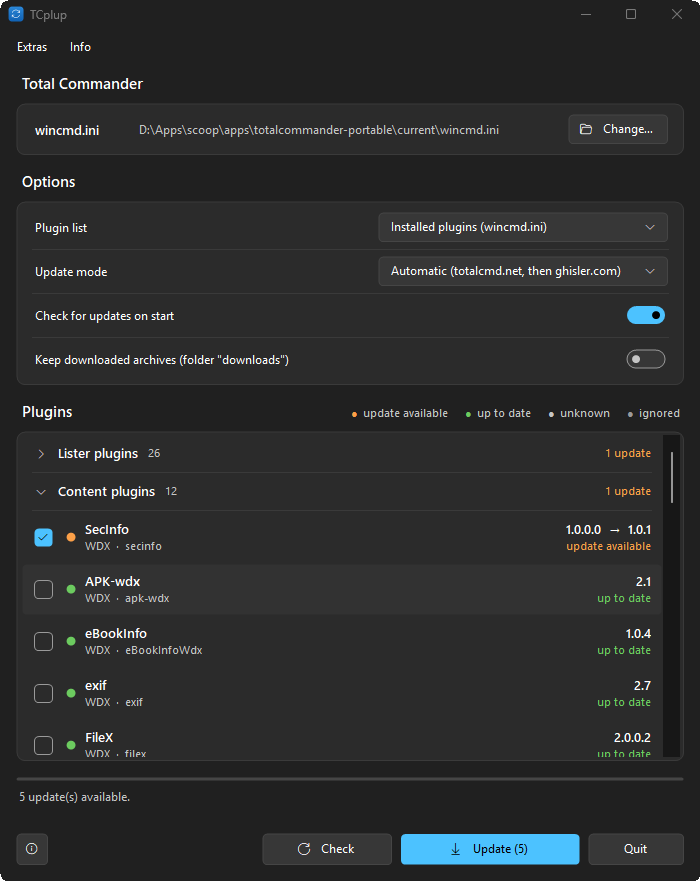
TCplup – программа для обновления плагинов Total CommanderTCplup поддерживает плагины Total Commander в актуальном состоянии. Он считывает список ваших плагинов из wincmd.ini (или все плагины из папки плагинов), ищет более новые версии на totalcmd.net, в таблицах плагинов на ghisler.com и в релизах репозитория GitHub, а затем скачивает и устанавливает их – одним щелчком для всех сразу.
Возможности
- Список плагинов: плагины, зарегистрированные в wincmd.ini (в том числе когда раздел перенесён в другой файл, например wincmd_plugins.ini), или все плагины из папки плагинов.
- Источники: totalcmd.net и таблицы плагинов на ghisler.com; Update mode определяет, где искать плагины (автоматически, только totalcmd.net, только ghisler.com). Источник можно задать для каждого плагина отдельно – репозиторий GitHub (используется последний релиз), страница totalcmd.net или ghisler.com.
- Плагины сгруппированы по типам – просмотрщика (Lister), контентные (Content), архиваторные (Packer), системные (File system) – в сворачиваемых группах, сначала те, для которых есть обновления. Легенда (доступно обновление, актуальная версия, неизвестно, игнорируется) фильтрует список.
- Устанавливает архивы ZIP, 7z и RAR (для 7z и RAR нужен 7-Zip). Контрольные суммы SHA-256 проверяются, если источник их предоставляет; архивы с небезопасными путями отклоняются; неудачная установка откатывается.
- Total Commander можно не закрывать: используемый плагин переименовывается, а не перезаписывается (чтобы загрузить новую версию, перезапустите Total Commander). Ваши файлы .ini никогда не перезаписываются.
- Можно обновить отмеченные плагины или только выбранные через контекстное меню; пропустить версию; добавить плагин в список игнорируемых.
- Интерфейс на английском и немецком языках, светлая и тёмная темы в стиле Windows 11.
- Плагин, который не был найден, ищется снова через 7 дней или сразу, если его название появляется в списке новейших плагинов на totalcmd.net.
- Встроенное самообновление из релизов на GitHub (подпись проверяется).
Установка
Скачайте TCplup.exe, поместите его в любую папку и запустите. Установка не требуется; настройки хранятся в TCplup.ini рядом с программой.
Требования
Windows 10 или 11 (.NET Framework 4.5 или новее предустановлен), Total Commander 32 или 64 бит, установленный или портативный. 7-Zip для архивов 7z и RAR.
Разработчик: Ali Naderi – digitalent.dev
Freeware: бесплатно для использования и распространения без изменений; продажа запрещена.
Что нового
1.10.0 (2026-11-19)
- New: TCplup.exe --autoupdate updates all plugins silently, without a window, for scheduled tasks and update scripts (uses the saved options, ignored and skipped plugins are left alone, exit code 0 = all fine, 1 = a plugin failed, 2 = no Total Commander configuration found)
1.9.1 (2026-11-14)
- Fixed: a GitHub release with a standalone app next to the plugin (FontMaster) installed the wrong archive ("no plugin in archive"); the archive named after the plugin type (WLX, WCX, ...) is now preferred
- Fixed: the Check button now reads the plugins from disk again, so a plugin updated outside of TCplup is noticed without a restart
1.9.0 (2026-11-13)
- New: option "Appearance" (Light, Dark or Follow TC, the dark mode setting of Total Commander)
- New: option "Copy only the files matching this Total Commander (32 / 64 bit)": of a pair like x.wfx / x.wfx64 only the file your Total Commander loads is installed
- New: "Clean up" button: moves the unused file of every 32/64-bit pair to the recycle bin (after asking)
1.8.1 (2026-11-10)
- Fixed: the "User defined" filter works on its own again; with Updates, Up to date and Unknown unticked, ignored, skipped and marked plugins are listed instead of an empty list
1.8.0. (2026-11-09)
- The filters (Updates, Up to date, Unknown and the "User defined" entries) are remembered after a restart
1.7.1 (2026-11-09)
- Fixed an "index out of range" error when clicking the empty area below the last entry of the plugin list (e.g., with only the "User defined" filter active)
1.7.0 (2026-11-09)
- The window position and size (also maximized) are remembered
- Plugins you ignored, skipped or marked as updated are marked in the list, each in its own color; every action can be undone in the right-click menu (Stop skipping this version, Remove "updated" mark)
- New filter row above the list: Updates, Up to date, Unknown and a "User defined" menu (Ignored, Skipped, Marked as updated); all on by default, replaces the clickable legend
- New right-click entry "Take current version from the source" for plugins whose files carry no version: the source's version counts as installed, so they are no longer reported as "installed version unknown"
1.6.0 (2026-11-07)
- New settings file TCplup.json (instead of TCplup.ini): clearly laid out, one entry per plugin with name, type, folder, source, and installed version; the old file is taken over once and kept as TCplup.ini.bak
- Entries of plugins that are no longer installed are removed from the file automatically.
- Plugins with the same name (ICLRead.wcx / ICLView.wlx) no longer share their settings
- Plugins of different types with different versions in one folder (eBookInfo.wlx / eBookInfo.wdx) are listed separately.
- The most detailed file version is used (NTLinks 1.6 / 1.6.1.294 is no longer reported as outdated).
- High-DPI: per-monitor DPI awareness in the manifest, no more blurry scaling by Windows; the list uses the available screen height
1.5.0 (2026-11-04)
- Options can be folded: click the heading Options to hide or show the option block; the state is remembered.
- Per-monitor DPI: the window follows the scaling of the monitor it is on and rebuilds itself when moved to a monitor with another scaling (fixes clipped text on high-DPI screens).
- The plugin list is fully repainted when the window width changes.
1.4.0 (2026-11-03)
- New option "Force update": offers every plugin that has a download as an update, so the current version is installed again (also in the right-click menu of a plugin).
- New list column "Last update" with the date of the plugin's newest file.
1.3.0 (2026-11-03)
- New context-menu entry "Mark as updated": for a plugin you updated by hand, the offered version counts as installed.
- "Open plugin folder" opens the folder in the running Total Commander (active panel) instead of Explorer.
- Text is no longer cut off on screens where Windows scaling and font size disagree.
1.2.0 (2026-11-01)
- New option "Download only (do not install)": saves the archives in the download folder and leaves the installed plugins untouched.
- The download folder can be chosen in the options.
1.1.0 (2026-11-01)
- Two views of the plugin list: grouped by type or one list sorted A–Z; plugins with an update stay on top.
- A checkbox above the list selects the updates, then all plugins, then clears the selection.
1.0.2 (2026-11-01)
- ZIPs with a compression method Windows cannot unpack (e.g. Deflate64) are unpacked with 7-Zip if it is installed.<br>
- "Keep downloaded archives" also keeps the archive when the install fails.
1.0.1 (2026-10-31)
- A plugin that was "not found" is searched again at once when it shows up in the newest-plugins list of totalcmd.net, instead of after 7 days.
1.0.0 (2026-10-28)
- New: TCplup.exe --autoupdate updates all plugins silently, without a window, for scheduled tasks and update scripts (uses the saved options, ignored and skipped plugins are left alone, exit code 0 = all fine, 1 = a plugin failed, 2 = no Total Commander configuration found)
1.9.1 (2026-11-14)
- Fixed: a GitHub release with a standalone app next to the plugin (FontMaster) installed the wrong archive ("no plugin in archive"); the archive named after the plugin type (WLX, WCX, ...) is now preferred
- Fixed: the Check button now reads the plugins from disk again, so a plugin updated outside of TCplup is noticed without a restart
1.9.0 (2026-11-13)
- New: option "Appearance" (Light, Dark or Follow TC, the dark mode setting of Total Commander)
- New: option "Copy only the files matching this Total Commander (32 / 64 bit)": of a pair like x.wfx / x.wfx64 only the file your Total Commander loads is installed
- New: "Clean up" button: moves the unused file of every 32/64-bit pair to the recycle bin (after asking)
1.8.1 (2026-11-10)
- Fixed: the "User defined" filter works on its own again; with Updates, Up to date and Unknown unticked, ignored, skipped and marked plugins are listed instead of an empty list
1.8.0. (2026-11-09)
- The filters (Updates, Up to date, Unknown and the "User defined" entries) are remembered after a restart
1.7.1 (2026-11-09)
- Fixed an "index out of range" error when clicking the empty area below the last entry of the plugin list (e.g., with only the "User defined" filter active)
1.7.0 (2026-11-09)
- The window position and size (also maximized) are remembered
- Plugins you ignored, skipped or marked as updated are marked in the list, each in its own color; every action can be undone in the right-click menu (Stop skipping this version, Remove "updated" mark)
- New filter row above the list: Updates, Up to date, Unknown and a "User defined" menu (Ignored, Skipped, Marked as updated); all on by default, replaces the clickable legend
- New right-click entry "Take current version from the source" for plugins whose files carry no version: the source's version counts as installed, so they are no longer reported as "installed version unknown"
1.6.0 (2026-11-07)
- New settings file TCplup.json (instead of TCplup.ini): clearly laid out, one entry per plugin with name, type, folder, source, and installed version; the old file is taken over once and kept as TCplup.ini.bak
- Entries of plugins that are no longer installed are removed from the file automatically.
- Plugins with the same name (ICLRead.wcx / ICLView.wlx) no longer share their settings
- Plugins of different types with different versions in one folder (eBookInfo.wlx / eBookInfo.wdx) are listed separately.
- The most detailed file version is used (NTLinks 1.6 / 1.6.1.294 is no longer reported as outdated).
- High-DPI: per-monitor DPI awareness in the manifest, no more blurry scaling by Windows; the list uses the available screen height
1.5.0 (2026-11-04)
- Options can be folded: click the heading Options to hide or show the option block; the state is remembered.
- Per-monitor DPI: the window follows the scaling of the monitor it is on and rebuilds itself when moved to a monitor with another scaling (fixes clipped text on high-DPI screens).
- The plugin list is fully repainted when the window width changes.
1.4.0 (2026-11-03)
- New option "Force update": offers every plugin that has a download as an update, so the current version is installed again (also in the right-click menu of a plugin).
- New list column "Last update" with the date of the plugin's newest file.
1.3.0 (2026-11-03)
- New context-menu entry "Mark as updated": for a plugin you updated by hand, the offered version counts as installed.
- "Open plugin folder" opens the folder in the running Total Commander (active panel) instead of Explorer.
- Text is no longer cut off on screens where Windows scaling and font size disagree.
1.2.0 (2026-11-01)
- New option "Download only (do not install)": saves the archives in the download folder and leaves the installed plugins untouched.
- The download folder can be chosen in the options.
1.1.0 (2026-11-01)
- Two views of the plugin list: grouped by type or one list sorted A–Z; plugins with an update stay on top.
- A checkbox above the list selects the updates, then all plugins, then clears the selection.
1.0.2 (2026-11-01)
- ZIPs with a compression method Windows cannot unpack (e.g. Deflate64) are unpacked with 7-Zip if it is installed.<br>
- "Keep downloaded archives" also keeps the archive when the install fails.
1.0.1 (2026-10-31)
- A plugin that was "not found" is searched again at once when it shows up in the newest-plugins list of totalcmd.net, instead of after 7 days.
1.0.0 (2026-10-28)
Предыдущие версии
- 1.9.1 14.11.2026 Скачать 112 КБ
- 1.9.0 13.11.2026 64-битная версия 112 КБ
- 1.8.1 10.11.2026 Скачать 109 КБ
- 1.8.0. 09.11.2026 Скачать 109 КБ
- 1.7.1 09.11.2026 Скачать 109 КБ
- 1.7.0 09.11.2026 Скачать 109 КБ
- 1.6.0 07.11.2026 Скачать 108 КБ
- 1.5.0 04.11.2026 Скачать 101 КБ
- 1.4.0 03.11.2026 Скачать 101 КБ
- 1.3.0 03.11.2026 Скачать 100 КБ
- 1.2.0 01.11.2026 Скачать 100 КБ
- 1.1.0 01.11.2026 Скачать 99 КБ
- 1.0.2 01.11.2026 Скачать 96 КБ
- 1.0.1 31.10.2026 Скачать 95 КБ