TreeView 1.3.2
Описание
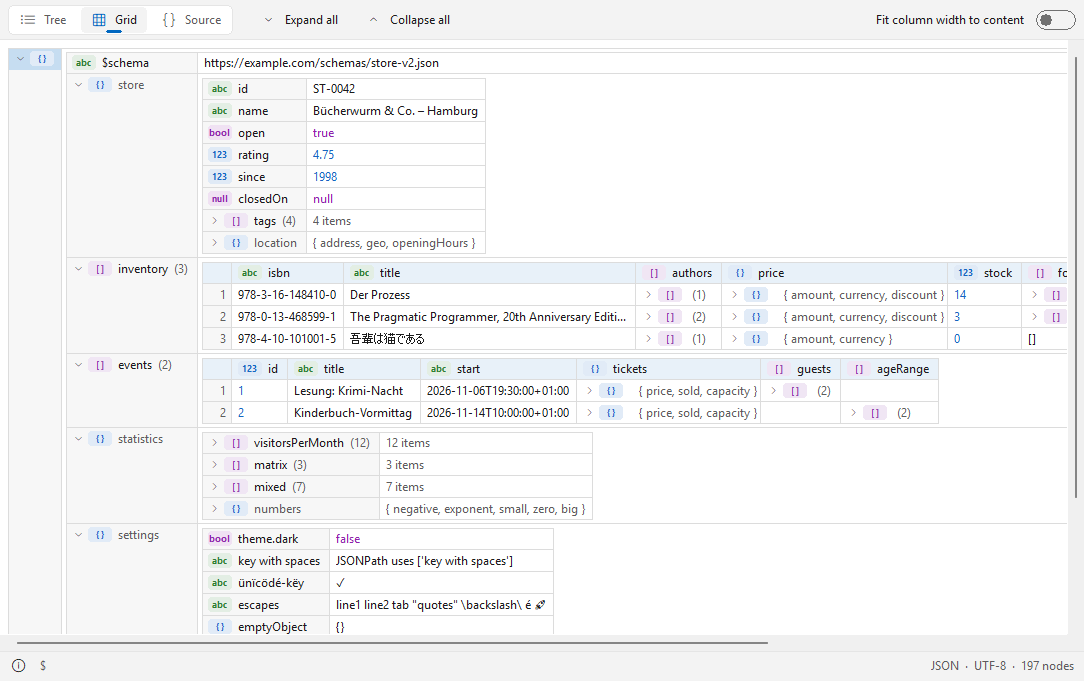
TreeView – просмотрщик XML, JSON и YAML (плагин Lister) для Total Commander, 32 и 64 битTreeView показывает файлы со структурированными данными в Lister (F3) Total Commander в трёх видах: в виде дерева (как XML Notepad), в виде вложенной таблицы (как XMLSpy) и в виде отформатированного цветного исходного кода. Большие файлы открываются быстро, а повреждённые файлы всё равно отображаются до места ошибки. Нативный плагин, без среды выполнения, кроме самого плагина ничего устанавливать не нужно.
Поддерживаемые файлы
- XML и его диалекты: .xml, .xsd, .xsl, .xslt, .svg, .config, .csproj, .vbproj, .vcxproj, .fsproj, .props, .targets, .nuspec, .resx, .plist, .rss, .atom, .wsdl, .kml, .gpx, .xaml, .manifest, .xlf, .xliff, .fb2, .rdf, .owl, .opml, .gml, .graphml, .bpmn, .wxs, .wxi, .wxl, .appxmanifest, .vsixmanifest, .vstemplate, .pubxml, .runsettings, .ruleset, .slnx, .user, .rdl, .rdlc, .dtsx, .tmx, .xbrl, .xmi, .dae, .xib, .storyboard, .musicxml, .opf, .ncx, .xspf
- JSON: .json, .jsonc, .json5, .geojson, .topojson, .webmanifest, .har, .arb (с допусками: комментарии, завершающие запятые, одинарные кавычки)
- JSON Lines: .jsonl, .ndjson
- YAML: .yaml, .yml (якоря и алиасы, ключи слияния, теги, несколько документов в одном файле)
- TOML: .toml
- Экспорт реестра Windows: .reg
Возможности
- Дерево (Ctrl+1): имена и значения рядом, значки типов (текст, число, bool, null, объект, массив), необязательный счётчик дочерних узлов.
- Таблица (Ctrl+2): вложенные таблицы; массивы однотипных объектов превращаются в одну таблицу с отдельной колонкой для каждого ключа; ширину колонок можно подогнать под содержимое.
- Исходный код (Ctrl+3): форматированный исходный код с подсветкой синтаксиса; при переключении видов выбранный узел остаётся выбранным.
- Развернуть всё (Ctrl+плюс), свернуть всё (Ctrl+минус), развернуть поддерево (*).
- Копирование значения, имени, пути (XPath для XML, JSONPath для JSON) или всего узла как XML/JSON/YAML из контекстного меню.
- Путь выбранного узла в строке состояния, а также формат, кодировка и число узлов.
- О синтаксических ошибках сообщается с номером строки; всё, что прочитано до ошибки, по-прежнему отображается.
- Поиск через Find (F7) Total Commander.
- Выбор шрифта; светлое и тёмное оформление (автоматически как в Windows или фиксированное) в стиле Windows 11.
- Кодировки текста: UTF-8, UTF-16 (с BOM и без), Windows-1252 и объявление кодировки XML.
- Интерфейс на английском и немецком языках (в зависимости от языка Windows).
Установка
Откройте TreeView.zip в Total Commander и подтвердите установку. Настройки хранятся в TreeView.ini рядом с плагином.
Требования
Total Commander 32 или 64 бит, Windows 10 или 11.
Разработчик: Ali Naderi – digitalent.dev
Freeware: бесплатно используйте и распространяйте без изменений; продажа запрещена.
Что нового
1.3.2 (2026-11-11)
- Expanded option: Expanded=1 in TreeView.ini opens every file with "Expand all" switched on
1.3.1 (2026-11-10)
- Search field: optional field in the toolbar (context menu > Search field in the toolbar, or Search=1 in TreeView.ini; Search=2 shows only a search button). Enter = next match, Shift+Enter = previous, Esc = back to the view; the ".*" button searches with a regular expression; Ctrl+Shift+F jumps to the field (SearchKey=F makes it Ctrl+F)
- Highlighted matches in the tree, the grid and the source; the current match stands out, and in the source view the matches are stepped through one by one, also several in one line
- Color schemes: Ayu, GitHub, Solarized, One, Catppuccin, Gruvbox, Tokyo Night, Rosé Pine and Visual Studio, each light and dark (context menu > Color scheme); your own VS Code color themes (*.json) can be added to the Themes folder
- Ctrl+E / F4 on an element or container without a value of its own edits the first value inside it
1.2.1 (2026-10-30)
- Source view: Ctrl+E, F4 and double-click now edit a value right in its line, like in the tree and the grid, instead of opening a dialog
1.2.0 (2026-10-30)
Buttons: the view switch, Expand all / Collapse all and the toggle switch can now sit at the top (default), in the status bar next to the info button, or be hidden – Buttons in the context menu (Buttons in TreeView.ini)
Theme: new choice Like Total Commander (follows Total Commander's dark mode only)
1.1.0 (2026-10-28)
- Edit values in place: double-click a value, Ctrl+E or F4 – in the tree and grid right in the cell, otherwise in a small dialog. Works for text, numbers, booleans, XML attributes and element text in XML, JSON, JSON Lines, YAML and TOML.
- Only the edited value is rewritten in the file – comments, formatting, line endings and the text encoding (including BOM) stay as they are. Invalid input is rejected before anything is written.
- Not editable: .reg files, files with syntax errors, read-only files, YAML aliases and block scalars, multi-line TOML strings.
- Expanded option: Expanded=1 in TreeView.ini opens every file with "Expand all" switched on
1.3.1 (2026-11-10)
- Search field: optional field in the toolbar (context menu > Search field in the toolbar, or Search=1 in TreeView.ini; Search=2 shows only a search button). Enter = next match, Shift+Enter = previous, Esc = back to the view; the ".*" button searches with a regular expression; Ctrl+Shift+F jumps to the field (SearchKey=F makes it Ctrl+F)
- Highlighted matches in the tree, the grid and the source; the current match stands out, and in the source view the matches are stepped through one by one, also several in one line
- Color schemes: Ayu, GitHub, Solarized, One, Catppuccin, Gruvbox, Tokyo Night, Rosé Pine and Visual Studio, each light and dark (context menu > Color scheme); your own VS Code color themes (*.json) can be added to the Themes folder
- Ctrl+E / F4 on an element or container without a value of its own edits the first value inside it
1.2.1 (2026-10-30)
- Source view: Ctrl+E, F4 and double-click now edit a value right in its line, like in the tree and the grid, instead of opening a dialog
1.2.0 (2026-10-30)
Buttons: the view switch, Expand all / Collapse all and the toggle switch can now sit at the top (default), in the status bar next to the info button, or be hidden – Buttons in the context menu (Buttons in TreeView.ini)
Theme: new choice Like Total Commander (follows Total Commander's dark mode only)
1.1.0 (2026-10-28)
- Edit values in place: double-click a value, Ctrl+E or F4 – in the tree and grid right in the cell, otherwise in a small dialog. Works for text, numbers, booleans, XML attributes and element text in XML, JSON, JSON Lines, YAML and TOML.
- Only the edited value is rewritten in the file – comments, formatting, line endings and the text encoding (including BOM) stay as they are. Invalid input is rejected before anything is written.
- Not editable: .reg files, files with syntax errors, read-only files, YAML aliases and block scalars, multi-line TOML strings.